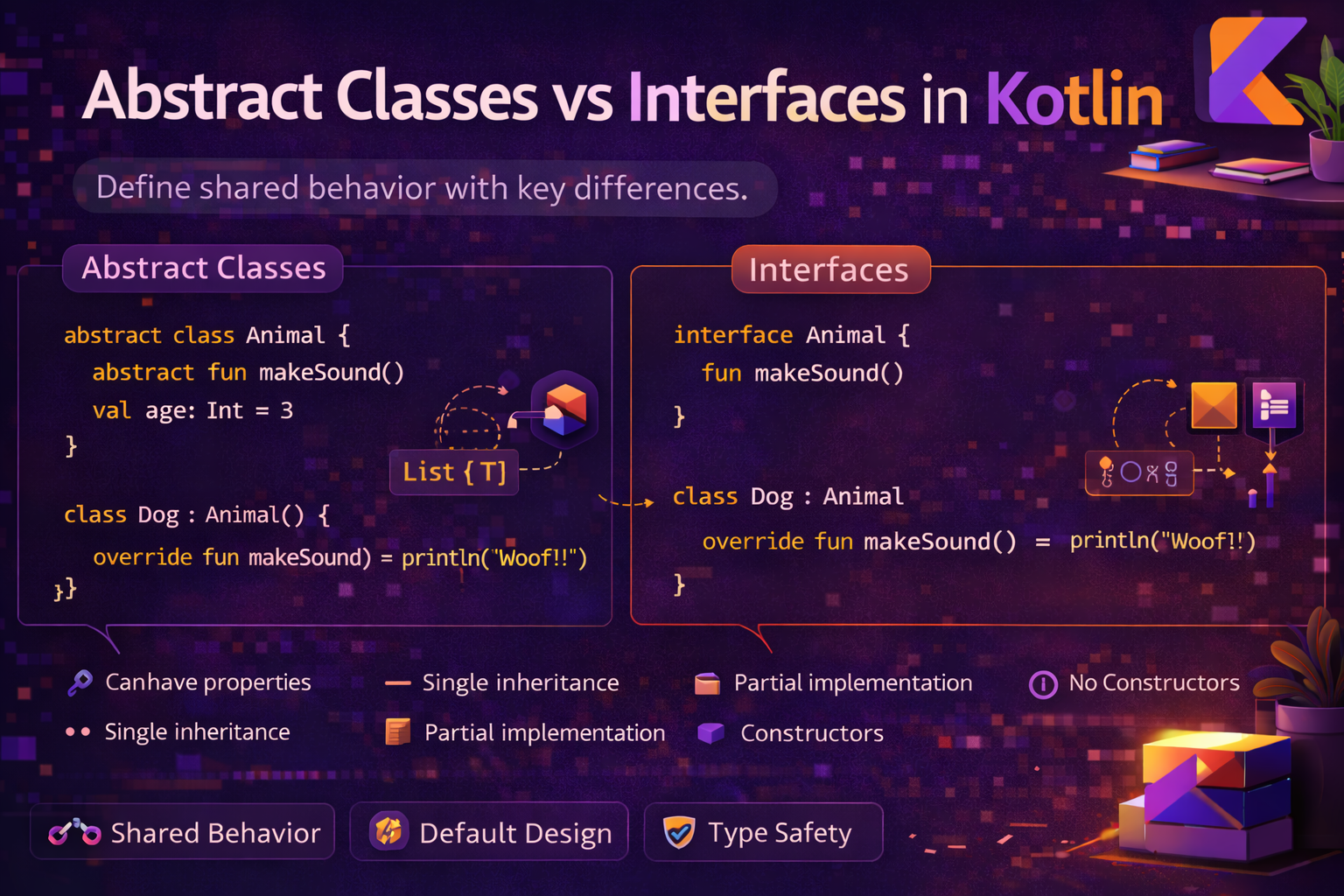
Abstract classes and interfaces are both tools for defining contracts and sharing behavior — but they serve different purposes. Choosing the wrong one leads to rigid, hard-to-maintain code. This guide explains both clearly, compares them side by side, and gives you a practical decision framework with real Android examples.
Abstract Classes
An abstract class is a class that cannot be instantiated directly. It exists to be extended. It can have both abstract members (no implementation — subclasses must implement) and concrete members (with implementation — subclasses inherit or override).
abstract class Animal(val name: String) {

    // Abstract — no implementation, subclasses MUST override
    abstract fun makeSound(): String
    abstract val legs: Int

    // Concrete — has implementation, subclasses inherit this
    fun breathe() {
        println("$name is breathing")
    }

    fun describe() {
        println("$name has $legs legs and says: ${makeSound()}")
    }
}

class Dog(name: String) : Animal(name) {
    override fun makeSound() = "Woof"
    override val legs = 4
}

class Bird(name: String) : Animal(name) {
    override fun makeSound() = "Tweet"
    override val legs = 2
}

// val animal = Animal("Generic")   // ❌ cannot instantiate abstract class

val dog = Dog("Rex")
dog.describe()    // Rex has 4 legs and says: Woof
dog.breathe()     // Rex is breathing
Abstract classes can have constructors
abstract class BaseViewModel(
    protected val repository: ArticleRepository
) : ViewModel() {

    // Shared state all ViewModels need
    private val _isLoading = MutableStateFlow(false)
    val isLoading: StateFlow<Boolean> = _isLoading

    private val _error = MutableStateFlow<String?>(null)
    val error: StateFlow<String?> = _error

    // Abstract — each ViewModel loads its own data
    abstract fun loadData()

    // Concrete helpers all subclasses can use
    protected fun setLoading(loading: Boolean) {
        _isLoading.value = loading
    }

    protected fun setError(message: String?) {
        _error.value = message
    }

    protected fun launchWithLoading(block: suspend () -> Unit) {
        viewModelScope.launch {
            setLoading(true)
            try {
                block()
                setError(null)
            } catch (e: Exception) {
                setError(e.message)
            } finally {
                setLoading(false)
            }
        }
    }
}

class ArticleViewModel(repository: ArticleRepository) : BaseViewModel(repository) {
    private val _articles = MutableStateFlow<List<Article>>(emptyList())
    val articles: StateFlow<List<Article>> = _articles

    override fun loadData() {
        launchWithLoading {   // ✅ inherited helper
            _articles.value = repository.getArticles()
        }
    }
}
Interfaces
An interface defines a contract — a set of functions and properties a class must implement. Unlike abstract classes, interfaces cannot hold state (no backing fields), but they can have default implementations since Kotlin.
interface Clickable {
    fun onClick()                          // abstract — must implement
    fun onLongClick() = onClick()          // default implementation — optional to override
}

interface Focusable {
    fun onFocus()
    fun onFocusLost() {}                   // default — empty by default
}

// A class can implement multiple interfaces
class Button : Clickable, Focusable {
    override fun onClick() = println("Button clicked")
    override fun onFocus() = println("Button focused")
    // onLongClick and onFocusLost use default implementations
}

val button = Button()
button.onClick()      // Button clicked
button.onLongClick()  // Button clicked — uses default which calls onClick
button.onFocus()      // Button focused
button.onFocusLost()  // nothing — default empty implementation
Interface properties
Interfaces can declare properties — but they have no backing field. They must be overridden or given a computed getter:
interface Identifiable {
    val id: String             // abstract property — must override
    val displayName: String    // abstract property
    val tag: String get() = "${javaClass.simpleName}_$id"   // default computed property
}

data class User(
    override val id: String,
    override val displayName: String,
    val email: String
) : Identifiable

val user = User("u_001", "Alice", "alice@email.com")
println(user.id)           // u_001
println(user.displayName)  // Alice
println(user.tag)          // User_u_001
Resolving diamond problem with interfaces
When two interfaces have the same default method, the implementing class must explicitly resolve the conflict:
interface A {
    fun greet() = println("Hello from A")
}

interface B {
    fun greet() = println("Hello from B")
}

class C : A, B {
    override fun greet() {
        super<A>.greet()   // explicitly choose which one to call
        super<B>.greet()
    }
}

C().greet()
// Hello from A
// Hello from B
Side-by-Side Comparison
| Feature | Abstract Class | Interface |
|---|---|---|
| Instantiate directly | ❌ No | ❌ No |
| Constructor | ✅ Yes | ❌ No |
| State (backing fields) | ✅ Yes | ❌ No |
| Default method implementation | ✅ Yes | ✅ Yes (since Kotlin 1.0) |
| Multiple inheritance | ❌ One only | ✅ Many |
| Abstract members | ✅ Yes | ✅ Yes |
| Visibility modifiers on members | ✅ Any | ⚠️ Public only |
| Can extend a class | ✅ Yes | ❌ No |
When to Use Abstract Class
Use an abstract class when:
- You want to share state (properties with backing fields) across subclasses
- You need a constructor to initialize shared data
- Subclasses represent a clear "is-a" relationship with a shared base
- You want to provide protected helper methods only subclasses should use
- All subclasses share significant common behavior
// ✅ Good use — shared state, constructor, protected helpers
abstract class BaseFragment : Fragment() {

    protected abstract val layoutRes: Int
    protected abstract fun initViews()
    protected abstract fun observeViewModel()

    override fun onCreateView(
        inflater: LayoutInflater, container: ViewGroup?, savedInstanceState: Bundle?
    ): View = inflater.inflate(layoutRes, container, false)

    override fun onViewCreated(view: View, savedInstanceState: Bundle?) {
        super.onViewCreated(view, savedInstanceState)
        initViews()
        observeViewModel()
    }

    // Shared helpers all fragments need
    protected fun showToast(message: String) {
        Toast.makeText(requireContext(), message, Toast.LENGTH_SHORT).show()
    }

    protected fun hideKeyboard() {
        val imm = requireContext().getSystemService(Context.INPUT_METHOD_SERVICE)
                as InputMethodManager
        imm.hideSoftInputFromWindow(requireView().windowToken, 0)
    }
}

class ArticleListFragment : BaseFragment() {
    override val layoutRes = R.layout.fragment_article_list
    override fun initViews() { /* setup RecyclerView */ }
    override fun observeViewModel() { /* collect StateFlow */ }
}
When to Use Interface
Use an interface when:
- You want to define a capability or contract without dictating implementation
- Multiple unrelated classes need to share the same contract
- You need multiple inheritance of behavior
- You want to enable composition — attach capabilities to existing classes
- You're defining a listener, callback, or event contract
// ✅ Good use — capability contract, multiple unrelated classes
interface Shareable {
    fun getShareText(): String
    fun getShareTitle(): String = "Check this out"
}

interface Bookmarkable {
    fun bookmark()
    fun isBookmarked(): Boolean
}

interface Reportable {
    fun report(reason: String)
}

// Article implements all three — composition of capabilities
data class Article(val id: String, val title: String, val content: String) :
    Shareable, Bookmarkable, Reportable {

    override fun getShareText() = "$title\n\n${content.take(100)}..."
    override fun bookmark() { /* save to DB */ }
    override fun isBookmarked(): Boolean = false
    override fun report(reason: String) { /* send report */ }
}

// Video only needs some of them
data class Video(val id: String, val title: String, val url: String) :
    Shareable, Bookmarkable {

    override fun getShareText() = "$title — watch at $url"
    override fun bookmark() { /* save to DB */ }
    override fun isBookmarked(): Boolean = false
}
// ✅ Interface for callbacks and listeners
interface ArticleActionListener {
fun onArticleClick(article: Article)
fun onBookmarkClick(article: Article)
fun onShareClick(article: Article)
fun onLongPress(article: Article) {} // default — optional
}
class ArticleAdapter(
private val listener: ArticleActionListener
) : RecyclerView.Adapter<ArticleViewHolder>() {
// adapter uses listener.onArticleClick, etc.
}Abstract Class + Interface Together
The most powerful pattern — use an interface to define the contract, and an abstract class to provide a partial implementation:
// Interface — defines the contract
interface Repository<T> {
    suspend fun getAll(): List<T>
    suspend fun getById(id: String): T?
    suspend fun save(item: T)
    suspend fun delete(id: String)
}

// Abstract class — provides common implementation using the interface
abstract class CachedRepository<T>(
    private val cache: Cache<String, T>
) : Repository<T> {

    // Concrete — handles caching logic for all subclasses
    override suspend fun getById(id: String): T? {
        return cache.get(id) ?: fetchById(id)?.also { cache.put(id, it) }
    }

    override suspend fun delete(id: String) {
        cache.remove(id)
        deleteFromSource(id)
    }

    // Abstract — subclass knows where to actually fetch/delete
    protected abstract suspend fun fetchById(id: String): T?
    protected abstract suspend fun deleteFromSource(id: String)
}

// Concrete implementation — only needs to implement the truly specific parts
class ArticleRepository(
    cache: Cache<String, Article>,
    private val apiService: ApiService,
    private val dao: ArticleDao
) : CachedRepository<Article>(cache) {

    override suspend fun getAll() = apiService.getArticles()
    override suspend fun save(item: Article) = dao.insert(item)
    override suspend fun fetchById(id: String) = apiService.getArticle(id)
    override suspend fun deleteFromSource(id: String) = dao.deleteById(id)
}
Common Mistakes to Avoid
Mistake 1: Using abstract class when interface is sufficient
// ❌ Abstract class with no state or constructor — should be interface
abstract class Clickable {
    abstract fun onClick()
}

// ✅ Interface is the right tool here
interface Clickable {
    fun onClick()
}
Mistake 2: Using interface when you need shared state
// ❌ Trying to store state in an interface — no backing field
interface HasCounter {
    var count: Int   // no backing field — each implementor must store it
}

// Every class implementing HasCounter must declare its own count field
// ✅ Use abstract class if state is truly shared
abstract class WithCounter {
    protected var count: Int = 0   // shared, stored here
    fun increment() { count++ }
}
Mistake 3: Deep abstract class hierarchies
// ❌ Deep hierarchy — fragile, hard to change
abstract class Base
abstract class Middle : Base()
abstract class SubMiddle : Middle()
class Concrete : SubMiddle()

// ✅ Prefer shallow hierarchies + interfaces for capabilities
abstract class BaseViewModel : ViewModel()   // one level deep is fine
class ArticleViewModel : BaseViewModel()     // concrete immediately
Mistake 4: Adding non-public members to interfaces
interface MyInterface {
    private fun helper() { }   // ❌ private members in interfaces are limited
    protected fun setup() { } // ❌ protected not allowed in interfaces
}

// ✅ If you need private/protected helpers, use abstract class
abstract class MyAbstract {
    private fun helper() { }      // ✅
    protected fun setup() { }     // ✅
}
Decision Framework
/*
Do you need a constructor or stored state?
  └─ Yes → Abstract Class

Do multiple unrelated classes need this contract?
  └─ Yes → Interface

Do you need multiple inheritance?
  └─ Yes → Interface

Is this a capability (Clickable, Shareable, Loggable)?
  └─ Yes → Interface

Is this a shared base with common behavior for related classes?
  └─ Yes → Abstract Class

Are you defining a listener or callback?
  └─ Yes → Interface (or fun interface for SAM)

Still unsure?
  └─ Default to Interface — you can always add an abstract class on top later
*/
Summary
- Abstract class — cannot be instantiated, can have constructors, state, and concrete methods. One per class.
- Interface — defines a contract, no constructor, no state (no backing fields), can have default implementations. A class can implement many.
- Use abstract class for shared state, shared behavior, and "is-a" base types (BaseViewModel, BaseFragment)
- Use interface for capabilities, contracts, listeners, and multiple inheritance (Clickable, Shareable, Repository)
- The most powerful pattern: interface defines the contract + abstract class provides partial implementation
- Prefer shallow hierarchies — one level of abstract class is usually enough
- When in doubt, default to interface — it's easier to add an abstract class later than to remove one
- Interfaces cannot have
protectedmembers — use abstract class if you need that
Understanding when to use abstract classes vs interfaces is one of the clearest signs of growing as a Kotlin developer. The rule of thumb is simple: interfaces for contracts and capabilities, abstract classes for shared state and base behavior.
Happy coding!
Comments (0)