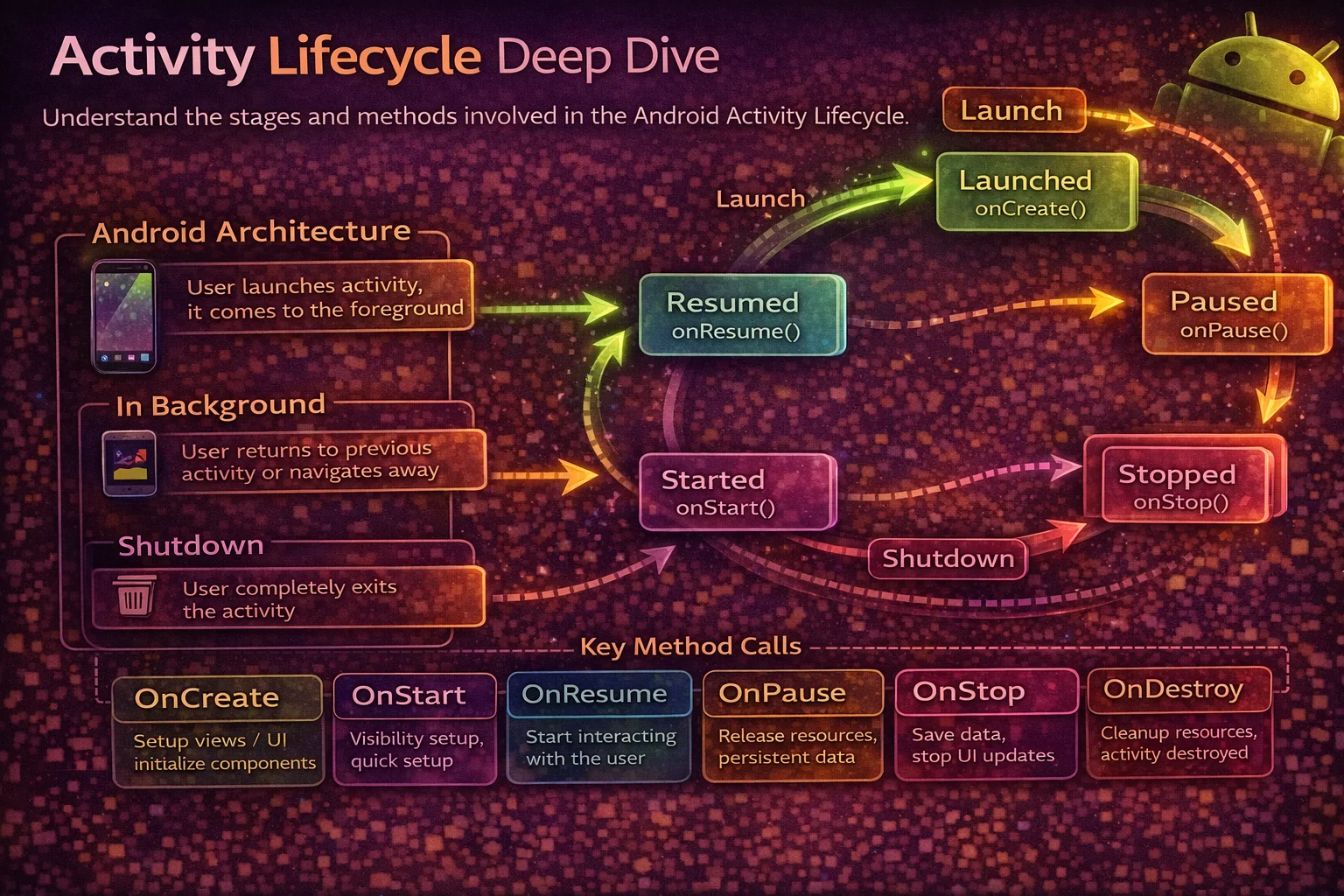
The Activity lifecycle is the single most important concept in Android development. Every bug related to crashes on rotation, blank screens after returning to the app, or data loss after backgrounding traces back to a lifecycle misunderstanding. Yet most tutorials only show the basic diagram without explaining why each callback exists and what actually happens at each stage. This guide covers every lifecycle callback with real scenarios, the exact order in which they fire, and the practical patterns you need to handle configuration changes, process death, and multi-Activity navigation.
The Lifecycle Callbacks
// The complete Activity lifecycle — in order
//
//    onCreate()          ← Activity is CREATED (first time or after process death)
//        ↓
//    onStart()           ← Activity is VISIBLE (but may not be in foreground)
//        ↓
//    onResume()          ← Activity is in FOREGROUND (interactive, user can touch)
//        ↓
//    ———— Activity is running ————
//        ↓
//    onPause()           ← Activity is PARTIALLY VISIBLE (dialog on top, multi-window)
//        ↓
//    onStop()            ← Activity is NO LONGER VISIBLE (another Activity on top, home pressed)
//        ↓
//    onDestroy()         ← Activity is being DESTROYED (finished or config change)
//
// Additional callbacks:
//    onRestart()         ← Called before onStart() when returning from stopped state
//    onSaveInstanceState()  ← Save UI state before potential destruction
Each Callback — What It Does and What You Do There
onCreate() — Birth
// Called ONCE when the Activity is first created
// Also called after process death when the system recreates the Activity

override fun onCreate(savedInstanceState: Bundle?) {
    super.onCreate(savedInstanceState)   // always call super first

    // 1. Set the layout
    setContentView(R.layout.activity_main)
    // Or with ViewBinding:
    binding = ActivityMainBinding.inflate(layoutInflater)
    setContentView(binding.root)

    // 2. Initialise ViewModel
    val viewModel: ArticleViewModel by viewModels()

    // 3. Set up UI components that only need to happen once
    binding.recyclerView.adapter = adapter
    binding.recyclerView.layoutManager = LinearLayoutManager(this)

    // 4. Restore saved state (if coming back from process death)
    if (savedInstanceState != null) {
        val scrollPosition = savedInstanceState.getInt("scroll_position", 0)
        binding.recyclerView.scrollToPosition(scrollPosition)
    }

    // 5. Process Intent extras
    val articleId = intent.getStringExtra("article_id")

    // 6. Set up observers
    lifecycleScope.launch {
        repeatOnLifecycle(Lifecycle.State.STARTED) {
            viewModel.uiState.collect { state -> renderState(state) }
        }
    }
}

// Key facts about onCreate:
// - Called ONCE per Activity instance (not again on resume/restart)
// - savedInstanceState is NULL on first creation, NON-NULL on recreation
// - Activity is NOT visible yet — don't start animations here
// - This is the MOST EXPENSIVE callback — keep it fast for quick startup
onStart() — Becoming Visible
// Called when the Activity becomes VISIBLE to the user
// But it may not be in the foreground yet (e.g., behind a transparent Activity)

override fun onStart() {
    super.onStart()

    // Register lifecycle-aware observers
    // Start listening for location updates, sensor data, etc.
    // Bind to a Service if needed

    // In practice, you rarely override onStart() directly
    // Use lifecycleScope with repeatOnLifecycle(STARTED) instead
}

// Key facts:
// - Called every time the Activity becomes visible (not just first time)
// - Paired with onStop() — onStart/onStop = visibility lifecycle
// - Quick callback — don't do heavy work here
onResume() — Interactive
// Called when the Activity is in the FOREGROUND and ready for user interaction

override fun onResume() {
    super.onResume()

    // Start animations
    // Resume video/audio playback
    // Start camera preview
    // Refresh data that might have changed while away

    // Example: resume camera
    cameraProvider.bindToLifecycle(this, cameraSelector, preview)
}

// Key facts:
// - User can NOW interact with the Activity (touch, type, etc.)
// - Called after onStart() on first launch
// - Called after onPause() when returning to foreground
// - Paired with onPause() — onResume/onPause = foreground lifecycle
// - This is where you resume things that were paused in onPause()
onPause() — Losing Focus
// Called when the Activity is PARTIALLY VISIBLE or losing foreground
// This happens when: a dialog appears, multi-window mode, another Activity starts

override fun onPause() {
    super.onPause()

    // Pause animations
    // Pause video/audio playback
    // Release camera (if not using CameraX lifecycle)
    // Save lightweight unsaved data (draft text in an EditText)

    // ⚠️ onPause() must be FAST
    // The next Activity won't resume until this Activity's onPause() finishes
    // Don't do heavy I/O or network calls here
}

// Key facts:
// - Activity is still PARTIALLY VISIBLE (behind a dialog or in multi-window)
// - User CANNOT interact (another window has focus)
// - Keep this callback SHORT — it blocks the next Activity
// - NOT a good place to save persistent data (use onStop for that)
onStop() — No Longer Visible
// Called when the Activity is NO LONGER VISIBLE
// This happens when: user presses Home, navigates to another Activity,
// or a new Activity completely covers this one

override fun onStop() {
    super.onStop()

    // Save persistent data (database writes, preferences)
    // Unregister receivers or listeners that don't need to run while invisible
    // Release resources that aren't needed while invisible

    // This is a SAFE place for heavier operations (unlike onPause)
}

// Key facts:
// - Activity is completely HIDDEN but still IN MEMORY
// - After onStop(), the system MAY kill your process (without calling onDestroy)
// - onSaveInstanceState() is called BEFORE onStop() (API 28+) or after (older)
// - When user returns: onRestart() → onStart() → onResume()
onDestroy() — Death
// Called when the Activity is being DESTROYED
// Two reasons: finish() was called, or system is destroying it (config change)

override fun onDestroy() {
    super.onDestroy()

    // Release ALL remaining resources
    // Cancel any non-lifecycle-aware callbacks
    // The Activity object is about to be garbage collected

    // Check WHY it's being destroyed:
    if (isFinishing) {
        // User pressed back, or finish() was called
        // Activity is GONE for real — clean up everything
    } else {
        // Configuration change (rotation) — Activity will be recreated
        // ViewModel survives — no need to save data there
    }
}

// Key facts:
// - NOT guaranteed to be called — system can kill your process without it
// - Don't rely on onDestroy for saving data — use onStop instead
// - isFinishing tells you if it's a real finish or a config change recreation
// - After onDestroy, the Activity object is garbage collected
onRestart() — Coming Back
// Called ONLY when returning from the stopped state
// onStop → onRestart → onStart → onResume

override fun onRestart() {
    super.onRestart()
    // Activity was stopped and is now being restarted
    // Rarely used — most developers use onStart() instead
}

// Lifecycle flow when returning to a stopped Activity:
// onRestart() → onStart() → onResume()
//
// onRestart is NOT called on first creation:
// First launch: onCreate → onStart → onResume
// Return from background: onRestart → onStart → onResume
Real Scenarios — Exact Callback Order
Scenario 1: Opening the app for the first time
// User taps app icon
// onCreate() → onStart() → onResume()
// Activity is now visible and interactive
Scenario 2: User presses Home button
// Activity goes to background
// onPause() → onStop()
// Activity is stopped but still in memory

// User returns to app (from recents)
// onRestart() → onStart() → onResume()
Scenario 3: User presses Back button
// Activity is being finished
// onPause() → onStop() → onDestroy()
// isFinishing = true
// Activity is gone — removed from back stack
Scenario 4: Screen rotation (configuration change)
// Old Activity instance is destroyed
// onPause() → onStop() → onSaveInstanceState() → onDestroy()

// New Activity instance is created
// onCreate(savedInstanceState) → onStart() → onResume()

// ViewModel SURVIVES — same instance, new Activity
// savedInstanceState has the data you saved
// Views are recreated from scratch — layout is re-inflated
Scenario 5: Another Activity opens on top
// Activity A starts Activity B
// A: onPause()
// B: onCreate() → onStart() → onResume()
// A: onStop()

// ⚠️ Notice: A.onPause() is called BEFORE B.onCreate()
// This is why onPause must be fast — it blocks the next Activity

// User presses Back from B
// B: onPause()
// A: onRestart() → onStart() → onResume()
// B: onStop() → onDestroy()
Scenario 6: Dialog Activity on top
// A transparent/dialog Activity appears on top
// A: onPause()
// (A is still VISIBLE behind the dialog — onStop is NOT called)

// Dialog is dismissed
// A: onResume()
// (A was never stopped — just paused)
Scenario 7: Process death
// System kills the app while it's in the background
// onPause() → onStop() → onSaveInstanceState()
// (onDestroy MAY or MAY NOT be called)
// Process is killed — ViewModel, statics, everything is GONE

// User returns to the app
// System recreates the Activity from scratch:
// onCreate(savedInstanceState) → onStart() → onResume()

// savedInstanceState has the data you saved in onSaveInstanceState
// ViewModel is a NEW instance — previous data is lost
// SavedStateHandle data is restored from the saved bundle
Scenario 8: Multi-window mode
// In multi-window, the Activity the user is NOT interacting with is PAUSED
// Only the focused Activity is in RESUMED state

// User taps on your Activity in split-screen:
// onResume()

// User taps on the OTHER app:
// onPause()

// Your Activity is still VISIBLE — onStop is NOT called
// This is why you should NOT stop video playback in onPause()
// Only stop it in onStop() when the Activity is truly invisible
Saving and Restoring State
onSaveInstanceState — for process death
// Called before the Activity might be destroyed by the system
// Save SMALL, UI-related state here (scroll position, selected tab, draft text)

override fun onSaveInstanceState(outState: Bundle) {
    super.onSaveInstanceState(outState)

    outState.putInt("scroll_position", layoutManager.findFirstVisibleItemPosition())
    outState.putString("search_query", searchEditText.text.toString())
    outState.putInt("selected_tab", tabLayout.selectedTabPosition)
}

// Restore in onCreate:
override fun onCreate(savedInstanceState: Bundle?) {
    super.onCreate(savedInstanceState)

    if (savedInstanceState != null) {
        val position = savedInstanceState.getInt("scroll_position", 0)
        val query = savedInstanceState.getString("search_query", "")
        val tab = savedInstanceState.getInt("selected_tab", 0)
    }
}

// Rules:
// - Bundle should be SMALL (under 1 MB total for all Activities)
// - Don't save large objects (bitmaps, lists) — use ViewModel or database
// - System automatically saves/restores: EditText content, scroll position,
//   CheckBox state (if the View has an android:id)
// - onSaveInstanceState is NOT called when user presses Back (finish)
The complete state survival table
// What survives what?
//
// ┌──────────────────────────┬──────────────┬───────────────┬──────────────┐
// │ Storage                  │ Config Change│ Process Death │ User Finish  │
// │                          │ (rotation)   │ (system kill) │ (back press) │
// ├──────────────────────────┼──────────────┼───────────────┼──────────────┤
// │ Local variables          │ ❌ Lost       │ ❌ Lost        │ ❌ Lost       │
// │ View state (with id)     │ ✅ Restored   │ ✅ Restored    │ ❌ Lost       │
// │ onSaveInstanceState      │ ✅ Restored   │ ✅ Restored    │ ❌ Not called │
// │ ViewModel                │ ✅ Survives   │ ❌ Lost        │ ❌ Lost       │
// │ ViewModel + SavedState   │ ✅ Survives   │ ✅ Restored    │ ❌ Lost       │
// │ DataStore / SharedPrefs  │ ✅ Persisted  │ ✅ Persisted   │ ✅ Persisted  │
// │ Room database            │ ✅ Persisted  │ ✅ Persisted   │ ✅ Persisted  │
// └──────────────────────────┴──────────────┴───────────────┴──────────────┘
//
// Strategy:
// Transient UI state (scroll, tab) → onSaveInstanceState / SavedStateHandle
// Screen data (loaded articles)    → ViewModel (re-fetch on process death)
// Persistent data (user prefs)     → DataStore
// Structured data (articles, users)→ Room database
ViewModel and the Lifecycle
// ViewModel is scoped to the Activity — survives configuration changes
// but NOT process death

class ArticleViewModel : ViewModel() {
    private val _articles = MutableStateFlow<List<Article>>(emptyList())
    val articles: StateFlow<List<Article>> = _articles

    init {
        // This runs ONCE — even across rotations
        loadArticles()
    }

    private fun loadArticles() {
        viewModelScope.launch {
            _articles.value = repository.getArticles()
        }
    }
}

// Timeline during rotation:
// 1. Activity A created → ViewModel created → loadArticles() called
// 2. User rotates screen
// 3. Activity A destroyed (onDestroy, isFinishing = false)
// 4. Activity B created → SAME ViewModel instance reused
// 5. loadArticles() is NOT called again — data is already loaded
// 6. Activity B observes the existing StateFlow → UI shows data immediately

// Timeline during process death:
// 1. Activity stopped → process killed → ViewModel destroyed
// 2. User returns → Activity recreated → NEW ViewModel created
// 3. loadArticles() runs AGAIN — data is re-fetched
// To avoid this, use caching (Room) or SavedStateHandle
Lifecycle-Aware Components
// Instead of manually managing callbacks, use lifecycle-aware components

// LifecycleObserver — react to lifecycle events
class LocationTracker(private val context: Context) : DefaultLifecycleObserver {

    override fun onStart(owner: LifecycleOwner) {
        startTracking()   // automatically called when Activity starts
    }

    override fun onStop(owner: LifecycleOwner) {
        stopTracking()    // automatically called when Activity stops
    }
}

// Register in Activity
override fun onCreate(savedInstanceState: Bundle?) {
    super.onCreate(savedInstanceState)
    lifecycle.addObserver(LocationTracker(this))
    // No need to manually call start/stop in onStart/onStop
}

// lifecycleScope + repeatOnLifecycle — the modern approach
lifecycleScope.launch {
    repeatOnLifecycle(Lifecycle.State.STARTED) {
        // This block runs when STARTED, cancels when STOPPED
        // Automatically restarts when STARTED again
        viewModel.articles.collect { updateUI(it) }
    }
}
Testing Lifecycle Behaviour
// Enable "Don't keep activities" in Developer Options
// This simulates process death every time you leave an Activity

// Steps to test:
// 1. Settings → Developer Options → "Don't keep activities" → ON
// 2. Open your app → navigate to a screen
// 3. Press Home (Activity is destroyed immediately)
// 4. Return to app (Activity is recreated from scratch)

// What to verify:
// ✅ UI state is restored (scroll position, selected tab, entered text)
// ✅ Data is re-loaded or restored from cache
// ✅ No crashes from null references
// ✅ No duplicate network calls (ViewModel handles this)

// Also test with:
// - Screen rotation (configuration change)
// - Language change (configuration change)
// - Dark mode toggle (configuration change)
// - Memory pressure (adb shell am kill com.example.myapp)
Common Mistakes to Avoid
Mistake 1: Doing heavy work in onCreate
// ❌ Blocking onCreate delays the Activity from being visible
override fun onCreate(savedInstanceState: Bundle?) {
    super.onCreate(savedInstanceState)
    setContentView(R.layout.activity_main)
    val data = database.getAllArticlesSync()   // blocks main thread!
    adapter.submitList(data)
}

// ✅ Load data asynchronously
override fun onCreate(savedInstanceState: Bundle?) {
    super.onCreate(savedInstanceState)
    setContentView(R.layout.activity_main)
    // ViewModel loads data in a coroutine — UI shows loading state first
    viewModel.articles.collect { adapter.submitList(it) }
}
Mistake 2: Stopping video playback in onPause instead of onStop
// ❌ In multi-window mode, onPause is called but Activity is still visible
override fun onPause() {
    super.onPause()
    videoPlayer.pause()   // video stops even though user can still see it!
}

// ✅ Pause in onStop — Activity is truly invisible
override fun onStop() {
    super.onStop()
    videoPlayer.pause()
}

// Resume in onStart — Activity is visible again
override fun onStart() {
    super.onStart()
    videoPlayer.resume()
}
Mistake 3: Saving large data in onSaveInstanceState
// ❌ Bundle has a ~1 MB limit — large data causes TransactionTooLargeException
override fun onSaveInstanceState(outState: Bundle) {
    super.onSaveInstanceState(outState)
    outState.putParcelableArrayList("articles", ArrayList(articles))   // 💥 too large!
}

// ✅ Save only small UI state — let ViewModel or Room hold the data
override fun onSaveInstanceState(outState: Bundle) {
    super.onSaveInstanceState(outState)
    outState.putInt("scroll_position", currentScrollPosition)   // small ✅
    outState.putString("search_query", currentQuery)            // small ✅
}
Mistake 4: Not calling super in lifecycle callbacks
// ❌ Forgetting super — crashes or breaks lifecycle machinery
override fun onCreate(savedInstanceState: Bundle?) {
    // super.onCreate(savedInstanceState)   // missing! 💥 SuperNotCalledException
    setContentView(R.layout.activity_main)
}

// ✅ Always call super FIRST in creation callbacks
override fun onCreate(savedInstanceState: Bundle?) {
    super.onCreate(savedInstanceState)   // always first
    setContentView(R.layout.activity_main)
}

// ✅ Always call super LAST in destruction callbacks
override fun onDestroy() {
    releaseResources()
    super.onDestroy()   // last — let the framework clean up after you
}
Summary
- onCreate — set layout, init ViewModel, setup UI, restore saved state (called once per instance)
- onStart — Activity is visible, register observers (paired with onStop)
- onResume — Activity is interactive, start animations/camera (paired with onPause)
- onPause — losing focus, pause interactions but keep showing content (must be fast)
- onStop — no longer visible, save data, release resources (safe for heavier work)
- onDestroy — final cleanup, check
isFinishingto know if it’s a real finish or config change - onSaveInstanceState — save small UI state before potential destruction (Bundle < 1 MB)
- Configuration change (rotation) — destroys and recreates Activity, ViewModel survives, saved state restored
- Process death — kills everything, only onSaveInstanceState/SavedStateHandle data survives
- Use ViewModel for screen data, SavedStateHandle for surviving process death, Room/DataStore for persistence
- In multi-window, Activity is paused but visible — don’t stop video/audio in onPause
- A.onPause() runs before B.onCreate() — keep onPause fast
- Test with “Don’t keep activities” in Developer Options to catch process death bugs
- Use repeatOnLifecycle instead of manually managing start/stop in callbacks
The Activity lifecycle isn’t something you memorise once and forget — it’s something you develop an intuition for. Every time you wonder “where should I put this code?”, the answer comes from understanding which lifecycle state you need: visible? interactive? about to be destroyed? Once that intuition clicks, lifecycle bugs become rare instead of mysterious.
Happy coding!
Comments (0)