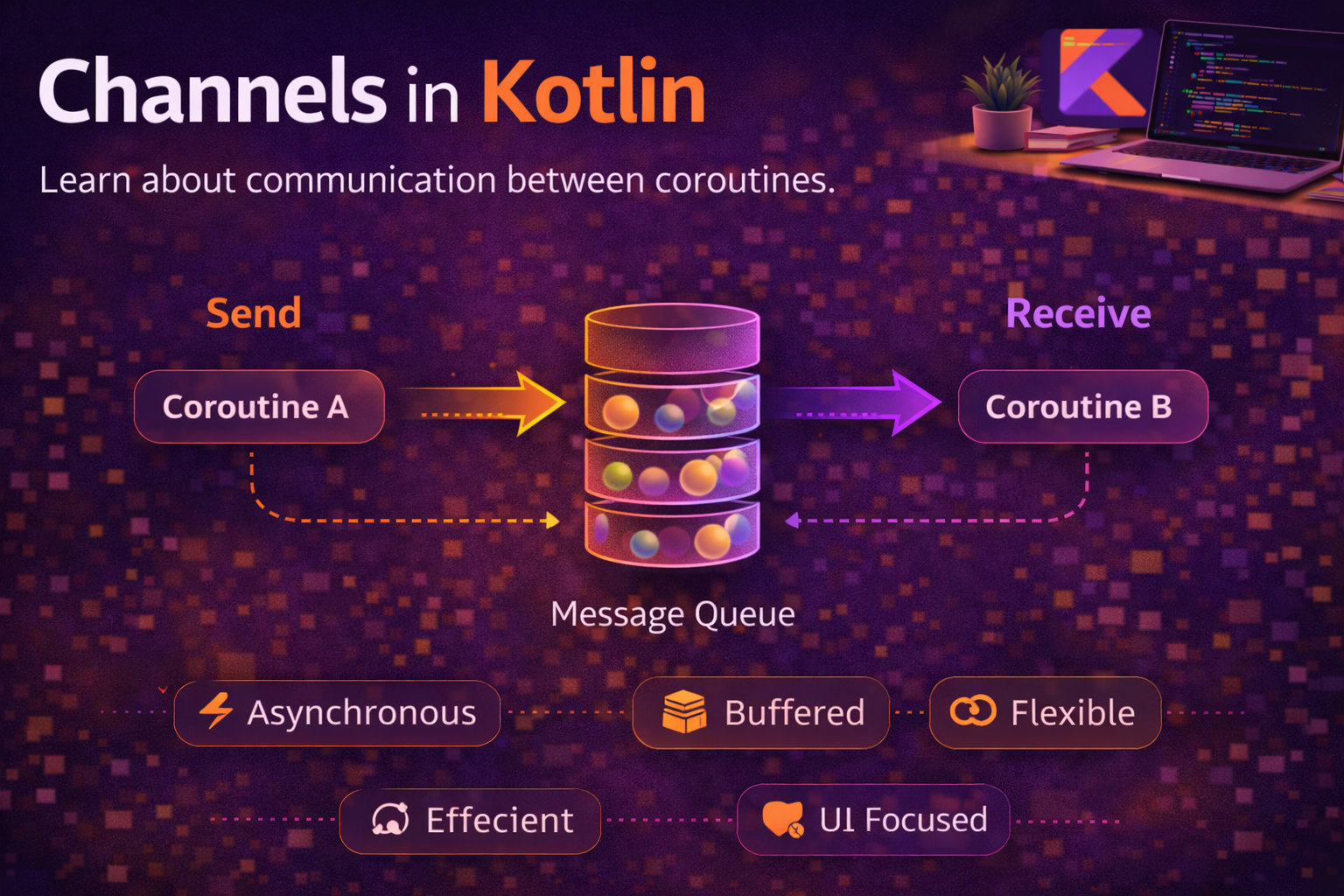
Kotlin Channels are how coroutines communicate with each other. While Flow is designed for one-to-many reactive streams, a Channel is a one-to-one pipeline — one coroutine sends, another receives. Think of it like a BlockingQueue, but built for coroutines — instead of blocking threads, it suspends coroutines. Channels are useful for producer-consumer patterns, fan-out work distribution, coordinating parallel tasks, and bridging callback-based APIs. This guide covers how Channels work, the different channel types, when to use them (and when not to), and real patterns for Android development.
What is a Channel?
A Channel is a hot, suspending queue that allows coroutines to send and receive values safely:
val channel = Channel<Int>()

// Producer coroutine — sends values
launch {
    channel.send(1)
    channel.send(2)
    channel.send(3)
    channel.close()   // signal that no more values are coming
}

// Consumer coroutine — receives values
launch {
    for (value in channel) {   // iterates until channel is closed
        println(value)
    }
}
// Output: 1, 2, 3
Key points about Channels:
- Hot — values are sent regardless of whether anyone is receiving
- Suspending —
send()suspends if the channel is full,receive()suspends if the channel is empty - One-time delivery — each value is received by exactly one consumer, not broadcast to all
- Closable — the producer calls
close()to signal no more values are coming
Channel vs Flow
Before going deeper, let’s be clear about when to use which:
// ┌──────────────────────┬──────────────────────┬──────────────────────┐
// │                      │     Channel           │     Flow              │
// ├──────────────────────┼──────────────────────┼──────────────────────┤
// │ Hot or Cold           │ Hot                   │ Cold (default)        │
// │ Consumers             │ One (single receiver) │ Many (multiple)       │
// │ Delivery              │ Each value once       │ Each value to all     │
// │ Backpressure          │ Suspends sender       │ Suspends emitter      │
// │ Lifecycle              │ Must close manually   │ Completes naturally   │
// │ Use case              │ Coroutine-to-coroutine│ Reactive data streams │
// │ Android UI            │ Rarely                │ Primary choice        │
// └──────────────────────┴──────────────────────┴──────────────────────┘

// Rule of thumb:
// - Exposing data to UI? → Use Flow (StateFlow / SharedFlow)
// - Two coroutines passing work between them? → Use Channel
// - Broadcasting to multiple observers? → Use Flow
// - Fan-out to multiple workers? → Use Channel
Channel Types
Channels differ in how they buffer values between send and receive. This controls what happens when the sender is faster than the receiver:
Rendezvous (default) — no buffer
val channel = Channel<Int>()   // default: RENDEZVOUS

launch {
    println("Sending 1")
    channel.send(1)        // suspends until someone calls receive()
    println("Sent 1")
    channel.send(2)        // suspends again
    println("Sent 2")
}

launch {
    delay(1000)
    println("Receiving")
    println(channel.receive())   // 1 — sender resumes
    println(channel.receive())   // 2
}
// Output:
// Sending 1               (send suspends immediately)
// Receiving               (after 1s delay)
// 1
// Sent 1                  (sender resumes after receive)
// Sent 2
// 2
Buffered — fixed-size buffer
val channel = Channel<Int>(capacity = 3)   // buffer holds 3 values

launch {
    channel.send(1)   // doesn't suspend — buffer has space
    channel.send(2)   // doesn't suspend
    channel.send(3)   // doesn't suspend
    channel.send(4)   // SUSPENDS — buffer is full, waits for receive
}

// Buffered channels let the producer get ahead of the consumer
// Good for: smoothing out speed differences between producer and consumer
Unlimited — unlimited buffer
val channel = Channel<Int>(Channel.UNLIMITED)

launch {
    repeat(1_000_000) {
        channel.send(it)   // never suspends — buffer grows as needed
    }
}

// ⚠️ Careful — can cause OutOfMemoryError if consumer is too slow
// Good for: when you're certain the consumer will keep up eventually
Conflated — keeps only the latest value
val channel = Channel<Int>(Channel.CONFLATED)

launch {
    channel.send(1)
    channel.send(2)
    channel.send(3)   // 1 and 2 are dropped — only 3 is kept
}

launch {
    delay(1000)
    println(channel.receive())   // 3 — only the latest
}

// Similar to StateFlow behaviour — slow consumers get the latest value
// Good for: status updates where only the most recent matters
When to use which
// Rendezvous (default) — tight synchronization between producer and consumer
//   Example: handoff tasks one at a time

// Buffered              — smooth out temporary speed differences
//   Example: producer bursts, consumer is steady

// Unlimited             — producer must never suspend
//   Example: logging, analytics events (consume at your own pace)

// Conflated             — only latest value matters
//   Example: UI position updates, sensor readings
Sending and Receiving
Basic send and receive
val channel = Channel<String>()

// send() — suspends if channel is full
launch {
    channel.send("Hello")
    channel.send("World")
    channel.close()
}

// receive() — suspends if channel is empty
launch {
    println(channel.receive())   // "Hello"
    println(channel.receive())   // "World"
    // channel.receive()          // would throw ClosedReceiveChannelException
}
Iterating over a channel
// for-in loop — iterates until channel is closed
launch {
    for (value in channel) {
        println(value)
    }
    println("Channel closed, loop done")
}

// consumeEach — same but also consumes (cancels) the channel on exception
launch {
    channel.consumeEach { value ->
        println(value)
    }
}
trySend and tryReceive — non-suspending alternatives
val channel = Channel<Int>(capacity = 1)

// trySend — returns immediately, doesn't suspend
val sendResult = channel.trySend(42)
if (sendResult.isSuccess) {
    println("Sent successfully")
} else {
    println("Channel full or closed")
}

// tryReceive — returns immediately, doesn't suspend
val receiveResult = channel.tryReceive()
if (receiveResult.isSuccess) {
    println("Received: ${receiveResult.getOrNull()}")
} else {
    println("Channel empty or closed")
}

// Useful in callbacks where you can't suspend
val callbackChannel = Channel<Location>(Channel.CONFLATED)

locationClient.requestUpdates { location ->
    callbackChannel.trySend(location)   // non-suspending, safe in callbacks
}
Closing channels
val channel = Channel<Int>()

launch {
    channel.send(1)
    channel.send(2)
    channel.close()   // no more values will be sent

    // channel.send(3)          // ❌ throws ClosedSendChannelException
    // channel.trySend(3)       // returns failure result
}

launch {
    for (value in channel) {
        println(value)           // prints 1, 2 — then loop exits
    }
    // After close:
    println(channel.isClosedForReceive)   // true (after all values consumed)
    println(channel.isClosedForSend)      // true (immediately after close)
}
produce — Channel Builder
The produce builder creates a channel and launches a coroutine that sends values into it. The channel is automatically closed when the block completes:
// produce = launch + Channel, with auto-close
fun CoroutineScope.produceNumbers(): ReceiveChannel<Int> = produce {
    var count = 1
    while (true) {
        send(count++)
        delay(1000)
    }
}
// Channel closes automatically when the coroutine ends or is cancelled

// Usage
val numbers = produceNumbers()
repeat(5) {
    println(numbers.receive())   // 1, 2, 3, 4, 5
}
numbers.cancel()   // cancel the producing coroutine

// produce is preferred over manually creating channels because:
// 1. Auto-closes the channel when done
// 2. Cancels cleanly with structured concurrency
// 3. Less boilerplate
Fan-Out — Multiple Consumers
When multiple coroutines receive from the same channel, each value goes to exactly one consumer. This is the fan-out pattern — distributing work across workers:
val taskChannel = Channel<Task>(capacity = 10)

// Producer — sends tasks
launch {
    for (task in tasks) {
        taskChannel.send(task)
    }
    taskChannel.close()
}

// Multiple workers — each task is processed by exactly one worker
repeat(3) { workerId ->
    launch {
        for (task in taskChannel) {
            println("Worker $workerId processing: ${task.name}")
            task.process()
        }
    }
}

// If 9 tasks are sent:
// Worker 0 might process: Task 1, Task 4, Task 7
// Worker 1 might process: Task 2, Task 5, Task 8
// Worker 2 might process: Task 3, Task 6, Task 9
// Distribution depends on processing speed
Fan-In — Multiple Producers
Multiple coroutines can send to the same channel. This merges multiple sources into one stream:
val eventChannel = Channel<Event>(Channel.UNLIMITED)

// Multiple producers sending to the same channel
launch {
    networkMonitor.events.collect { event ->
        eventChannel.send(Event.Network(event))
    }
}

launch {
    sensorManager.readings.collect { reading ->
        eventChannel.send(Event.Sensor(reading))
    }
}

launch {
    userInput.clicks.collect { click ->
        eventChannel.send(Event.UserAction(click))
    }
}

// Single consumer — processes events from all sources
launch {
    for (event in eventChannel) {
        when (event) {
            is Event.Network -> handleNetwork(event)
            is Event.Sensor -> handleSensor(event)
            is Event.UserAction -> handleUserAction(event)
        }
    }
}
select — Receiving from Multiple Channels
The select expression lets you receive from whichever channel has a value ready first:
val primaryChannel = Channel<String>()
val fallbackChannel = Channel<String>()

// Receive from whichever channel is ready first
val result = select {
    primaryChannel.onReceive { value ->
        "Primary: $value"
    }
    fallbackChannel.onReceive { value ->
        "Fallback: $value"
    }
}
println(result)

// Practical example — timeout with fallback
val dataChannel = Channel<Data>()

val result = select {
    dataChannel.onReceive { data ->
        Result.Success(data)
    }
    onTimeout(5000) {
        Result.Timeout
    }
}
Channel to Flow Conversion
You can convert between Channels and Flows when needed:
// Channel → Flow
val channel = Channel<Int>(Channel.BUFFERED)

val flow: Flow<Int> = channel.receiveAsFlow()
// Each value is delivered to ONE collector (same as channel semantics)
// If multiple collectors, values are distributed fan-out style

val flow2: Flow<Int> = channel.consumeAsFlow()
// Same but consumes the channel — only one collector allowed

// Flow → Channel
val channel2: ReceiveChannel<Int> = flowOf(1, 2, 3)
    .produceIn(coroutineScope)   // launches a coroutine to collect the Flow
receiveAsFlow vs consumeAsFlow
val channel = Channel<Int>(10)

// receiveAsFlow — multiple collectors share the channel (fan-out)
val flow = channel.receiveAsFlow()
launch { flow.collect { println("A: $it") } }
launch { flow.collect { println("B: $it") } }
// Values are split between A and B (each value goes to one)

// consumeAsFlow — only one collector, consumes the channel
val flow2 = channel.consumeAsFlow()
launch { flow2.collect { println("Only: $it") } }
// Second collector would throw IllegalStateException
Real Android Patterns
Work queue with multiple workers
class ImageProcessor(private val scope: CoroutineScope) {

    private val taskChannel = Channel<ImageTask>(capacity = 50)

    init {
        // Launch 3 worker coroutines
        repeat(3) { workerId ->
            scope.launch(Dispatchers.Default) {
                for (task in taskChannel) {
                    try {
                        val result = processImage(task)
                        task.callback(Result.success(result))
                    } catch (e: CancellationException) {
                        throw e
                    } catch (e: Exception) {
                        task.callback(Result.failure(e))
                    }
                }
            }
        }
    }

    suspend fun submit(task: ImageTask) {
        taskChannel.send(task)
    }

    fun shutdown() {
        taskChannel.close()
    }
}
Event queue in ViewModel
class OrderViewModel(private val repository: OrderRepository) : ViewModel() {

    // Channel for sequential event processing
    private val actionChannel = Channel<UserAction>(Channel.UNLIMITED)

    private val _uiState = MutableStateFlow(OrderUiState())
    val uiState: StateFlow<OrderUiState> = _uiState

    init {
        // Process actions one at a time, in order
        viewModelScope.launch {
            for (action in actionChannel) {
                when (action) {
                    is UserAction.AddItem -> handleAddItem(action.item)
                    is UserAction.RemoveItem -> handleRemoveItem(action.itemId)
                    is UserAction.PlaceOrder -> handlePlaceOrder()
                    is UserAction.ApplyDiscount -> handleApplyDiscount(action.code)
                }
            }
        }
    }

    // UI calls these — actions are queued and processed sequentially
    fun addItem(item: Item) {
        actionChannel.trySend(UserAction.AddItem(item))
    }

    fun removeItem(itemId: String) {
        actionChannel.trySend(UserAction.RemoveItem(itemId))
    }

    fun placeOrder() {
        actionChannel.trySend(UserAction.PlaceOrder)
    }

    private suspend fun handleAddItem(item: Item) {
        _uiState.update { state ->
            state.copy(items = state.items + item)
        }
        // Recalculate total from server
        val total = repository.calculateTotal(uiState.value.items)
        _uiState.update { it.copy(total = total) }
    }

    private suspend fun handlePlaceOrder() {
        _uiState.update { it.copy(isSubmitting = true) }
        try {
            repository.placeOrder(uiState.value.items)
            _uiState.update { it.copy(isSubmitting = false, orderPlaced = true) }
        } catch (e: CancellationException) {
            throw e
        } catch (e: Exception) {
            _uiState.update { it.copy(isSubmitting = false, error = e.message) }
        }
    }
}
Rate-limited API caller with Channel
class RateLimitedApi(
    private val api: Api,
    private val scope: CoroutineScope
) {
    private val requestChannel = Channel<ApiRequest>(Channel.UNLIMITED)

    init {
        scope.launch {
            for (request in requestChannel) {
                try {
                    val response = api.execute(request.call)
                    request.deferred.complete(response)
                } catch (e: CancellationException) {
                    throw e
                } catch (e: Exception) {
                    request.deferred.completeExceptionally(e)
                }
                delay(100)   // rate limit: max 10 requests per second
            }
        }
    }

    suspend fun <T> execute(call: suspend () -> T): T {
        val deferred = CompletableDeferred<T>()
        requestChannel.send(ApiRequest(call, deferred))
        return deferred.await()
    }
}

// Usage
val rateLimitedApi = RateLimitedApi(api, viewModelScope)

// These are queued and executed with 100ms gaps
val user = rateLimitedApi.execute { api.getUser() }
val orders = rateLimitedApi.execute { api.getOrders() }
Common Mistakes to Avoid
Mistake 1: Forgetting to close the channel
// ❌ Consumer hangs forever waiting for more values
val channel = Channel<Int>()

launch {
    channel.send(1)
    channel.send(2)
    // forgot channel.close()!
}

launch {
    for (value in channel) {   // loops forever — never finishes
        println(value)
    }
}

// ✅ Always close when done sending
launch {
    channel.send(1)
    channel.send(2)
    channel.close()   // consumer's for-loop exits
}

// ✅ Or use produce {} which auto-closes
val channel = produce {
    send(1)
    send(2)
}   // automatically closed when block finishes
Mistake 2: Using Channel when Flow is more appropriate
// ❌ Using Channel to expose data to UI
class MyViewModel : ViewModel() {
    val articles = Channel<List<Article>>()   // wrong tool!
    // Problems:
    // - No current value for new subscribers
    // - Must manually manage lifecycle
    // - Only one collector gets the data
}

// ✅ Use StateFlow for UI state
class MyViewModel : ViewModel() {
    val articles: StateFlow<List<Article>> = repository.getArticles()
        .stateIn(viewModelScope, SharingStarted.WhileSubscribed(5000), emptyList())
}
Mistake 3: Using Channel.UNLIMITED without considering memory
// ❌ Unlimited buffer + slow consumer = OutOfMemoryError
val channel = Channel<LargeObject>(Channel.UNLIMITED)

launch {
    while (true) {
        channel.send(generateLargeObject())   // fills memory endlessly
    }
}

launch {
    for (obj in channel) {
        slowProcess(obj)   // consumer can't keep up
    }
}

// ✅ Use bounded buffer — producer suspends when buffer is full
val channel = Channel<LargeObject>(capacity = 10)

// ✅ Or use CONFLATED if only the latest matters
val channel = Channel<LargeObject>(Channel.CONFLATED)
Mistake 4: Not handling ClosedSendChannelException
// ❌ Crashes if channel is closed while trying to send
launch {
    while (true) {
        channel.send(produceValue())   // throws if channel was closed
    }
}

// ✅ Use trySend or handle the exception
launch {
    while (true) {
        val result = channel.trySend(produceValue())
        if (result.isFailure) break   // channel closed, stop producing
    }
}

// ✅ Or check isClosedForSend
launch {
    while (!channel.isClosedForSend) {
        channel.send(produceValue())
    }
}
Summary
- A Channel is a hot, suspending queue for coroutine-to-coroutine communication
- Each value is delivered to exactly one receiver — unlike Flow which broadcasts to all collectors
- Rendezvous (default) has no buffer — sender and receiver meet at the same point
- Buffered channels let the producer get ahead by a fixed amount
- Unlimited channels never suspend the sender but risk
OutOfMemoryError - Conflated channels keep only the latest value — good for status updates
produce {}is the preferred way to create channels — auto-closes when done- Fan-out: multiple consumers on one channel = work distribution
- Fan-in: multiple producers on one channel = event merging
selectlets you receive from whichever channel is ready first- Convert between Channel and Flow with
receiveAsFlow()andproduceIn() - Use Flow for UI state (StateFlow/SharedFlow) — use Channels for internal coroutine coordination
- Always close channels when done — or use
produce {}for automatic closing - Prefer bounded buffers over UNLIMITED to prevent memory issues
Channels are a lower-level primitive than Flow. Most Android developers will use Flow and StateFlow day-to-day and reach for Channels only in specific scenarios — work queues, rate limiting, fan-out processing, and coroutine coordination. But understanding Channels completes your mental model of Kotlin’s concurrency toolkit. Flow is built on top of Channels internally, so knowing how both work makes you a stronger Kotlin developer overall.
Happy coding!
Comments (0)