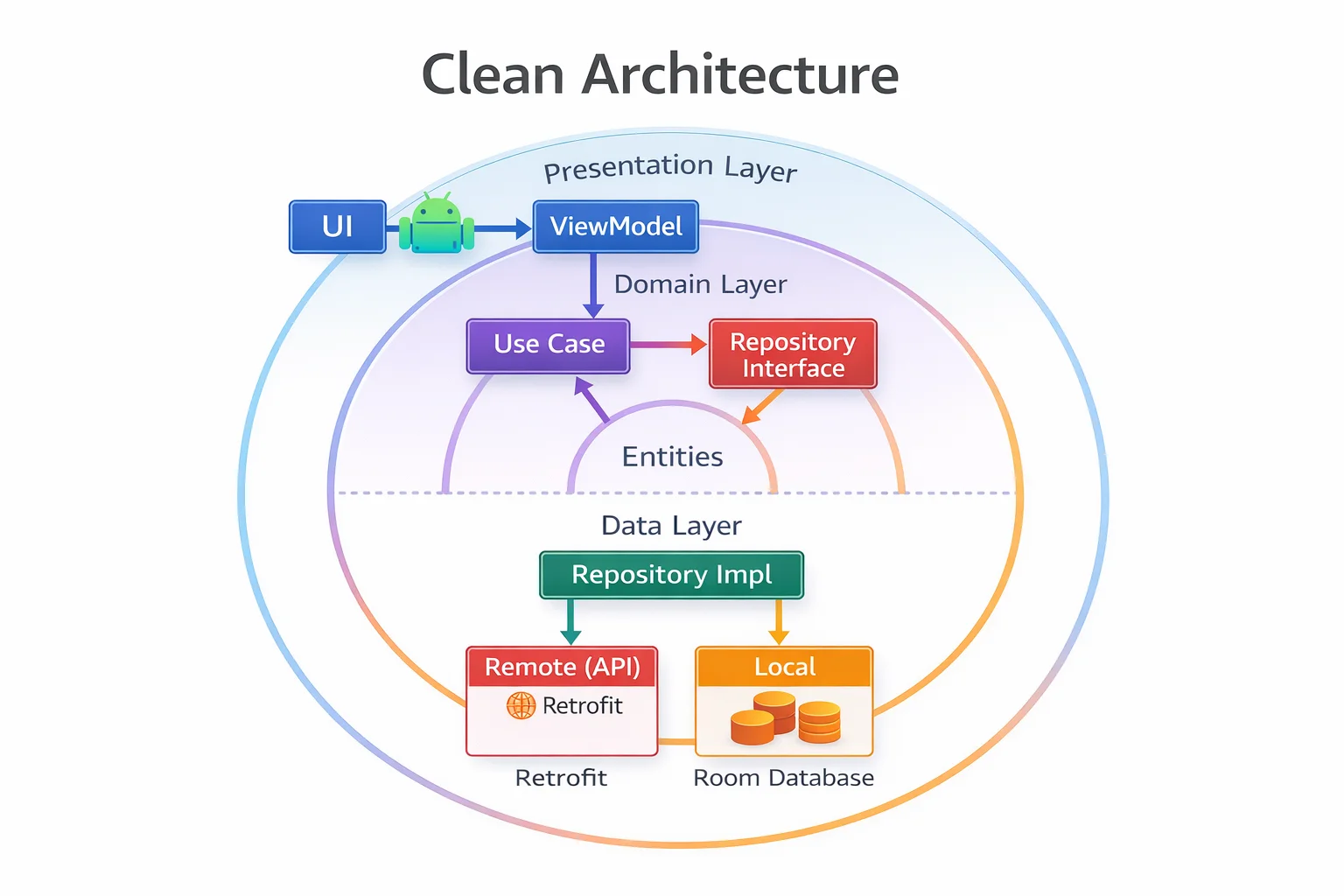
Clean Architecture is the most discussed and most misunderstood pattern in Android development. Some teams over-engineer it with dozens of empty interfaces and pass-through classes. Others dismiss it entirely and put everything in the ViewModel. The truth is in the middle: Clean Architecture gives you a clear structure with enforced dependency rules that make your app testable, maintainable, and scalable — but only if you apply it pragmatically. This guide shows you how it actually works in Android, when to use it, and when it’s overkill.
The Three Layers
// Clean Architecture divides your app into THREE layers:
//
// ┌─────────────────────────────────────────────────────────────────┐
// │                                                                 │
// │  PRESENTATION LAYER                                             │
// │  UI + ViewModel                                                 │
// │  Activity, Fragment, Composable, ViewModel                      │
// │  Depends on: Domain                                             │
// │                                                                 │
// ├─────────────────────────────────────────────────────────────────┤
// │                                                                 │
// │  DOMAIN LAYER (innermost — pure Kotlin, no Android)             │
// │  Use Cases + Domain Models + Repository Interfaces              │
// │  Business logic that's independent of any framework             │
// │  Depends on: NOTHING (no Android, no Retrofit, no Room)         │
// │                                                                 │
// ├─────────────────────────────────────────────────────────────────┤
// │                                                                 │
// │  DATA LAYER                                                     │
// │  Repository Implementations + Data Sources + DTOs + Entities    │
// │  Retrofit, Room, DataStore, API calls, database queries         │
// │  Depends on: Domain (implements Domain's interfaces)            │
// │                                                                 │
// └─────────────────────────────────────────────────────────────────┘
//
// THE DEPENDENCY RULE:
// Dependencies point INWARD — toward the Domain layer
// Outer layers know about inner layers, NOT the other way around
//
// Presentation → Domain ✅
// Data → Domain ✅
// Domain → Presentation ❌ (domain doesn't know about UI)
// Domain → Data ❌ (domain doesn't know about Retrofit/Room)
//
// Domain is the CENTER — it has ZERO dependencies on anything external
The dependency rule visualised
// ═══ DEPENDENCY DIRECTION ════════════════════════════════════════════
//
//  ┌─────────────────────────────────────────────┐
//  │           PRESENTATION LAYER                 │
//  │     (ViewModel, UI, Activity, Compose)       │
//  │               │                              │
//  │               │ depends on                   │
//  │               ↓                              │
//  │   ┌───────────────────────────┐              │
//  │   │       DOMAIN LAYER        │              │
//  │   │  (Use Cases, Models,      │              │
//  │   │   Repository Interfaces)  │              │
//  │   │           ↑               │              │
//  │   └───────────│───────────────┘              │
//  │               │ implements                   │
//  │               │                              │
//  │   ┌───────────────────────────┐              │
//  │   │        DATA LAYER         │              │
//  │   │  (Repository Impl,       │              │
//  │   │   API, Database, DTO)    │              │
//  │   └───────────────────────────┘              │
//  └─────────────────────────────────────────────┘
//
//  Domain defines an INTERFACE: ArticleRepository
//  Data provides the IMPLEMENTATION: ArticleRepositoryImpl
//  Presentation uses the INTERFACE (doesn't know about the implementation)
//  Hilt wires interface → implementation at compile time
The Domain Layer — Pure Business Logic
The domain layer is the heart of your app. It contains business logic, domain models, and repository interfaces — with zero dependencies on Android, Retrofit, Room, or any framework.
Domain Models
// Domain models are pure Kotlin data classes
// NO framework annotations — no @Entity, no @SerializedName, no @Composable
// They represent your app's BUSINESS concepts

data class Article(
    val id: String,
    val title: String,
    val content: String,
    val author: Author,
    val publishedAt: Long,
    val category: Category,
    val tags: List<String>,
    val isBookmarked: Boolean,
    val viewCount: Int
) {
    val isRecent: Boolean
        // Computed PROPERTY — business logic lives on the model
        get() = System.currentTimeMillis() - publishedAt < 7 * 24 * 60 * 60 * 1000L

    val readTimeMinutes: Int
        get() = (content.split(" ").size / 200).coerceAtLeast(1)
}

data class Author(
    val id: String,
    val name: String,
    val avatarUrl: String?
)

enum class Category {
    // enum class — fixed set of categories
    TECHNOLOGY, SCIENCE, BUSINESS, SPORTS, ENTERTAINMENT
}

// Domain models:
// ✅ Pure Kotlin — no Android imports
// ✅ Business logic as computed properties or extension functions
// ✅ Can be used in ANY Kotlin module (backend, KMP, tests)
// ❌ No Room annotations, no Gson annotations, no Compose annotations
Repository Interface (defined in Domain)
// The Repository INTERFACE lives in the Domain layer
// The IMPLEMENTATION lives in the Data layer
// This is DEPENDENCY INVERSION — Domain defines what it needs,
// Data provides how to do it

interface ArticleRepository {
    // interface — defines the contract without implementation
    // Domain layer knows WHAT data operations exist
    // but NOT HOW they're implemented (Room? Retrofit? Firebase?)

    fun getArticlesFlow(): Flow<List<Article>>
    // Flow is from kotlinx.coroutines — pure Kotlin, not Android-specific

    fun getArticleFlow(id: String): Flow<Article?>

    fun searchArticlesFlow(query: String): Flow<List<Article>>

    suspend fun refreshArticles()
    // suspend KEYWORD — callable from coroutines

    suspend fun toggleBookmark(articleId: String)

    suspend fun deleteArticle(articleId: String)
}

// This interface has:
// ✅ No Retrofit types (no Response<T>, no @GET)
// ✅ No Room types (no Entity, no Dao)
// ✅ No Android types (no Context, no SharedPreferences)
// ✅ Only Kotlin/coroutines types (Flow, suspend, List, String)
Use Cases — Single Business Operations
// A Use Case (also called Interactor) is a CLASS that encapsulates
// ONE specific business operation

// Use Cases contain business logic that:
// - Combines data from multiple repositories
// - Applies business rules
// - Transforms data for a specific use case

class GetArticlesUseCase @Inject constructor(
    // @Inject is an ANNOTATION from javax.inject — Hilt provides dependencies
    private val articleRepository: ArticleRepository,
    // Uses the INTERFACE — doesn't know about the implementation
    private val userRepository: UserRepository
) {
    // operator fun invoke() makes the class callable like a function
    // invoke is an OPERATOR FUNCTION — enables useCase() syntax
    operator fun invoke(): Flow<List<Article>> {
        return combine(
            // combine is a TOP-LEVEL FUNCTION from kotlinx.coroutines.flow
            articleRepository.getArticlesFlow(),
            userRepository.getBookmarkedIdsFlow()
        ) { articles, bookmarkedIds ->
            articles.map { article ->
                article.copy(isBookmarked = article.id in bookmarkedIds)
            }
        }
    }
}

class SearchArticlesUseCase @Inject constructor(
    private val articleRepository: ArticleRepository
) {
    operator fun invoke(query: String): Flow<List<Article>> {
        // Business rule: minimum 2 characters to search
        if (query.length < 2) return flowOf(emptyList())
        // flowOf() is a TOP-LEVEL FUNCTION — creates a Flow that emits one value

        return articleRepository.searchArticlesFlow(query)
    }
}

class ToggleBookmarkUseCase @Inject constructor(
    private val articleRepository: ArticleRepository,
    private val analytics: AnalyticsRepository
) {
    suspend operator fun invoke(articleId: String) {
        // Business logic: toggle bookmark AND log analytics
        articleRepository.toggleBookmark(articleId)
        analytics.logEvent("bookmark_toggled", mapOf("article_id" to articleId))
    }
}

class RefreshArticlesUseCase @Inject constructor(
    private val articleRepository: ArticleRepository
) {
    suspend operator fun invoke() {
        articleRepository.refreshArticles()
    }
}

// Usage in ViewModel — clean and expressive:
val articles = getArticlesUseCase()   // looks like a function call
//            ↑ actually calls operator fun invoke()

viewModelScope.launch {
    toggleBookmarkUseCase(articleId)   // also invoke()
}
When Use Cases are worth it vs overkill
// ✅ USE a Use Case when:
// - Business logic combines MULTIPLE repositories
//   GetArticlesUseCase combines articles + bookmarks
// - Business rules need to be enforced
//   SearchArticlesUseCase enforces minimum query length
// - The same logic is used in MULTIPLE ViewModels
//   ToggleBookmarkUseCase used in ArticleListVM, ArticleDetailVM, BookmarksVM
// - You want to test business logic independently

// ❌ SKIP a Use Case when:
// - It just passes through to a single Repository method
//   class GetArticlesUseCase(private val repo: ArticleRepository) {
//       operator fun invoke() = repo.getArticlesFlow()   // just a proxy!
//   }
//   → ViewModel can call repo.getArticlesFlow() directly — no need for wrapper
//
// - It has no business logic — just data fetching
// - Only ONE ViewModel uses it (no reusability benefit)

// Pragmatic approach:
// Start WITHOUT Use Cases — ViewModel calls Repository directly
// Extract a Use Case WHEN you need to share logic or the ViewModel gets complex
// Don't create Use Cases "just in case" — YAGNI (You Ain't Gonna Need It)
The Data Layer — Implementation Details
// Data layer IMPLEMENTS the interfaces defined in Domain
// It depends ON Domain — Domain does NOT depend on Data

// Repository Implementation
class ArticleRepositoryImpl @Inject constructor(
    private val remoteDataSource: ArticleRemoteDataSource,
    private val localDataSource: ArticleLocalDataSource
) : ArticleRepository {
    // IMPLEMENTS the Domain's ArticleRepository interface

    override fun getArticlesFlow(): Flow<List<Article>> {
        return localDataSource.getArticlesFlow()
            .map { entities -> entities.map { it.toDomain() } }
    }

    override suspend fun refreshArticles() {
        val remote = remoteDataSource.getArticles()
        localDataSource.insertArticles(remote.map { it.toEntity() })
    }

    override suspend fun toggleBookmark(articleId: String) {
        localDataSource.toggleBookmark(articleId)
    }

    override fun getArticleFlow(id: String): Flow<Article?> {
        return localDataSource.getArticleFlow(id)
            .map { it?.toDomain() }
    }

    override fun searchArticlesFlow(query: String): Flow<List<Article>> {
        return localDataSource.searchFlow(query)
            .map { entities -> entities.map { it.toDomain() } }
    }

    override suspend fun deleteArticle(articleId: String) {
        localDataSource.deleteArticle(articleId)
    }
}

// Hilt binds Interface → Implementation
@Module
// @Module is an ANNOTATION from Dagger — provides binding instructions
@InstallIn(SingletonComponent::class)
// @InstallIn is an ANNOTATION — scope to application lifetime
// SingletonComponent is a CLASS — Hilt's app-level component
abstract class RepositoryModule {

    @Binds
    // @Binds is an ANNOTATION from Dagger — binds interface to implementation
    // More efficient than @Provides for interface binding (no instance creation)
    @Singleton
    abstract fun bindArticleRepository(
        impl: ArticleRepositoryImpl
    ): ArticleRepository
    // When someone @Injects ArticleRepository, Hilt provides ArticleRepositoryImpl
}
The Presentation Layer — ViewModel + UI
@HiltViewModel
class ArticleViewModel @Inject constructor(
    private val getArticlesUseCase: GetArticlesUseCase,
    private val refreshArticlesUseCase: RefreshArticlesUseCase,
    private val toggleBookmarkUseCase: ToggleBookmarkUseCase
    // Depends on USE CASES (Domain layer), not Repository directly
    // In simpler apps, you CAN inject Repository directly — that's fine
) : ViewModel() {

    val uiState: StateFlow<UiState> = getArticlesUseCase()
        // operator fun invoke() returns Flow<List<Article>>
        .map<List<Article>, UiState> { articles ->
            UiState.Success(articles)
        }
        .onStart { emit(UiState.Loading) }
        .catch { e -> emit(UiState.Error(e.message ?: "Error")) }
        .stateIn(viewModelScope, SharingStarted.WhileSubscribed(5000), UiState.Loading)

    private val _events = MutableSharedFlow<UiEvent>()
    val events: SharedFlow<UiEvent> = _events.asSharedFlow()

    fun refresh() {
        viewModelScope.launch {
            try {
                refreshArticlesUseCase()
                // invoke() — refresh from network
            } catch (e: CancellationException) { throw e }
            catch (e: Exception) {
                _events.emit(UiEvent.ShowSnackbar("Refresh failed"))
            }
        }
    }

    fun onBookmarkToggled(articleId: String) {
        viewModelScope.launch {
            toggleBookmarkUseCase(articleId)
            // invoke() — toggle bookmark + log analytics (all in Use Case)
        }
    }

    sealed interface UiState {
        data object Loading : UiState
        data class Success(val articles: List<Article>) : UiState
        data class Error(val message: String) : UiState
    }

    sealed interface UiEvent {
        data class ShowSnackbar(val message: String) : UiEvent
    }
}
Package / Module Structure
// Option 1: PACKAGES within a single module (simpler apps)
//
// com.example.myapp/
// ├── domain/
// │   ├── model/
// │   │   ├── Article.kt
// │   │   ├── Author.kt
// │   │   └── Category.kt
// │   ├── repository/
// │   │   ├── ArticleRepository.kt      (interface)
// │   │   └── UserRepository.kt         (interface)
// │   └── usecase/
// │       ├── GetArticlesUseCase.kt
// │       ├── SearchArticlesUseCase.kt
// │       └── ToggleBookmarkUseCase.kt
// ├── data/
// │   ├── remote/
// │   │   ├── api/
// │   │   │   └── ArticleApi.kt         (Retrofit interface)
// │   │   ├── dto/
// │   │   │   └── ArticleDto.kt
// │   │   └── ArticleRemoteDataSource.kt
// │   ├── local/
// │   │   ├── dao/
// │   │   │   └── ArticleDao.kt         (Room DAO)
// │   │   ├── entity/
// │   │   │   └── ArticleEntity.kt
// │   │   └── ArticleLocalDataSource.kt
// │   ├── repository/
// │   │   └── ArticleRepositoryImpl.kt  (implements Domain interface)
// │   └── mapper/
// │       └── ArticleMapper.kt          (DTO ↔ Entity ↔ Domain)
// └── presentation/
//     ├── articles/
//     │   ├── ArticleViewModel.kt
//     │   └── ArticleScreen.kt          (Compose)
//     └── detail/
//         ├── DetailViewModel.kt
//         └── DetailScreen.kt


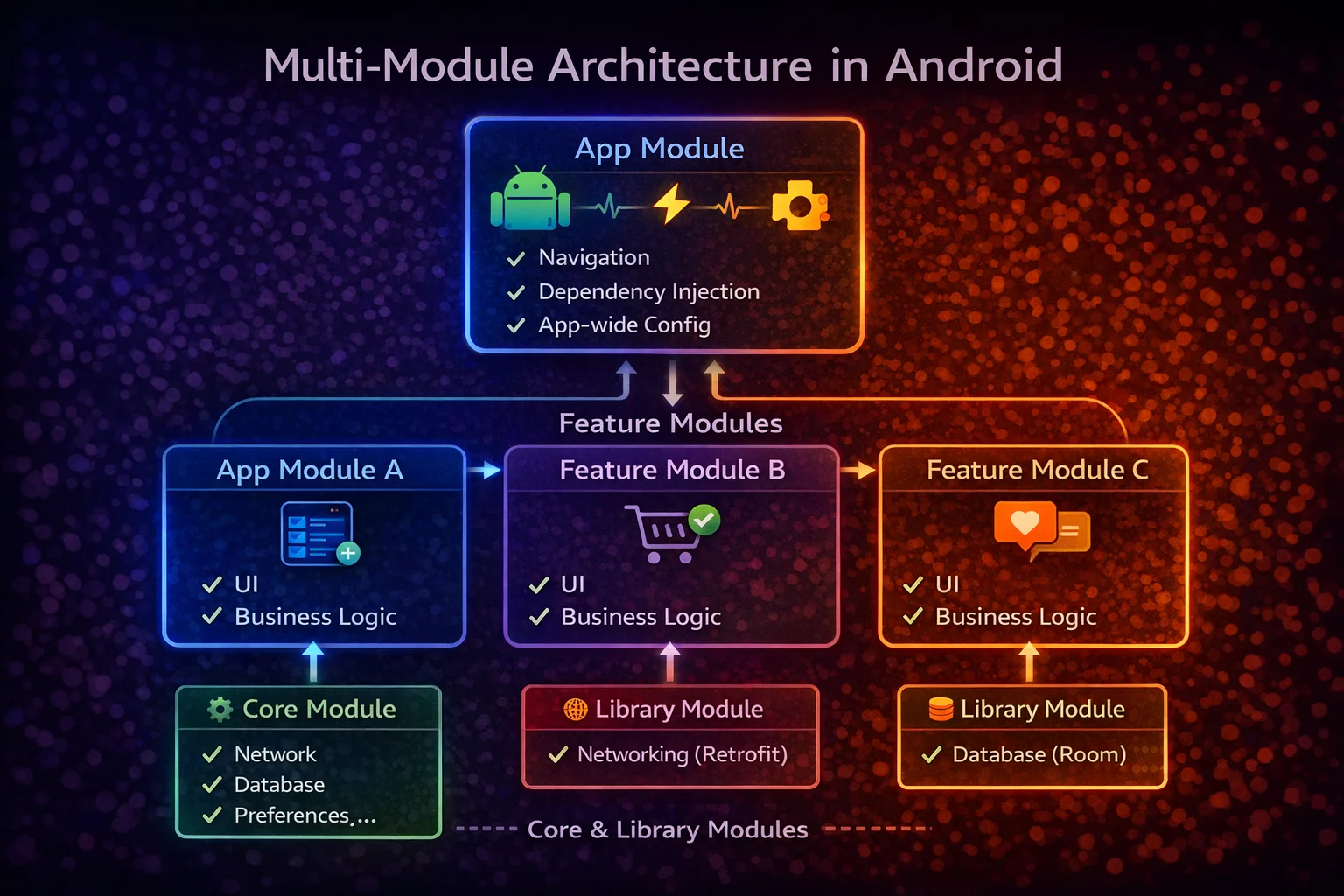
// Option 2: SEPARATE GRADLE MODULES (larger apps)
//
// :domain          — pure Kotlin module (no Android)
//   plugins: kotlin("jvm")
//   dependencies: kotlinx-coroutines-core ONLY
//
// :data            — Android library module
//   plugins: android.library
//   dependencies: :domain, Retrofit, Room, Hilt
//
// :presentation    — Android library or app module
//   plugins: android.application (or android.library for features)
//   dependencies: :domain, Compose, Hilt, Navigation
//
// The Gradle module structure ENFORCES the dependency rule:
// :domain has NO dependency on :data or :presentation
// :data depends on :domain (implements interfaces)
// :presentation depends on :domain (uses Use Cases and models)
// If someone tries to import Retrofit in :domain → compile error!
Complete Data Flow — Visual
// ═══ CLEAN ARCHITECTURE DATA FLOW ════════════════════════════════════
//
//  PRESENTATION                    DOMAIN                     DATA
//  (ViewModel + UI)                (Use Cases + Interfaces)   (Implementations)
//
//  ArticleViewModel                GetArticlesUseCase         ArticleRepositoryImpl
//  ┌──────────────┐               ┌────────────────┐         ┌──────────────────┐
//  │              │── invoke() ──→│                │         │                  │
//  │ uiState =    │               │ combine(       │         │                  │
//  │  getArticles │               │   articleRepo  │──Flow──→│ localDataSource  │
//  │  UseCase()   │               │     .getFlow(),│         │   .getFlow()     │
//  │  .stateIn()  │               │   userRepo     │         │                  │
//  │              │               │     .getIds()) │         │ remoteDataSource │
//  │              │               │                │         │   .getArticles() │
//  └──────────────┘               └────────────────┘         └──────────────────┘
//        │                              │                           │
//        │                              │                           │
//   UI observes                    Pure Kotlin                 Android/3rd party
//   StateFlow                      No Android                  Retrofit, Room
//   (Compose/Fragment)             No framework                DataStore
//
//  Dependencies: Presentation → Domain ← Data
//  Domain is the CENTER — depends on NOTHING
When Clean Architecture is Overkill
// Clean Architecture adds STRUCTURE at the cost of MORE FILES and INDIRECTION
// Not every app needs all three layers with full separation

// ❌ OVERKILL for:
// - Small apps (under 10 screens)
// - Hackathons / prototypes / MVPs
// - Apps with simple CRUD and no complex business logic
// - Solo developer projects with no plans to scale

// For simple apps, MVVM is enough:
// ViewModel → Repository → DataSources
// No Use Cases, no Domain interfaces
// Repository is a concrete class, not an interface

// ✅ WORTH IT for:
// - Large apps (20+ screens) with multiple developers
// - Apps with complex business logic (e-commerce, banking, social)
// - Apps that need to share logic across platforms (KMP)
// - Apps with extensive testing requirements
// - Apps that will be maintained for years

// PRAGMATIC approach:
// 1. Start with MVVM (ViewModel → Repository)
// 2. Add Domain models when DTOs/Entities leak into ViewModel
// 3. Add Use Cases when ViewModel gets complex or logic is shared
// 4. Add Repository interfaces when you need to swap implementations (testing)
// 5. Separate into Gradle modules when the codebase grows

// Don't start with full Clean Architecture on day one
// Let the architecture GROW with the complexity of the app
Common Mistakes to Avoid
Mistake 1: Pass-through Use Cases with no logic
// ❌ Use Case that just delegates — adds a file with zero value
class GetArticlesUseCase @Inject constructor(
    private val repository: ArticleRepository
) {
    operator fun invoke(): Flow<List<Article>> = repository.getArticlesFlow()
    // No business logic — just proxying!
}

// ✅ Either add actual logic or skip the Use Case
// Skip: ViewModel calls repository.getArticlesFlow() directly
// Keep: if it combines repositories, enforces rules, or is shared across ViewModels
Mistake 2: Domain layer depending on Android
// ❌ Android import in Domain — breaks the dependency rule
package com.example.domain.usecase

import android.content.Context   // ❌ Android import in Domain!

class SaveFileUseCase(private val context: Context) { ... }

// ✅ Domain should be pure Kotlin
// If you need file operations, define an interface in Domain:
interface FileStorage {
    suspend fun saveFile(name: String, content: ByteArray)
}
// Implement it in the Data layer with Android's Context
Mistake 3: Over-engineering with too many interfaces
// ❌ Interface for everything — even things that will never be swapped
interface ArticleRemoteDataSource { ... }
interface ArticleLocalDataSource { ... }
interface ArticleMapper { ... }
interface ArticleValidator { ... }
// 10 interfaces, 10 implementations, 10 Hilt modules — for one feature!

// ✅ Interfaces only where they provide VALUE
// Repository interface → YES (swappable for tests, dependency inversion)
// Data Source interface → MAYBE (useful for fakes in testing)
// Mapper interface → NO (pure functions, test directly)
// Validator interface → NO (pure functions, test directly)

// Rule: add an interface when you need to SWAP the implementation
// (testing with fakes, multiple implementations, dependency inversion)
Mistake 4: Domain models with framework annotations
// ❌ Domain model with Room and Gson annotations
@Entity(tableName = "articles")
data class Article(
    @PrimaryKey val id: String,
    @SerializedName("title") val title: String
)
// Domain now depends on Room AND Gson — defeats the purpose!

// ✅ Separate models per layer
// Domain:  data class Article(val id: String, val title: String)
// Entity:  @Entity data class ArticleEntity(@PrimaryKey val id: String, ...)
// DTO:     data class ArticleDto(@SerializedName("title") val title: String, ...)
// Map between them with extension functions
Mistake 5: ViewModel depending on Data layer directly
// ❌ ViewModel imports Retrofit/Room types — coupled to data layer
@HiltViewModel
class ArticleViewModel @Inject constructor(
    private val api: ArticleApi,          // ❌ Retrofit in ViewModel
    private val dao: ArticleDao           // ❌ Room in ViewModel
) : ViewModel()

// ✅ ViewModel depends only on Domain (Repository interface or Use Cases)
@HiltViewModel
class ArticleViewModel @Inject constructor(
    private val getArticlesUseCase: GetArticlesUseCase   // ✅ Domain only
) : ViewModel()
Summary
- Clean Architecture separates your app into three layers: Presentation (UI + ViewModel), Domain (business logic), Data (implementation details)
- The Dependency Rule: dependencies point inward — Presentation → Domain ← Data — Domain depends on nothing
- Domain Layer contains: domain models (pure Kotlin data classes), repository interfaces, and use cases — zero Android/framework dependencies
- Use Cases (classes with
operator fun invoke()) encapsulate single business operations — combine repositories, enforce rules, enable reuse - Data Layer implements domain interfaces:
ArticleRepositoryImplimplementsArticleRepositoryinterface @Binds(annotation from Dagger) binds interface to implementation in Hilt modules — more efficient than@Provides- Use separate models per layer: DTO (network), Entity (database), Domain (business) with mapper extension functions
- Enforce the dependency rule with Gradle modules:
:domain(pure Kotlin),:data(Android),:presentation(Android) - Don’t over-engineer: skip pass-through Use Cases, skip unnecessary interfaces, start with MVVM and evolve
- Pragmatic approach: start with MVVM → add domain models → add Use Cases when needed → separate modules when codebase grows
- Clean Architecture is worth it for large, complex, long-lived apps with multiple developers and extensive testing
- Clean Architecture is overkill for small apps, prototypes, and solo projects
Clean Architecture isn’t about following rules dogmatically — it’s about keeping your business logic independent from frameworks so it’s testable, reusable, and maintainable. The Domain layer is the core: pure Kotlin, no dependencies, no frameworks. Everything else is a detail that can change without affecting your business logic. Apply it pragmatically — let the architecture grow with the complexity of your app, not ahead of it.
Happy coding!
Comments (0)