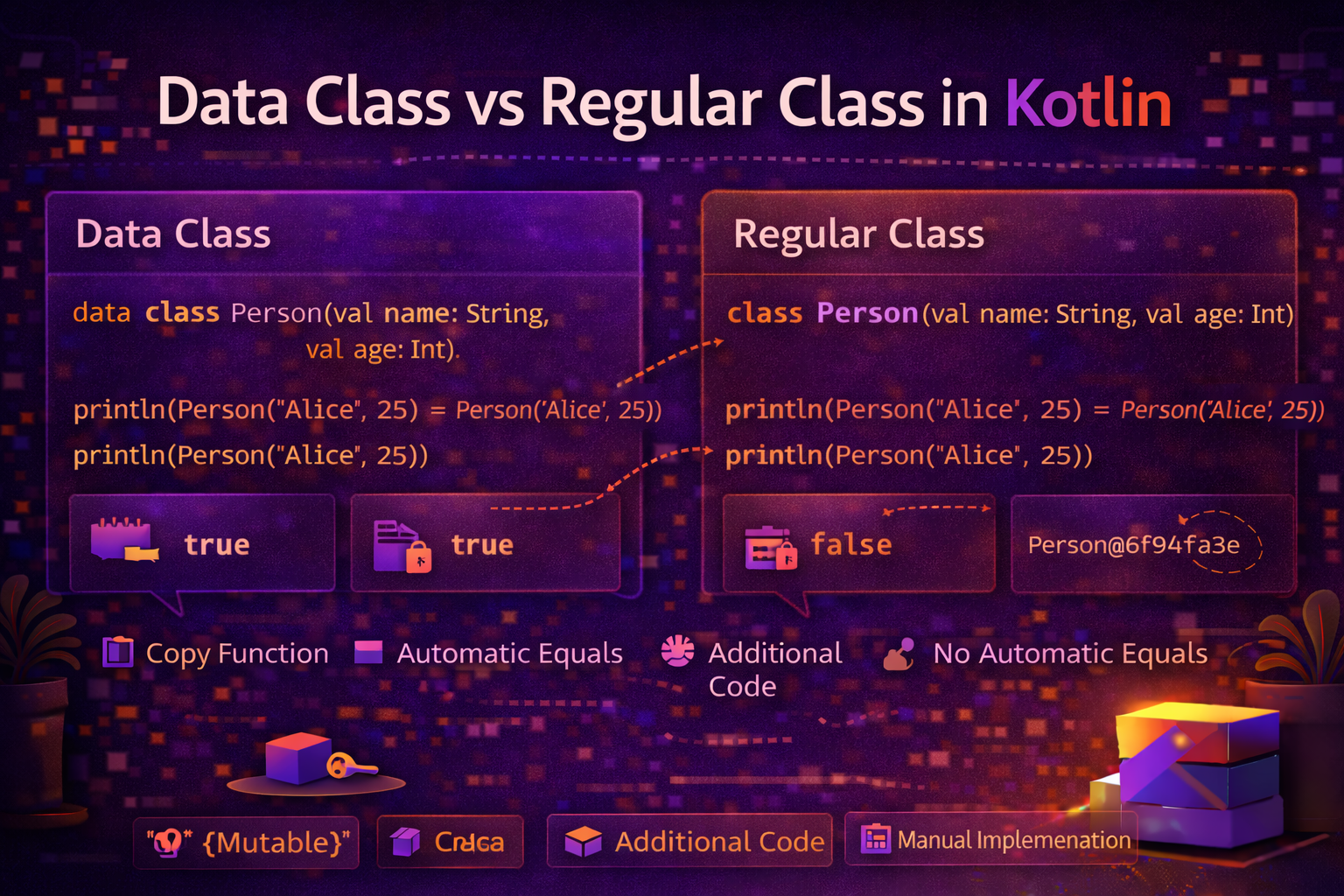
One of the most common questions Kotlin developers ask is: "Should this be a data class or a regular class?" The answer matters more than it seems — choosing wrong leads to subtle bugs, unnecessary boilerplate, or bloated model classes. This guide gives you a clear, practical framework for making the right choice every time.
A Quick Recap
Regular class — a general-purpose class. No auto-generated functions. You control everything.
class UserRepository(private val api: ApiService)Data class — a class designed to hold data. Kotlin auto-generates toString(), equals(), hashCode(), copy(), and componentN() functions based on the constructor properties.
data class User(val name: String, val age: Int)Both are valid Kotlin classes. The difference is intent and behavior.
What Data Class Gives You Automatically
Let's see exactly what you get for free with data class:
data class Article(
    val id: String,
    val title: String,
    val category: String,
    val isPublished: Boolean
)

val a1 = Article("1", "Kotlin Guide", "Kotlin", true)
val a2 = Article("1", "Kotlin Guide", "Kotlin", true)

// toString() — readable representation
println(a1)
// Article(id=1, title=Kotlin Guide, category=Kotlin, isPublished=true)

// equals() — content comparison
println(a1 == a2)    // true — same content
println(a1 === a2)   // false — different objects

// copy() — modified copy
val updated = a1.copy(isPublished = false)
println(updated)
// Article(id=1, title=Kotlin Guide, category=Kotlin, isPublished=false)

// componentN() — destructuring
val (id, title, category, isPublished) = a1
println("$id: $title")   // 1: Kotlin Guide
A regular class gives you none of this automatically — you get reference equality, a useless toString(), and no copy().
class Article(val id: String, val title: String)

val a1 = Article("1", "Kotlin Guide")
val a2 = Article("1", "Kotlin Guide")

println(a1 == a2)    // false — different objects (reference comparison)
println(a1)          // Article@1a2b3c4d — not useful
// no copy() available
The Core Decision: Data or Behavior?
The clearest way to decide:
Does this class primarily hold data, or primarily perform actions?
- Holds data →
data class - Performs actions → regular
class// Holds data — use data class data class UserProfile(val name: String, val email: String, val age: Int) data class ApiResponse<T>(val data: T?, val error: String?, val code: Int) data class LoginUiState(val isLoading: Boolean, val error: String?) // Performs actions — use regular class class UserRepository(private val api: ApiService, private val db: UserDao) class LoginViewModel(private val authService: AuthService) : ViewModel() class ImageLoader(private val context: Context) class NotificationManager(private val context: Context)
Side by Side Comparison
| Feature | data class |
Regular class |
|---|---|---|
toString() |
✅ Auto-generated, readable | ❌ Default: ClassName@hashcode |
equals() |
✅ Content comparison | ❌ Reference comparison |
hashCode() |
✅ Consistent with equals | ❌ Based on object identity |
copy() |
✅ Auto-generated | ❌ Not available |
| Destructuring | ✅ Auto componentN() |
❌ Need manual componentN() |
open / inheritable |
❌ Cannot be open |
✅ Can be open |
| Inheritance | ✅ Can extend classes | ✅ Can extend classes |
| Abstract | ❌ Cannot be abstract | ✅ Can be abstract |
| Mutable state | ⚠️ Possible but discouraged | ✅ Natural fit |
| Complex logic | ⚠️ Should be minimal | ✅ Natural fit |
When to Use data class
1. Model classes (API responses, DB entities)
// API response model
data class ArticleResponse(
    val id: Int,
    val title: String,
    val content: String,
    val author: AuthorResponse,
    val publishedAt: String,
    val tags: List<String>
)

data class AuthorResponse(
    val id: Int,
    val name: String,
    val avatarUrl: String?
)

// Room database entity
@Entity(tableName = "articles")
data class ArticleEntity(
    @PrimaryKey val id: Int,
    @ColumnInfo(name = "title") val title: String,
    @ColumnInfo(name = "content") val content: String,
    @ColumnInfo(name = "category") val category: String,
    @ColumnInfo(name = "is_published") val isPublished: Boolean
)
2. UI state
data class ArticleListUiState(
    val isLoading: Boolean = false,
    val articles: List<Article> = emptyList(),
    val errorMessage: String? = null,
    val selectedCategory: String = "All",
    val hasMorePages: Boolean = true
)

// ViewModel uses copy() to update state immutably
_uiState.value = _uiState.value.copy(
    isLoading = false,
    articles = newArticles
)
3. Value objects and DTOs
data class Money(val amount: Double, val currency: String) {
    operator fun plus(other: Money): Money {
        require(currency == other.currency) { "Currency mismatch" }
        return copy(amount = amount + other.amount)
    }
}

data class Coordinate(val lat: Double, val lng: Double)

data class DateRange(val start: LocalDate, val end: LocalDate) {
    val days: Long get() = ChronoUnit.DAYS.between(start, end)
}
4. Events and actions
// One-time UI events
sealed class UiEvent {
    data class ShowSnackbar(val message: String) : UiEvent()
    data class Navigate(val route: String) : UiEvent()
    object NavigateBack : UiEvent()
}

// User actions
sealed class ArticleAction {
    data class Like(val articleId: String) : ArticleAction()
    data class Bookmark(val articleId: String) : ArticleAction()
    data class Share(val article: Article) : ArticleAction()
    object Refresh : ArticleAction()
}
When to Use Regular class
1. Repositories and data sources
class ArticleRepository(
    private val apiService: ApiService,
    private val articleDao: ArticleDao,
    private val preferencesManager: PreferencesManager
) {
    suspend fun getArticles(category: String): List<Article> { /* ... */ }
    suspend fun saveArticle(article: Article) { /* ... */ }
    fun searchArticles(query: String): Flow<List<Article>> { /* ... */ }
}
2. ViewModels
class ArticleViewModel(
    private val repository: ArticleRepository
) : ViewModel() {

    private val _uiState = MutableStateFlow(ArticleListUiState())
    val uiState = _uiState.asStateFlow()

    fun loadArticles(category: String) {
        viewModelScope.launch { /* ... */ }
    }
}
3. Managers, helpers, services
class SessionManager(private val prefs: SharedPreferences) {
    fun saveToken(token: String) { /* ... */ }
    fun getToken(): String? { /* ... */ }
    fun clearSession() { /* ... */ }
}

class AnalyticsService(private val context: Context) {
    fun trackEvent(name: String, params: Map<String, Any> = emptyMap()) { /* ... */ }
    fun trackScreen(screenName: String) { /* ... */ }
}
4. Classes that need inheritance
// Base class — cannot be data class
open class BaseAdapter<T>(
    protected var items: List<T> = emptyList()
) : RecyclerView.Adapter<RecyclerView.ViewHolder>() {

    fun updateItems(newItems: List<T>) {
        items = newItems
        notifyDataSetChanged()
    }
}

class ArticleAdapter : BaseAdapter<Article>() {
    // extends BaseAdapter — fine because BaseAdapter is a regular class
}
5. Classes with significant mutable internal state
class DownloadManager {
    private val activeDownloads = mutableMapOf<String, DownloadJob>()
    private var totalBytesDownloaded = 0L
    private var isRunning = false

    fun startDownload(url: String) {
        isRunning = true
        activeDownloads[url] = DownloadJob(url)
    }

    fun cancelDownload(url: String) {
        activeDownloads.remove(url)
        if (activeDownloads.isEmpty()) isRunning = false
    }
}
The Gray Areas — Tricky Decisions
Classes with both data and behavior
Sometimes a class holds data AND has behavior. The question is — which is primary?
// More data than behavior — data class makes sense
data class User(
    val id: String,
    val name: String,
    val email: String
) {
    val initials: String get() = name.split(" ")
        .mapNotNull { it.firstOrNull() }
        .joinToString("")
        .uppercase()

    fun isValidEmail() = email.contains("@") && email.contains(".")
}

// More behavior than data — regular class makes sense
class UserValidator(private val existingEmails: Set<String>) {
    fun validate(user: User): ValidationResult { /* ... */ }
    fun checkEmailUnique(email: String): Boolean { /* ... */ }
    fun checkPasswordStrength(password: String): PasswordStrength { /* ... */ }
}
Configuration objects
// These are borderline — both work, but data class gives you equals() for free
// which is useful for detecting settings changes

data class NetworkConfig(
    val baseUrl: String = "https://api.example.com",
    val timeout: Long = 30,
    val maxRetries: Int = 3,
    val useSSL: Boolean = true
)

// Can detect config changes easily
if (currentConfig != newConfig) {
    rebuildNetworkClient(newConfig)
}
Common Mistakes
Mistake 1: Making everything a data class
// ❌ Wrong — ViewModel is not data, it has lifecycle and behavior
data class ArticleViewModel(val repository: ArticleRepository) : ViewModel()

// ✅ Regular class
class ArticleViewModel(private val repository: ArticleRepository) : ViewModel()
Mistake 2: Using var in data class unnecessarily
// ❌ Mutable data class — loses immutability benefits
data class User(var name: String, var email: String)

// External code can do:
user.name = "Hacker"   // breaks predictability

// ✅ Immutable — use copy() to "change" values
data class User(val name: String, val email: String)
val updated = user.copy(name = "New Name")
Mistake 3: Putting business logic in data classes
// ❌ Data class doing too much
data class Order(val items: List<Item>, val userId: String) {
    fun processPayment(card: CreditCard) { /* ... */ }
    fun sendConfirmationEmail() { /* ... */ }
    fun updateInventory() { /* ... */ }
}

// ✅ Data class stays simple; logic goes in a service/use case
data class Order(val items: List<Item>, val userId: String)

class OrderProcessor(
    private val paymentService: PaymentService,
    private val emailService: EmailService
) {
    fun process(order: Order, card: CreditCard) { /* ... */ }
}
Mistake 4: Expecting data class to work with inheritance
// ❌ data class cannot be open (inherited from)
open data class Base(val x: Int)  // compile error

// ✅ Use sealed class or regular class for inheritable types
sealed class Shape
data class Circle(val radius: Double) : Shape()
data class Rectangle(val width: Double, val height: Double) : Shape()
Mistake 5: Ignoring that body properties are excluded from equals()
data class Product(val id: Int, val name: String) {
    var isInCart: Boolean = false   // NOT part of equals/hashCode/copy
}

val p1 = Product(1, "Phone")
val p2 = Product(1, "Phone")
p1.isInCart = true

println(p1 == p2)   // true — isInCart is ignored!
// This might be surprising — only constructor properties are compared
Quick Decision Checklist
Ask yourself these questions:
 Does it hold data (properties) as its primary purpose?
  └─ Yes → lean toward data class

Does it need to be extended (open/abstract)?
  └─ Yes → must be regular class

Does it have significant mutable internal state (not just UI state)?
  └─ Yes → lean toward regular class

Does it perform actions (network calls, DB writes, business logic)?
  └─ Yes → regular class

Do you need equals() to compare by content?
  └─ Yes → data class

Do you need copy() to create modified versions?
  └─ Yes → data class (especially for UI state)

Is it an Android component (ViewModel, Fragment, Activity, Adapter)?
  └─ Yes → always regular class
Summary
Use data class for |
Use regular class for |
|---|---|
| API response models | Repositories |
| Database entities | ViewModels |
| UI state objects | Managers, helpers, services |
| Events and actions | Adapters and UI components |
| Value objects | Classes needing inheritance |
| DTOs and transfer objects | Classes with heavy mutable state |
data classauto-generatestoString(),equals(),hashCode(),copy(), andcomponentN()equals()in data class compares content — in regular class it compares reference- Only constructor properties are included in generated functions — body properties are excluded
- Data classes cannot be
open,abstract,sealed, orinner - Prefer
valovervarin data classes — usecopy()to produce modified versions - Keep data classes simple — minimal behavior, no business logic, no side effects
- When in doubt: if it maps to a JSON object, database row, or UI state — it's a data class
Choosing between data class and regular class is one of the first design decisions you make when adding a new type to your app. The clearer your intent, the better your architecture.
Happy coding!
Comments (0)