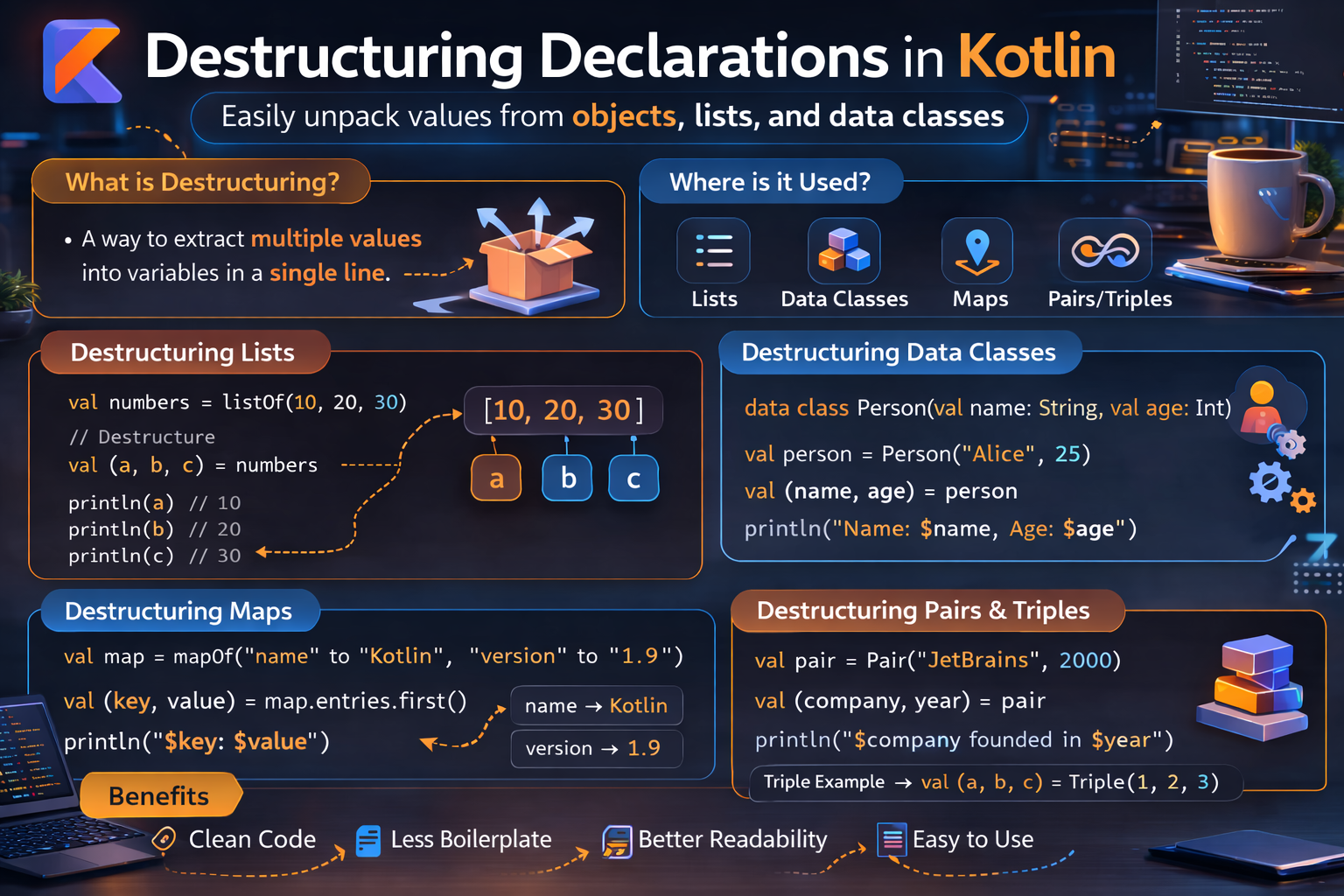
Destructuring lets you unpack an object into multiple variables in a single statement. Instead of writing val name = user.name and val age = user.age separately, you write val (name, age) = user. It's concise, readable, and used everywhere in Kotlin — in loops, lambdas, function returns, and more. This guide covers everything with practical Android examples.
What Is Destructuring?
Destructuring is the ability to break an object into its components and assign them to individual variables simultaneously.
// Without destructuring — verbose
val user = User("Alice", 25, "alice@email.com")
val name = user.name
val age = user.age
val email = user.email

// With destructuring — clean
val (name, age, email) = user
println("$name is $age years old")   // Alice is 25 years old
How It Works — componentN() Functions
Destructuring works through a convention: the compiler calls component1(), component2(), component3(), etc. on the object, and assigns the results to the declared variables.
val (name, age) = user
// Is equivalent to:
val name = user.component1()
val age = user.component2()
Data classes automatically generate these componentN() functions for every constructor property — that's why they support destructuring out of the box.
data class User(val name: String, val age: Int, val email: String)
// Kotlin auto-generates:
// fun component1() = name
// fun component2() = age
// fun component3() = email
Destructuring Data Classes
The most common use — destructuring data classes:
data class Article(
    val id: String,
    val title: String,
    val category: String,
    val isPublished: Boolean
)

val article = Article("1", "Kotlin Guide", "Kotlin", true)

// Destructure all properties
val (id, title, category, isPublished) = article
println("[$id] $title ($category)")   // [1] Kotlin Guide (Kotlin)

// Destructure partially — just the ones you need
val (_, title2, category2) = article  // skip id with _
println("$title2 — $category2")       // Kotlin Guide — Kotlin
Skipping Components with _
Use _ to skip a component you don't need. This avoids creating an unused variable and makes it clear you're intentionally ignoring that value.
data class Point(val x: Int, val y: Int, val z: Int)

val point = Point(10, 20, 30)

// Only need x and z
val (x, _, z) = point
println("x=$x, z=$z")   // x=10, z=30

// Only need the middle value
val (_, y, _) = point
println("y=$y")   // y=20
Destructuring in for Loops
One of the most elegant uses — destructuring while iterating:
List of data classes
val articles = listOf(
    Article("1", "Kotlin Guide", "Kotlin", true),
    Article("2", "Android Tips", "Android", false),
    Article("3", "Compose Basics", "Compose", true)
)

for ((id, title, category, isPublished) in articles) {
    if (isPublished) {
        println("[$id] $title ($category)")
    }
}
// [1] Kotlin Guide (Kotlin)
// [3] Compose Basics (Compose)
Map entries
Iterating over a Map is one of the most common uses of destructuring:
val scores = mapOf("Alice" to 95, "Bob" to 87, "Charlie" to 92)

for ((name, score) in scores) {
    println("$name scored $score")
}
// Alice scored 95
// Bob scored 87
// Charlie scored 92

// With withIndex()
val names = listOf("Alice", "Bob", "Charlie")
for ((index, name) in names.withIndex()) {
    println("$index: $name")
}
// 0: Alice
// 1: Bob
// 2: Charlie
Destructuring in Lambdas
You can destructure parameters directly in lambda expressions:
val scores = mapOf("Alice" to 95, "Bob" to 87, "Charlie" to 92)

// Without destructuring — verbose
scores.forEach { entry ->
    println("${entry.key}: ${entry.value}")
}

// With destructuring in lambda — clean
scores.forEach { (name, score) ->
    println("$name: $score")
}

// Filter with destructuring
val topScorers = scores.filter { (_, score) -> score >= 90 }
// {Alice=95, Charlie=92}

// Map with destructuring
val graded = scores.map { (name, score) ->
    "$name: ${if (score >= 90) "A" else "B"}"
}
// [Alice: A, Bob: B, Charlie: A]
Destructuring Function Return Values
When a function returns a Pair, Triple, or data class, you can destructure the result directly:
Pair
fun getMinMax(numbers: List<Int>): Pair<Int, Int> {
    return Pair(numbers.min(), numbers.max())
}

val (min, max) = getMinMax(listOf(3, 1, 7, 2, 9))
println("Min: $min, Max: $max")   // Min: 1, Max: 9

// to shorthand creates a Pair
val (first, second) = "Kotlin" to "Android"
println("$first / $second")   // Kotlin / Android
Triple
fun getRGBColor(hex: String): Triple<Int, Int, Int> {
    val r = hex.substring(1, 3).toInt(16)
    val g = hex.substring(3, 5).toInt(16)
    val b = hex.substring(5, 7).toInt(16)
    return Triple(r, g, b)
}

val (r, g, b) = getRGBColor("#FF5733")
println("R=$r, G=$g, B=$b")   // R=255, G=87, B=51
Data class return
For more than three values, always return a data class (more readable than Triple):
data class ValidationResult(
    val isValid: Boolean,
    val errorMessage: String?,
    val fieldName: String
)

fun validateEmail(email: String): ValidationResult {
    return when {
        email.isBlank()      -> ValidationResult(false, "Email is required", "email")
        !email.contains("@") -> ValidationResult(false, "Invalid email format", "email")
        else                 -> ValidationResult(true, null, "email")
    }
}

val (isValid, errorMessage, fieldName) = validateEmail(emailInput)
if (!isValid) {
    showError(fieldName, errorMessage ?: "Invalid")
}
Custom componentN() Functions
If a class isn't a data class, you can manually add componentN() functions to support destructuring:
class Color(val red: Int, val green: Int, val blue: Int) {
    operator fun component1() = red
    operator fun component2() = green
    operator fun component3() = blue
}

val color = Color(255, 128, 0)
val (r, g, b) = color
println("R=$r, G=$g, B=$b")   // R=255, G=128, B=0
The operator keyword is required. Components must be numbered sequentially starting from 1.
Destructuring with when
Combine destructuring with when for clean pattern matching:
data class Result<T>(val data: T?, val error: String?)

fun handleResult(result: Result<User>) {
    val (data, error) = result
    when {
        error != null -> showError(error)
        data != null  -> showUser(data)
        else          -> showEmpty()
    }
}
Real Android Examples
Processing API response
data class ApiResponse<T>(
    val data: T?,
    val errorMessage: String?,
    val statusCode: Int
)

fun processResponse(response: ApiResponse<List<Article>>) {
    val (data, error, code) = response

    when {
        code == 401         -> navigateToLogin()
        error != null       -> showError(error)
        data != null        -> showArticles(data)
        else                -> showEmptyState()
    }
}
Handling map of UI states
val fieldErrors = mapOf(
    "name" to "Name is required",
    "email" to "Invalid email",
    "password" to "Too short"
)

fieldErrors.forEach { (field, error) ->
    when (field) {
        "name"     -> nameInputLayout.error = error
        "email"    -> emailInputLayout.error = error
        "password" -> passwordInputLayout.error = error
    }
}
Destructuring in ViewModel state
data class FormState(
    val name: String = "",
    val email: String = "",
    val password: String = "",
    val isLoading: Boolean = false,
    val error: String? = null
)

// In Fragment — collect state and destructure
viewLifecycleOwner.lifecycleScope.launch {
    viewModel.formState.collect { state ->
        val (name, email, password, isLoading, error) = state

        nameEditText.setText(name)
        emailEditText.setText(email)
        progressBar.showIf(isLoading)
        error?.let { errorTextView.text = it }
    }
}
groupBy result processing
val articles = listOf(/* articles */)
val byCategory = articles.groupBy { it.category }

// Destructure while iterating the map
byCategory.forEach { (category, articleList) ->
    println("$category (${articleList.size} articles):")
    articleList.take(3).forEach { article ->
        println("  - ${article.title}")
    }
}
Pair-based configuration
val screenConfig = listOf(
    "primary_color" to "#6200EE",
    "accent_color" to "#03DAC6",
    "background" to "#FFFFFF",
    "text_color" to "#000000"
)

screenConfig.forEach { (key, value) ->
    applyThemeConfig(key, value)
}
Destructuring vs Direct Property Access
Destructuring is great — but it's not always the right choice:
data class User(val name: String, val age: Int, val email: String, val bio: String?)

val user = User("Alice", 25, "alice@email.com", "Android developer")

// ✅ Destructuring — good when using most properties
val (name, age, email, bio) = user
println("$name, $age, $email")

// ✅ Direct access — better when using only one or two properties
val greeting = "Hello, ${user.name}!"
val isAdult = user.age >= 18

// ❌ Destructuring to get one property — unnecessary
val (_, _, _, bio2) = user   // awkward — just use user.bio
Rule of thumb: Use destructuring when you need 3+ properties from an object. For 1-2 properties, direct access is cleaner.
Common Mistakes to Avoid
Mistake 1: Destructuring in wrong order
data class Point(val x: Int, val y: Int)

val point = Point(10, 20)
val (y, x) = point   // ❌ Wrong! — y gets 10 (x's value), x gets 20 (y's value)
// Destructuring follows declaration order, not variable names

val (x2, y2) = point   // ✅ x2=10, y2=20 — matches declaration order
Mistake 2: Adding properties to data class and forgetting destructuring order changes
// Before: data class User(val name: String, val age: Int)
val (name, age) = user   // works fine

// After adding id: data class User(val id: String, val name: String, val age: Int)
val (name, age) = user   // ❌ Now name gets id's value, age gets name's value!

// ✅ Update destructuring when class changes
val (id, name2, age2) = user   // correct
Mistake 3: Over-destructuring with many skips
data class Article(val id: String, val title: String, val content: String,
                   val author: String, val category: String, val date: Long)

// ❌ Awkward — too many underscores
val (_, _, _, _, category, _) = article

// ✅ Direct access is cleaner for one property
val category = article.category
Mistake 4: Forgetting componentN() needs operator modifier
class Size(val width: Int, val height: Int) {
    fun component1() = width   // ❌ Missing 'operator' — won't work for destructuring
    operator fun component2() = height   // ✅ correct
}

// ✅ Both need operator
class Size(val width: Int, val height: Int) {
    operator fun component1() = width
    operator fun component2() = height
}
Quick Reference
| Use Case | Syntax |
|---|---|
| Data class | val (a, b, c) = dataObject |
| Skip a component | val (a, _, c) = dataObject |
| In for loop | for ((a, b) in list) |
| Map iteration | for ((key, value) in map) |
| With index | for ((index, item) in list.withIndex()) |
| Lambda parameter | list.forEach { (a, b) -> } |
| Pair | val (first, second) = pair |
| Triple | val (a, b, c) = triple |
| Custom class | Add operator fun component1() etc. |
Summary
- Destructuring unpacks an object into individual variables in a single statement
- Works via
componentN()functions —component1(),component2(), etc. - Data classes auto-generate
componentN()for all constructor properties - Add
operator fun componentN()to any class to enable destructuring - Use
_to skip components you don't need - Works in
forloops, lambda parameters, and variable declarations - Destructuring follows declaration order — variable names don't matter, position does
- Best when using 3+ properties — for 1-2 properties, direct access is cleaner
- Be careful when adding new properties to a data class — it shifts component positions
Destructuring is one of those features that makes Kotlin code feel natural and expressive. Used in the right places — especially Map iteration and function return values — it significantly reduces noise and improves readability.
Happy coding!
Comments (0)