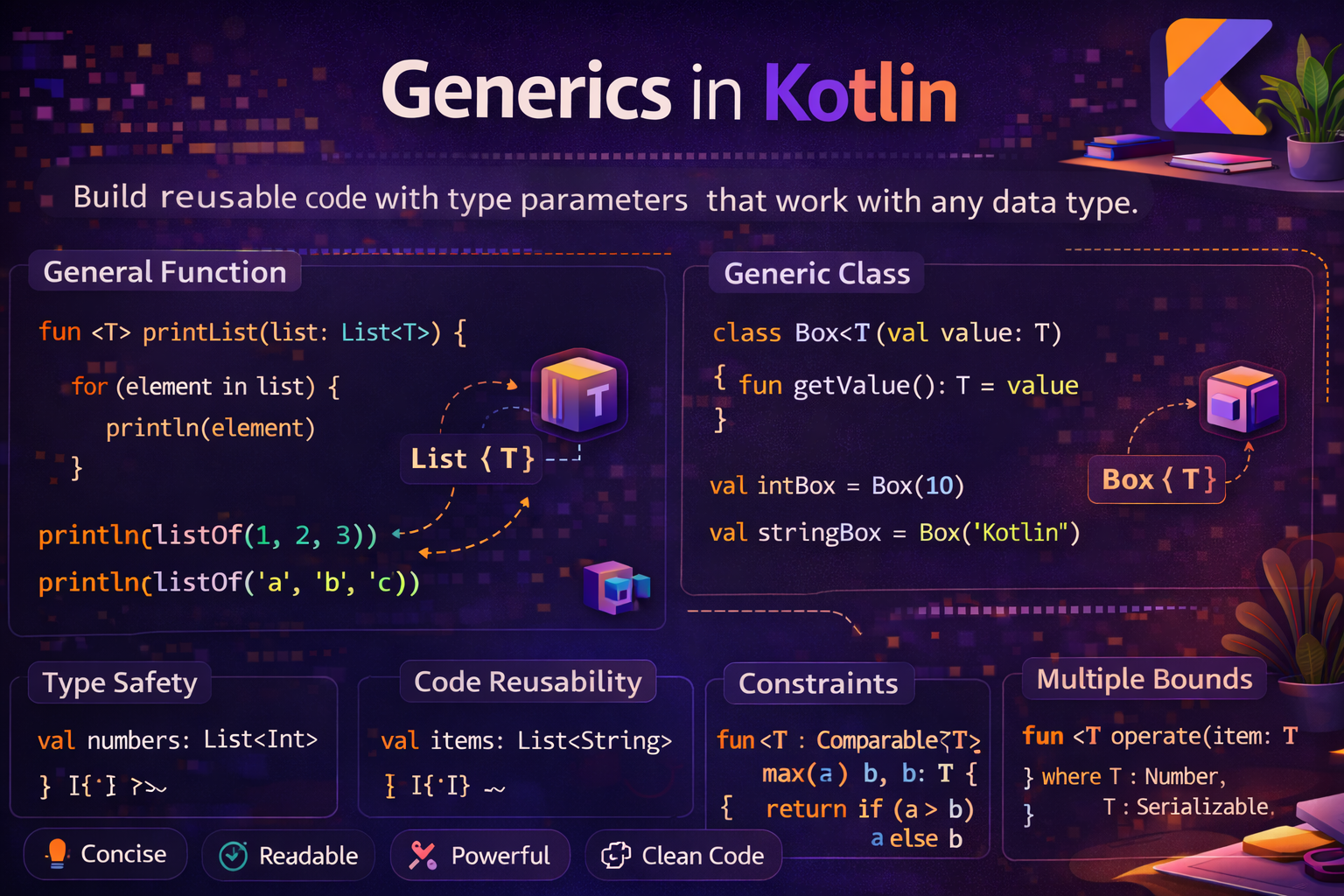
Generics let you write code that works with any type while keeping full type safety. You've been using generics every day — List<Article>, StateFlow<UiState>, ApiResult<User> — without necessarily understanding what's happening under the hood. This guide explains generics from scratch, covers variance (in/out), reified types, and type aliases — all with practical Android examples.
What Are Generics?
Generics let you write a class or function that works with any type, while the compiler still enforces type safety at compile time.
Without generics, you'd need a separate class for every type:
class IntBox(val value: Int)
class StringBox(val value: String)
class ArticleBox(val value: Article)
// ... one for every type — impossible to maintain
With generics, one class handles them all:
class Box<T>(val value: T)   // T is the type parameter

val intBox = Box(42)               // Box<Int>
val stringBox = Box("Hello")       // Box<String>
val articleBox = Box(Article(...)) // Box<Article>

println(intBox.value)     // 42
println(stringBox.value)  // Hello
T is a type parameter — a placeholder for a real type that gets filled in when you use the class. By convention, single letters are used: T (type), K (key), V (value), E (element), R (result).
Generic Classes
class ApiResult<T>(
    val data: T?,
    val error: String?,
    val isLoading: Boolean = false
) {
    val isSuccess: Boolean get() = data != null && error == null
    val isError: Boolean get() = error != null
}

// Usage with different types
val userResult: ApiResult<User> = ApiResult(data = user, error = null)
val articlesResult: ApiResult<List<Article>> = ApiResult(data = articles, error = null)
val errorResult: ApiResult<User> = ApiResult(data = null, error = "Not found")

if (userResult.isSuccess) {
    showUser(userResult.data!!)
}
This pattern — a generic result wrapper — is one of the most used patterns in Android development.
Generic Functions
Functions can also be generic — the type parameter is declared before the function name:
fun <T> swap(list: MutableList<T>, index1: Int, index2: Int) {
    val temp = list[index1]
    list[index1] = list[index2]
    list[index2] = temp
}

val numbers = mutableListOf(1, 2, 3, 4, 5)
swap(numbers, 0, 4)
println(numbers)   // [5, 2, 3, 4, 1]

val names = mutableListOf("Alice", "Bob", "Charlie")
swap(names, 0, 2)
println(names)   // [Charlie, Bob, Alice]
// Generic extension function — safe first element with default
fun <T> List<T>.firstOrDefault(default: T): T {
return if (isEmpty()) default else first()
}
val numbers = listOf(1, 2, 3)
println(numbers.firstOrDefault(0)) // 1
val empty = emptyList<Int>()
println(empty.firstOrDefault(0)) // 0Type Constraints — Upper Bounds
You can restrict what types are allowed using : to specify an upper bound:
// T must be a Number
fun <T : Number> sum(a: T, b: T): Double {
    return a.toDouble() + b.toDouble()
}

println(sum(3, 5))         // 8.0
println(sum(3.14, 2.86))   // 6.0
// sum("a", "b")           // ❌ compile error — String is not a Number
// T must implement Comparable — so we can compare values
fun <T : Comparable<T>> clamp(value: T, min: T, max: T): T {
return when {
value < min -> min
value > max -> max
else -> value
}
}
println(clamp(15, 0, 10)) // 10
println(clamp(-5, 0, 10)) // 0
println(clamp(3.7, 0.0, 5.0)) // 3.7// Multiple constraints — use 'where'
fun <T> copyIfPresent(source: T?, destination: MutableList<T>)
where T : Any, T : Comparable<T> {
source?.let { destination.add(it) }
}Variance — in and out
Variance controls how generic types relate to each other when the type parameter changes. This is where in and out come in — and it's the most important concept to understand when you start seeing compiler errors with generic types.
The Problem
fun printAll(items: List<Any>) {
    items.forEach { println(it) }
}

val strings: List<String> = listOf("Alice", "Bob")
printAll(strings)   // ✅ works in Kotlin — why?
This works because Kotlin's List is declared with out — meaning it's covariant.
out — Covariance (Producer)
Declare a type parameter with out to say: "this class only produces values of type T, never consumes them." This means Generic<Subtype> can be used where Generic<Supertype> is expected.
// out T means: this interface only produces T (read-only)
interface Producer<out T> {
    fun produce(): T          // ✅ can return T
    // fun consume(item: T)   // ❌ cannot take T as parameter
}

class StringProducer : Producer<String> {
    override fun produce() = "Hello"
}

val producer: Producer<Any> = StringProducer()   // ✅ works — covariance
println(producer.produce())   // Hello
This is exactly how Kotlin's List<out T> works — it's read-only, so a List<String> can safely be used as a List<Any>.
in — Contravariance (Consumer)
Declare a type parameter with in to say: "this class only consumes values of type T, never produces them." This means Generic<Supertype> can be used where Generic<Subtype> is expected.
// in T means: this interface only consumes T (write-only)
interface Consumer<in T> {
    fun consume(item: T)   // ✅ can take T as parameter
    // fun produce(): T    // ❌ cannot return T
}

class AnyConsumer : Consumer<Any> {
    override fun consume(item: Any) = println("Consuming: $item")
}

val consumer: Consumer<String> = AnyConsumer()   // ✅ works — contravariance
consumer.consume("Hello")   // Consuming: Hello
Invariance — No Modifier
Without in or out, a generic type is invariant — Generic<String> is completely unrelated to Generic<Any>.
class Box<T>(var value: T)   // invariant — no in or out

val stringBox: Box<String> = Box("hello")
val anyBox: Box<Any> = stringBox   // ❌ compile error — invariant

// MutableList is also invariant for the same reason:
// if MutableList<String> were a MutableList<Any>,
// you could add an Int into it — breaking type safety
Quick Variance Summary
| Modifier | Name | Can Return T | Can Accept T | Subtype Relationship |
|---|---|---|---|---|
out T |
Covariant | ✅ | ❌ | Generic<Sub> is a Generic<Super> |
in T |
Contravariant | ❌ | ✅ | Generic<Super> is a Generic<Sub> |
| No modifier | Invariant | ✅ | ✅ | No relationship |
Star Projection — <*>
When you don't know or don't care about the specific type, use * as a wildcard:
fun printListInfo(list: List<*>) {
    println("Size: ${list.size}")
    println("First: ${list.firstOrNull()}")
}

printListInfo(listOf(1, 2, 3))        // works
printListInfo(listOf("a", "b", "c"))  // works
printListInfo(listOf(true, false))    // works

// Check if something is a list of any type
fun isList(obj: Any): Boolean = obj is List<*>

println(isList(listOf(1, 2, 3)))   // true
println(isList("hello"))           // false
reified — Access Generic Type at Runtime
Normally, generic types are erased at runtime — the JVM doesn't know what T is after compilation. With inline + reified, the type is preserved at each call site:
// Without reified — cannot check T at runtime
fun <T> isType(value: Any): Boolean {
    return value is T   // ❌ compile error — T is erased
}

// With reified — T is preserved
inline fun <reified T> isType(value: Any): Boolean {
    return value is T   // ✅ works
}

println(isType<String>("hello"))   // true
println(isType<Int>("hello"))      // false
reified in Android
// Type-safe Activity navigation — no Class parameter needed
inline fun <reified T : Activity> Context.startActivity(
    noinline block: Intent.() -> Unit = {}
) {
    startActivity(Intent(this, T::class.java).apply(block))
}

startActivity<LoginActivity>()
startActivity<ArticleDetailActivity> {
    putExtra("article_id", articleId)
}
// Type-safe JSON parsing
inline fun <reified T> String.fromJson(): T {
return Gson().fromJson(this, T::class.java)
}
val user = jsonString.fromJson<User>()
val articles = jsonString.fromJson<List<Article>>()// Type-safe ViewModel retrieval
inline fun <reified VM : ViewModel> Fragment.viewModel(): VM {
return ViewModelProvider(this)[VM::class.java]
}
val vm = viewModel<ArticleViewModel>()Generic Sealed Classes — The Most Important Android Pattern
Combining generics with sealed classes gives you the most powerful result-handling pattern in Android:
sealed class Result<out T> {
    data class Success<T>(val data: T) : Result<T>()
    data class Error(val message: String, val code: Int? = null) : Result<Nothing>()
    object Loading : Result<Nothing>()
}

// Reusable safe API call wrapper
suspend fun <T> safeApiCall(call: suspend () -> T): Result<T> {
    return try {
        Result.Success(call())
    } catch (e: IOException) {
        Result.Error("No internet connection")
    } catch (e: HttpException) {
        Result.Error("Server error", e.code())
    } catch (e: Exception) {
        Result.Error(e.message ?: "Unknown error")
    }
}

// Works for any return type
suspend fun getArticles(): Result<List<Article>> = safeApiCall { apiService.getArticles() }
suspend fun getUser(id: String): Result<User> = safeApiCall { apiService.getUser(id) }
// In ViewModel — exhaustive when handles all cases
viewModelScope.launch {
when (val result = repository.getArticles()) {
is Result.Loading -> _uiState.value = uiState.value.copy(isLoading = true)
is Result.Success -> _uiState.value = uiState.value.copy(articles = result.data)
is Result.Error -> _uiState.value = uiState.value.copy(error = result.message)
}
}Type Aliases — Give Types a Better Name
A type alias creates a new name for an existing type. It doesn't create a new type — it's purely a shorthand. Use it when a type is long, complex, or repeated throughout your codebase.
// Without type alias — verbose and hard to read at a glance
val handler: (Result<List<Article>>) -> Unit = { result -> /* ... */ }
val callback: (String, Int, Boolean) -> Unit = { name, age, active -> /* ... */ }

// With type alias — clean and meaningful
typealias ArticleResultHandler = (Result<List<Article>>) -> Unit
typealias UserCallback = (String, Int, Boolean) -> Unit

val handler: ArticleResultHandler = { result -> /* ... */ }
val callback: UserCallback = { name, age, active -> /* ... */ }
Common type alias uses
// Simplify complex generic types
typealias ArticleMap = Map<String, List<Article>>
typealias UserPrefs  = Map<String, String>
typealias IdList     = List<String>

// Name function types meaningfully
typealias OnArticleClick  = (Article) -> Unit
typealias OnErrorOccurred = (String) -> Unit

// Much more readable function signatures
fun setupAdapter(
    articles: List<Article>,
    onArticleClick: OnArticleClick,
    onError: OnErrorOccurred
) { /* ... */ }
// Generic type aliases
typealias Predicate<T> = (T) -> Boolean
typealias Transformer<A, B> = (A) -> B
fun <T> List<T>.customFilter(predicate: Predicate<T>): List<T> = filter(predicate)
val isLongTitle: Predicate<Article> = { it.title.length > 30 }
val longTitleArticles = articles.customFilter(isLongTitle)More Real Android Examples
Generic pagination response
data class PaginatedResponse<T>(
    val items: List<T>,
    val currentPage: Int,
    val totalPages: Int,
    val totalItems: Int
) {
    val hasNextPage: Boolean get() = currentPage < totalPages
    val hasPreviousPage: Boolean get() = currentPage > 1
}

// Same class works for any content type
suspend fun getArticles(page: Int): PaginatedResponse<Article>
suspend fun getUsers(page: Int): PaginatedResponse<User>
suspend fun getComments(page: Int): PaginatedResponse<Comment>
Generic base ViewModel
abstract class BaseListViewModel<T> : ViewModel() {

    private val _items = MutableStateFlow<List<T>>(emptyList())
    val items: StateFlow<List<T>> = _items

    private val _isLoading = MutableStateFlow(false)
    val isLoading: StateFlow<Boolean> = _isLoading

    private val _error = MutableStateFlow<String?>(null)
    val error: StateFlow<String?> = _error

    protected abstract suspend fun fetchItems(): List<T>

    fun load() {
        viewModelScope.launch {
            _isLoading.value = true
            try {
                _items.value = fetchItems()
                _error.value = null
            } catch (e: Exception) {
                _error.value = e.message
            } finally {
                _isLoading.value = false
            }
        }
    }
}

class ArticleListViewModel(
    private val repository: ArticleRepository
) : BaseListViewModel<Article>() {
    override suspend fun fetchItems() = repository.getArticles()
}

class UserListViewModel(
    private val repository: UserRepository
) : BaseListViewModel<User>() {
    override suspend fun fetchItems() = repository.getUsers()
}
Generic cache
class Cache<K, V>(private val maxSize: Int = 100) {

    private val store = LinkedHashMap<K, V>(maxSize, 0.75f, true)

    fun put(key: K, value: V) {
        if (store.size >= maxSize) store.remove(store.keys.first())
        store[key] = value
    }

    fun get(key: K): V? = store[key]
    fun remove(key: K) = store.remove(key)
    fun clear() = store.clear()
    val size: Int get() = store.size
}

val articleCache = Cache<String, Article>(maxSize = 50)
val userCache    = Cache<Int, User>(maxSize = 20)
Common Mistakes to Avoid
Mistake 1: Using raw types without type parameters
// ❌ No type parameter — no type safety
val list = ArrayList()
list.add("string")
list.add(123)   // no compile error — dangerous

// ✅ Always specify the type
val list = ArrayList<String>()
list.add("string")
list.add(123)   // ❌ compile error — caught!
Mistake 2: Trying to instantiate a generic type directly
fun <T> createInstance(): T {
    return T()   // ❌ compile error — T is erased at runtime
}

// ✅ Use reified + inline
inline fun <reified T> createInstance(): T {
    return T::class.java.getDeclaredConstructor().newInstance()
}
Mistake 3: Variance mismatch causing compile errors
// ❌ MutableList is invariant — causes compile error
fun addItems(list: MutableList<Any>) { list.add("item") }
val strings = mutableListOf<String>()
addItems(strings)   // ❌ compile error

// ✅ List is covariant (out T) — works fine for reading
fun printItems(list: List<Any>) { list.forEach { println(it) } }
val strings = listOf("a", "b")
printItems(strings)   // ✅ works
Mistake 4: Thinking type alias creates a new type
typealias UserId    = String
typealias ArticleId = String

fun getUser(id: UserId) { }

val articleId: ArticleId = "article_123"
getUser(articleId)   // ✅ compiles — type alias is a synonym, NOT a new type
// Use value classes (inline classes) if you need true type distinction
Summary
- Generics let you write type-safe, reusable code —
class Box<T>,fun <T> swap() - Use type constraints with
: UpperBoundto restrict allowed types —<T : Number>,<T : Comparable<T>> out T(covariant) — class only produces T;Generic<Sub>is aGeneric<Super>in T(contravariant) — class only consumes T;Generic<Super>is aGeneric<Sub>- No modifier — invariant;
Generic<String>has no relationship toGeneric<Any> - Use
*(star projection) when you don't care about the specific type parameter reified+inlinepreserves generic type at runtime — enablesis T,T::class.java- Type aliases give better names to complex types —
typealias OnClick = (View) -> Unit - Type aliases are synonyms only — use value classes for truly distinct types
- The generic sealed
Result<T>+safeApiCallpattern is the most important generic pattern in Android
Generics are foundational to writing reusable, type-safe Android code. Once you understand variance and reified, you'll see why StateFlow<T>, List<T>, and Result<T> are designed the way they are — and you'll be writing your own powerful generic APIs with confidence.
Happy coding!
Comments (0)