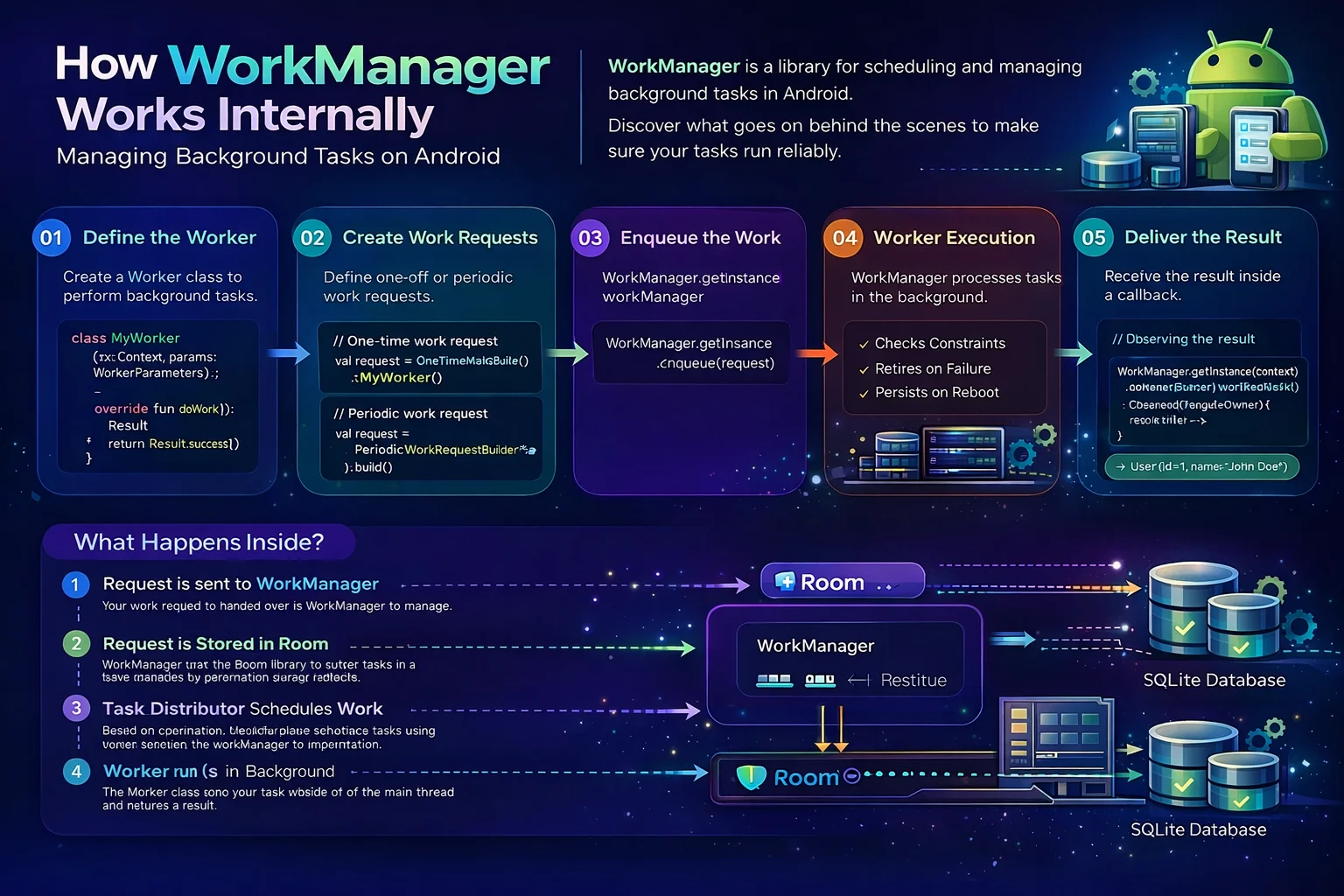
You call WorkManager.enqueue(request) and your background task runs — even if the app closes, even if the phone restarts. But how? Android has strict rules about background work. Apps get killed, processes die, JobScheduler has quotas. WorkManager somehow survives all of this. Understanding the internals reveals a clever system: a Room database that persists work across restarts, a scheduler layer that picks the best system API for each device, and a constraint monitoring system that watches battery, network, and storage in real time. This guide opens WorkManager’s hood.
The Mental Model — What WorkManager Actually Is
// WorkManager is NOT one system API — it's a LAYER on top of multiple APIs:
//
//  YOUR CODE
//    │
//    ↓
//  WorkManager (Jetpack library)
//    │
//    ├── Stores work in a ROOM DATABASE (survives app kill + reboot)
//    │
//    ├── Schedules via the BEST AVAILABLE SYSTEM API:
//    │   ├── JobScheduler (Android 6+, most devices)
//    │   ├── AlarmManager + BroadcastReceiver (old devices)
//    │   └── GCMNetworkManager (old Google Play devices, deprecated)
//    │
//    ├── Monitors CONSTRAINTS (network, battery, charging, storage)
//    │
//    └── Manages EXECUTION (threading, retry, backoff, chaining)
//
// The key insight: WorkManager uses a DATABASE to remember your work
// Even if Android kills your app or the phone reboots,
// the database survives, and WorkManager reschedules automatically
//
// When your app starts → WorkManager reads the database →
// "There's pending work!" → reschedules with the system API
WorkDatabase — The Heart of Persistence
// WorkManager uses an INTERNAL Room database to persist all work
// WorkDatabase is an INTERNAL CLASS extending RoomDatabase
// You never interact with it directly — WorkManager manages it

// The database has these tables (simplified):
//
// ┌── WorkSpec ───────────────────────────────────────────────────────┐
// │ id (TEXT PK)           — unique work ID (UUID)                    │
// │ state (INTEGER)        — ENQUEUED, RUNNING, SUCCEEDED, FAILED... │
// │ worker_class_name      — "com.example.SyncArticlesWorker"        │
// │ input (BLOB)           — serialized input Data                    │
// │ output (BLOB)          — serialized output Data                   │
// │ initial_delay (INTEGER)— delay before first execution             │
// │ interval_duration      — for periodic work (millis)               │
// │ flex_duration          — flex window for periodic work            │
// │ run_attempt_count      — how many times this has been tried       │
// │ backoff_policy         — LINEAR or EXPONENTIAL                    │
// │ backoff_delay_duration — delay between retries                    │
// │ period_count           — how many periods have elapsed            │
// │ minimum_log_level      — logging level                            │
// │ schedule_requested_at  — when scheduling was requested            │
// │ run_in_foreground      — should run as foreground service         │
// └───────────────────────────────────────────────────────────────────┘
//
// ┌── Constraint ─────────────────────────────────────────────────────┐
// │ work_spec_id (FK)      — links to WorkSpec                        │
// │ required_network_type  — CONNECTED, UNMETERED, etc.               │
// │ requires_charging      — boolean                                  │
// │ requires_battery_not_low— boolean                                 │
// │ requires_device_idle   — boolean                                  │
// │ requires_storage_not_low— boolean                                 │
// └───────────────────────────────────────────────────────────────────┘
//
// ┌── Dependency ─────────────────────────────────────────────────────┐
// │ work_spec_id           — the dependent work                       │
// │ prerequisite_id        — must complete before work_spec runs      │
// │ (This is how CHAINING works — stored as a dependency graph)       │
// └───────────────────────────────────────────────────────────────────┘
//
// ┌── WorkTag ────────────────────────────────────────────────────────┐
// │ tag                    — the string tag                           │
// │ work_spec_id           — which work has this tag                  │
// └───────────────────────────────────────────────────────────────────┘
//
// ┌── WorkName ───────────────────────────────────────────────────────┐
// │ name                   — unique work name                         │
// │ work_spec_id           — which work has this name                 │
// └───────────────────────────────────────────────────────────────────┘

// WHY a Room database?
// 1. SURVIVES app kill — Android can kill your process, data is on disk
// 2. SURVIVES reboot — database file persists across device restarts
// 3. QUERYABLE — WorkManager can find pending work by state, tag, name
// 4. TRANSACTIONAL — state changes are atomic (no half-updated work)
// 5. FAMILIAR — Room is already a Jetpack dependency, well-tested

// WHERE is this database?
// /data/data/com.example.yourapp/databases/androidx.work.workdb
// You can pull it via adb for debugging:
// adb shell run-as com.example.yourapp cat databases/androidx.work.workdb > workdb.db
// Open with DB Browser for SQLite — you can see all your pending work!
Schedulers — How WorkManager Picks the System API
// WorkManager doesn't execute work itself — it delegates to SYSTEM APIs
// Different Android versions have different APIs
// WorkManager automatically picks the BEST one for the device:
//
//  ┌────────────────────────────────────────────────────────┐
//  │ Android 6.0+ (API 23+)   →   JobScheduler             │
//  │ (most devices today)         The modern system scheduler│
//  │                              Handles constraints natively│
//  │                              Battery-friendly batching  │
//  ├────────────────────────────────────────────────────────┤
//  │ Android 5.x (API 21-22)  →   GCMNetworkManager        │
//  │ with Google Play Services     (deprecated)              │
//  │                              Legacy fallback            │
//  ├────────────────────────────────────────────────────────┤
//  │ All other cases          →   AlarmManager +             │
//  │                              BroadcastReceiver          │
//  │                              Last resort fallback       │
//  │                              Less battery-friendly      │
//  └────────────────────────────────────────────────────────┘

// TWO schedulers work together:

// 1. GreedyScheduler — runs work IMMEDIATELY when possible
// GreedyScheduler is an INTERNAL CLASS in WorkManager
// It checks: "Can this work run RIGHT NOW?"
// If the app is in the FOREGROUND and constraints are met → run immediately
// Doesn't use system APIs — just runs in the app's process
// Fast but only works while the app is alive

// 2. SystemJobScheduler (or SystemAlarmScheduler) — for deferred/guaranteed work
// SystemJobScheduler is an INTERNAL CLASS that wraps JobScheduler
// It tells the Android system: "run this work later, even if app dies"
// Survives app kill because the SYSTEM remembers the job

// The flow:
//
// enqueue(workRequest)
//   │
//   ├──→ Store in WorkDatabase (persist)
//   │
//   ├──→ GreedyScheduler:
//   │    "Constraints met AND app alive? → run NOW"
//   │
//   └──→ SystemJobScheduler:
//        "Schedule with JobScheduler for guaranteed execution"
//        (even if app is killed, system will wake it up)
//
// BOTH schedulers are used simultaneously:
// GreedyScheduler for immediate execution (fast UX)
// SystemJobScheduler for guaranteed execution (reliability)
// Whoever runs the work first wins — the other is cancelled
How JobScheduler integration works
// When WorkManager schedules via JobScheduler:
//
// 1. WorkManager creates a JobInfo (the system's work descriptor):
//    JobInfo.Builder(jobId, ComponentName(context, SystemJobService.class))
//        .setRequiredNetworkType(JobInfo.NETWORK_TYPE_ANY)
//        .setRequiresCharging(false)
//        .setRequiresBatteryNotLow(true)
//        // Maps WorkManager constraints → JobScheduler constraints
//        .build()
//
// 2. Calls jobScheduler.schedule(jobInfo)
//    The SYSTEM now owns this job — survives app kill
//
// 3. When constraints are met, the system starts SystemJobService
//    SystemJobService is an INTERNAL CLASS extending JobService
//    It reads the WorkSpec from the database → creates your Worker → calls doWork()
//
// 4. doWork() returns Result → WorkManager updates the database
//    Result.success() → state = SUCCEEDED
//    Result.retry() → state = ENQUEUED (will be rescheduled)
//    Result.failure() → state = FAILED
//
// 5. If the phone REBOOTS:
//    WorkManager has a BootReceiver (BroadcastReceiver for BOOT_COMPLETED)
//    On boot → reads WorkDatabase → reschedules all pending work with JobScheduler
//    Your work continues even after a restart!

// SystemJobService is declared in WorkManager's AndroidManifest.xml:
// <service android:name="androidx.work.impl.background.systemjob.SystemJobService"
//     android:permission="android.permission.BIND_JOB_SERVICE"
//     android:exported="true" />
// This is auto-merged into your app's manifest — you don't need to declare it
Constraint Monitoring — How WorkManager Watches Conditions
// When you set constraints like "requires network" or "requires charging",
// WorkManager needs to MONITOR these conditions in real time
// It uses ConstraintControllers — internal classes that watch system state

// ┌──────────────────────────────────────────────────────────────────┐
// │ Constraint             │ How WorkManager Monitors It              │
// ├────────────────────────┼──────────────────────────────────────────┤
// │ Network                │ NetworkStateTracker                      │
// │                        │ Registers ConnectivityManager callback   │
// │                        │ Watches: network available, type (wifi/  │
// │                        │ cellular), metered vs unmetered          │
// │                        │                                          │
// │ Battery Not Low        │ BatteryNotLowTracker                     │
// │                        │ Registers BroadcastReceiver for          │
// │                        │ ACTION_BATTERY_LOW / ACTION_BATTERY_OKAY │
// │                        │                                          │
// │ Charging               │ BatteryChargingTracker                   │
// │                        │ Registers BroadcastReceiver for          │
// │                        │ ACTION_POWER_CONNECTED / DISCONNECTED    │
// │                        │                                          │
// │ Storage Not Low        │ StorageNotLowTracker                     │
// │                        │ Registers BroadcastReceiver for          │
// │                        │ ACTION_DEVICE_STORAGE_LOW / OKAY         │
// │                        │                                          │
// │ Device Idle            │ Varies by API level                      │
// │                        │ Uses JobScheduler's idle constraint      │
// │                        │ or Doze mode detection                   │
// └────────────────────────┴──────────────────────────────────────────┘

// The monitoring flow:
//
// 1. Work is enqueued with constraint: requiresNetwork(CONNECTED)
//
// 2. GreedyScheduler asks NetworkStateTracker: "Is network available?"
//    YES → run the work immediately
//    NO → register a callback for network changes
//
// 3. User connects to WiFi → ConnectivityManager fires callback
//    → NetworkStateTracker notifies WorkManager
//    → WorkManager checks: does any pending work have network constraint?
//    → YES → GreedyScheduler runs the work
//
// 4. If network DROPS during execution:
//    → Worker's doWork() might fail with IOException
//    → Worker returns Result.retry()
//    → WorkManager reschedules (waits for network again)

// For SystemJobScheduler, constraints are DELEGATED to JobScheduler:
// JobScheduler monitors constraints natively at the system level
// More reliable (system-level) but less responsive than GreedyScheduler
// That's why BOTH schedulers work together
Work Execution — What Happens When doWork() Runs
// When it's time to execute your Worker, here's the internal flow:
//
// 1. SCHEDULER triggers execution
//    (GreedyScheduler runs it immediately, or SystemJobService is started by Android)
//
// 2. WorkerFactory creates your Worker instance
//    WorkerFactory is an ABSTRACT CLASS from WorkManager
//    Default: creates Worker via reflection (Class.forName + newInstance)
//    With Hilt: HiltWorkerFactory creates Worker with injected dependencies
//
// 3. WorkManager creates a WorkerWrapper
//    WorkerWrapper is an INTERNAL CLASS — wraps your Worker with lifecycle management
//    It handles: starting, stopping, timeout, result processing
//
// 4. WorkerWrapper calls doWork() on a background thread
//    For CoroutineWorker: runs on Dispatchers.Default (configurable)
//    For Worker (Java): runs on a background Executor
//
// 5. doWork() runs YOUR code
//    Network calls, database writes, file operations, etc.
//
// 6. doWork() returns Result
//    Result.success()  → WorkSpec.state = SUCCEEDED
//    Result.success(data) → state = SUCCEEDED + output data saved
//    Result.retry()    → WorkSpec.state = ENQUEUED + schedule retry with backoff
//    Result.failure()  → WorkSpec.state = FAILED
//
// 7. Database is UPDATED with the new state
//    State change triggers: observers (getWorkInfoByIdFlow), dependent work (chains)
//
// 8. If CHAINED work depends on this:
//    SUCCEEDED → next work in chain is ENQUEUED → process repeats
//    FAILED → dependent work is CANCELLED (unless it's a OneTimeWorkRequest with KEEP)

// TIMEOUTS:
// Standard work: 10 minutes maximum execution time
// After 10 minutes → WorkManager STOPS the worker
// If you need longer → use setForeground() (foreground service, no 10-min limit)

// If the PROCESS IS KILLED during execution:
// 1. doWork() is interrupted (coroutine cancelled or thread killed)
// 2. WorkSpec state is still RUNNING in the database
// 3. Next time the app starts or system triggers:
//    WorkManager sees RUNNING state → assumes it was interrupted
//    Reschedules the work (increments runAttemptCount)
//    Your Worker runs again from the BEGINNING (not resumed)
Expedited Work — setExpedited()
// Normal work might be DELAYED by the system (battery optimization, Doze mode)
// Expedited work tells the system: "this is important, run it ASAP"

val urgentWork = OneTimeWorkRequestBuilder<SyncWorker>()
    .setExpedited(OutOfQuotaPolicy.RUN_AS_NON_EXPEDITED_WORK_REQUEST)
    // setExpedited() is a FUNCTION on OneTimeWorkRequest.Builder
    // Tells WorkManager: try to run this as expedited (high priority)
    //
    // OutOfQuotaPolicy is an ENUM from WorkManager:
    // RUN_AS_NON_EXPEDITED_WORK_REQUEST → if quota is exhausted, run as normal work
    // DROP_WORK_REQUEST → if quota is exhausted, drop the work entirely
    .build()

// HOW EXPEDITED WORKS INTERNALLY:
//
// Android 12+ (API 31+):
// WorkManager uses JobScheduler's setExpedited(true)
// The system prioritizes this job — runs within seconds
// But there's a QUOTA — limited expedited jobs per app per time window
// If quota exhausted → OutOfQuotaPolicy decides what to do
//
// Android 11 and below:
// WorkManager runs the work as a FOREGROUND SERVICE
// Your Worker MUST implement getForegroundInfo() (or setForeground() in CoroutineWorker)
// Shows a notification to the user — required for foreground services

// When to use expedited:
// ✅ Important user-initiated work: "Send message NOW", "Upload photo NOW"
// ✅ Time-sensitive sync: payment confirmation, order placement
// ❌ Regular background sync: use normal work (no need for expedited)
// ❌ Periodic work: setExpedited() is NOT supported for periodic requests

// Implementation:
class UrgentSyncWorker(
    appContext: Context,
    workerParams: WorkerParameters
) : CoroutineWorker(appContext, workerParams) {

    override suspend fun doWork(): Result {
        // On Android 11-, setExpedited triggers foreground service
        // So we MUST provide ForegroundInfo:
        setForeground(getForegroundInfo())
        return try {
            performUrgentSync()
            Result.success()
        } catch (e: CancellationException) { throw e }
        catch (e: Exception) { Result.retry() }
    }

    override suspend fun getForegroundInfo(): ForegroundInfo {
        // getForegroundInfo() is a FUNCTION on CoroutineWorker
        // Called when WorkManager needs to show a foreground notification
        // REQUIRED if using setExpedited() on Android 11 and below
        val notification = NotificationCompat.Builder(applicationContext, "sync")
            .setContentTitle("Syncing...")
            .setSmallIcon(R.drawable.ic_sync)
            .build()
        return ForegroundInfo(1001, notification)
    }
}
ExistingWorkPolicy — Handling Duplicate One-Time Work
// For PERIODIC work, you have ExistingPeriodicWorkPolicy (KEEP, UPDATE, etc.)
// For ONE-TIME work, you have ExistingWorkPolicy:

WorkManager.getInstance(context).enqueueUniqueWork(
    // enqueueUniqueWork() is a FUNCTION on WorkManager
    // Like enqueue() but prevents duplicates by UNIQUE NAME
    "sync-articles",     // unique name
    ExistingWorkPolicy.REPLACE,   // what to do if work with this name exists
    syncRequest
)

// ExistingWorkPolicy is an ENUM from WorkManager:
//
// KEEP — if work with this name exists AND is not finished → keep it, ignore new request
// Use when: periodic refresh that's already running → don't restart
//
// REPLACE — cancel existing work → enqueue new work
// Use when: search query changed → cancel old search, start new one
//
// APPEND — add new work AFTER existing work (chain them)
// Use when: multiple uploads → queue them one after another
//
// APPEND_OR_REPLACE — APPEND if existing is running, REPLACE if failed/cancelled
// Use when: retry-safe append

// COMPARE with enqueueUniquePeriodicWork:
// ExistingPeriodicWorkPolicy.KEEP — keep existing periodic work
// ExistingPeriodicWorkPolicy.UPDATE — update existing with new config
// ExistingPeriodicWorkPolicy.CANCEL_AND_REENQUEUE — cancel and restart

// Common patterns:
// Sync on app launch:
WorkManager.getInstance(context).enqueueUniqueWork(
    "app-launch-sync",
    ExistingWorkPolicy.KEEP,    // if already syncing → don't restart
    syncRequest
)

// User triggers manual refresh:
WorkManager.getInstance(context).enqueueUniqueWork(
    "manual-refresh",
    ExistingWorkPolicy.REPLACE, // cancel any running refresh → start fresh
    refreshRequest
)
Initialization — How WorkManager Starts
// WorkManager initializes itself using the App Startup library
// You DON'T need to call WorkManager.initialize() — it's automatic

// DEFAULT initialization:
// 1. App Startup's InitializationProvider runs at app launch
//    (declared in WorkManager's own AndroidManifest.xml — auto-merged)
// 2. WorkManagerInitializer creates WorkManager with default Configuration
// 3. WorkManager opens the WorkDatabase
// 4. Reads all pending/running WorkSpecs
// 5. Reschedules anything that was interrupted

// CUSTOM initialization (needed for Hilt):
// You DISABLE default init and provide your own Configuration:

// Step 1: Disable default init in AndroidManifest.xml:
// <provider
//     android:name="androidx.startup.InitializationProvider"
//     android:authorities="${applicationId}.androidx-startup"
//     tools:node="merge">
//     <meta-data
//         android:name="androidx.work.WorkManagerInitializer"
//         android:value="androidx.startup"
//         tools:node="remove" />
// </provider>

// Step 2: Provide custom Configuration in Application:
@HiltAndroidApp
class MyApplication : Application(), Configuration.Provider {
    // Configuration.Provider is an INTERFACE from WorkManager
    // Implement it to provide custom WorkManager configuration

    @Inject lateinit var workerFactory: HiltWorkerFactory
    // HiltWorkerFactory is a CLASS from hilt-work
    // Creates Workers with dependency injection

    override val workManagerConfiguration: Configuration
        get() = Configuration.Builder()
            .setWorkerFactory(workerFactory)
            // setWorkerFactory() — use Hilt to create Workers
            .setMinimumLoggingLevel(if (BuildConfig.DEBUG) Log.DEBUG else Log.ERROR)
            // setMinimumLoggingLevel() — control WorkManager's internal logging
            .build()
}

// Step 3: WorkManager reads your Configuration on first access:
// WorkManager.getInstance(context) → sees Configuration.Provider → uses your config

// WHY custom initialization matters:
// Default: Workers created via reflection → no dependency injection
// Custom: Workers created via HiltWorkerFactory → full Hilt injection
// Without custom init, @HiltWorker and @Inject in Workers DON'T WORK!
How Work Survives App Kill and Reboot
// This is WorkManager's KILLER FEATURE — let's trace exactly how it works:
//
// ═══ SCENARIO: User enqueues work, then Android kills the app ════════
//
// 1. User taps "Sync" → enqueue(syncRequest)
//    → WorkSpec saved to WorkDatabase (state = ENQUEUED)
//    → JobScheduler.schedule(jobInfo) → system remembers the job
//
// 2. Android kills the app (low memory)
//    → Your process dies
//    → WorkDatabase file survives (it's on disk)
//    → JobScheduler job survives (it's in the system's job store)
//
// 3. JobScheduler determines: constraints met → time to run the job
//    → System starts your app's process
//    → System calls SystemJobService.onStartJob()
//    → WorkManager reads WorkSpec from database
//    → Creates your Worker → calls doWork()
//    → Work runs!
//
// ═══ SCENARIO: Phone reboots ═════════════════════════════════════════
//
// 1. Phone shuts down
//    → WorkDatabase survives (file on disk)
//    → JobScheduler jobs are LOST (system state is cleared)
//
// 2. Phone boots up
//    → WorkManager's BootReceiver fires (BOOT_COMPLETED broadcast)
//    → WorkManager opens WorkDatabase
//    → Finds all WorkSpecs with state = ENQUEUED or RUNNING
//    → Reschedules them with JobScheduler
//    → Work continues!
//
// The BootReceiver is declared in WorkManager's manifest:
// <receiver android:name="androidx.work.impl.background.systemalarm.RescheduleReceiver"
//     android:enabled="true" android:exported="false">
//     <intent-filter>
//         <action android:name="android.intent.action.BOOT_COMPLETED" />
//     </intent-filter>
// </receiver>
// Auto-merged — you don't need to declare it yourself

// KEY INSIGHT:
// The DATABASE is the source of truth, not JobScheduler
// JobScheduler jobs can be lost (reboot, system limits)
// But the database ALWAYS has the work → WorkManager can ALWAYS reschedule
// This is why WorkManager is "guaranteed" — the database makes it so
Periodic Work Internals
// Periodic work is more complex internally than one-time work:
//
// When you create periodic work with interval = 1 hour:
//
// ┌────────┐  1hr  ┌────────┐  1hr  ┌────────┐  1hr  ┌────────┐
// │  RUN   │──────→│  RUN   │──────→│  RUN   │──────→│  RUN   │
// └────────┘       └────────┘       └────────┘       └────────┘
//
// INTERNALLY, periodic work is implemented as:
// 1. Schedule a one-time job with JobScheduler
// 2. When it completes, schedule the NEXT one-time job
// 3. Repeat forever
//
// The WorkSpec stores:
// interval_duration = 3600000 (1 hour in millis)
// flex_duration = 300000 (5 min flex window, default)
// period_count = how many periods have run
//
// After each execution:
// WorkManager calculates next run time = now + interval
// Updates WorkSpec with new schedule
// Schedules next execution with JobScheduler
//
// FLEX WINDOW:
// interval = 1 hour, flex = 15 minutes
// Work runs sometime in the LAST 15 minutes of each hour:
// ┌──────────────────────────┬───────────────┐
// │      can't run (45 min)  │ can run (15m) │
// └──────────────────────────┴───────────────┘
// |← interval = 60 min ──────────────────────→|
// Why flex? Lets the system BATCH work from multiple apps → better battery

// MINIMUM INTERVAL: 15 minutes
// PeriodicWorkRequestBuilder<Worker>(15, TimeUnit.MINUTES)
// Anything less is silently rounded UP to 15 minutes
// This is a system limitation (JobScheduler enforces it)

// Result.retry() in periodic work:
// If doWork() returns retry() → WorkManager retries with backoff
// After successful retry → resets to periodic schedule
// If doWork() returns failure() → periodic work STOPS permanently!
// ⚠️ If you want periodic work to survive failures:
// Always return success() (even on error) and handle errors internally
Chaining Internals — The Dependency Graph
// When you chain work: beginWith(A).then(B).then(C)
// WorkManager stores this as a DEPENDENCY GRAPH in the database:
//
// Dependency table:
// | work_spec_id | prerequisite_id |
// |      B       |       A        |   ← B depends on A
// |      C       |       B        |   ← C depends on B
//
// Execution flow:
// 1. A is ENQUEUED (no prerequisites)
// 2. A runs → SUCCEEDED
// 3. WorkManager queries: "What depends on A?" → B
// 4. B's prerequisites all SUCCEEDED? → YES → ENQUEUE B
// 5. B runs → SUCCEEDED
// 6. WorkManager queries: "What depends on B?" → C
// 7. C runs → SUCCEEDED → chain complete!
//
// If A FAILS:
// 1. A → FAILED
// 2. B depends on A (which failed) → B is marked FAILED
// 3. C depends on B (which failed) → C is marked FAILED
// Entire chain FAILS — downstream work is cancelled
//
// For PARALLEL then sequential:
// beginWith(listOf(A, B)).then(C)
// | C | A |  ← C depends on A
// | C | B |  ← C depends on B
// C runs only when BOTH A and B succeed

// OUTPUT MERGING for parallel → sequential:
// A outputs: {"key1": "value1"}
// B outputs: {"key2": "value2"}
// C receives MERGED input: {"key1": "value1", "key2": "value2"}
// If both output the same key → ArrayCreatingInputMerger combines values
// Default: OverwritingInputMerger (last one wins)
Common Mistakes to Avoid
Mistake 1: Thinking WorkManager uses its own threading
// ❌ "WorkManager runs work on a special WorkManager thread"
// WRONG! WorkManager uses:
// - CoroutineWorker: Dispatchers.Default (configurable)
// - Worker (Java): a single-threaded Executor from Configuration
// - There's no special "WorkManager thread"

// ✅ For CoroutineWorker, you can change the dispatcher:
override suspend fun doWork(): Result {
    return withContext(Dispatchers.IO) {
        // Use IO for network/database work
        performSync()
        Result.success()
    }
}
Mistake 2: Not understanding that Workers start from scratch
// ❌ Thinking Worker state is preserved between retries
class SyncWorker : CoroutineWorker(...) {
    private var processedCount = 0   // this resets to 0 on every attempt!

    override suspend fun doWork(): Result {
        processedCount++   // always 1 — Worker is recreated each time
    }
}

// ✅ Workers are DESTROYED after doWork() returns
// A NEW instance is created for each attempt (retry)
// To track progress: use inputData or external storage (database, file)
// runAttemptCount tells you which attempt this is (0, 1, 2...)
Mistake 3: Returning failure() in periodic work
// ❌ failure() in periodic work PERMANENTLY STOPS it!
override suspend fun doWork(): Result {
    return try {
        sync()
        Result.success()
    } catch (e: Exception) {
        Result.failure()   // ❌ periodic work stops forever!
    }
}

// ✅ Return success() even on error — periodic work continues
override suspend fun doWork(): Result {
    return try {
        sync()
        Result.success()
    } catch (e: Exception) {
        // Log the error, but DON'T stop periodic work
        Result.success()   // ✅ next period will try again
    }
}

// Or use retry() for temporary failures (with backoff):
// Result.retry()   // retries within THIS period, then continues to next
Mistake 4: Not implementing getForegroundInfo() with setExpedited()
// ❌ On Android 11 and below, setExpedited runs as foreground service
// If getForegroundInfo() is not implemented → crash!

// ✅ Always implement getForegroundInfo() when using setExpedited()
override suspend fun getForegroundInfo(): ForegroundInfo {
    return ForegroundInfo(1001, createNotification())
}
Mistake 5: Not disabling default initialization when using Hilt
// ❌ WorkManager initializes BEFORE Hilt is ready → @HiltWorker doesn't work
// Default init uses reflection → ignores HiltWorkerFactory → @Inject fails

// ✅ Disable default init + provide Configuration.Provider
// See "Initialization" section above for the complete setup
Summary
- WorkManager uses an internal Room database (WorkDatabase) to persist all work — survives app kill and device reboot
- Tables store: WorkSpec (work definition + state), Constraint (requirements), Dependency (chain graph), WorkTag, WorkName
- Two schedulers work together: GreedyScheduler (immediate, in-process) and SystemJobScheduler (deferred, system-level via JobScheduler)
- On Android 6+: uses JobScheduler; older: AlarmManager + BroadcastReceiver or GCMNetworkManager
- Constraints are monitored by internal Trackers: NetworkStateTracker, BatteryNotLowTracker, BatteryChargingTracker, StorageNotLowTracker
- Workers are created by WorkerFactory (abstract class) — default uses reflection, Hilt uses HiltWorkerFactory
- Work survives reboot via a BootReceiver that reads WorkDatabase and reschedules with JobScheduler
- The database is the source of truth, not JobScheduler — work is always recoverable from the database
setExpedited()(function on Builder) runs work as high priority — uses JobScheduler expedited (API 31+) or foreground service (older)- OutOfQuotaPolicy (enum): RUN_AS_NON_EXPEDITED_WORK_REQUEST or DROP_WORK_REQUEST
- ExistingWorkPolicy (enum) for one-time unique work: KEEP, REPLACE, APPEND, APPEND_OR_REPLACE
- Periodic work is internally chained one-time jobs — each completion schedules the next; minimum interval is 15 minutes
- Result.failure() in periodic work permanently stops it — return success() and handle errors internally
- Chaining uses a dependency graph in the database — prerequisite failure cancels all downstream work
- Workers are recreated for each attempt — instance variables reset, use inputData or external storage for state
- Custom initialization via Configuration.Provider (interface) is required for Hilt integration
- Standard work has a 10-minute limit — use
setForeground()for longer tasks
WorkManager’s reliability comes from one design decision: the database is the source of truth. Every WorkSpec, constraint, and dependency is persisted in Room. Android can kill your app, the phone can reboot, JobScheduler jobs can be lost — but the database survives. WorkManager reads it, reschedules everything, and your work continues. That’s not magic — it’s a well-designed persistence layer with smart system API integration.
Happy coding!
Comments (0)