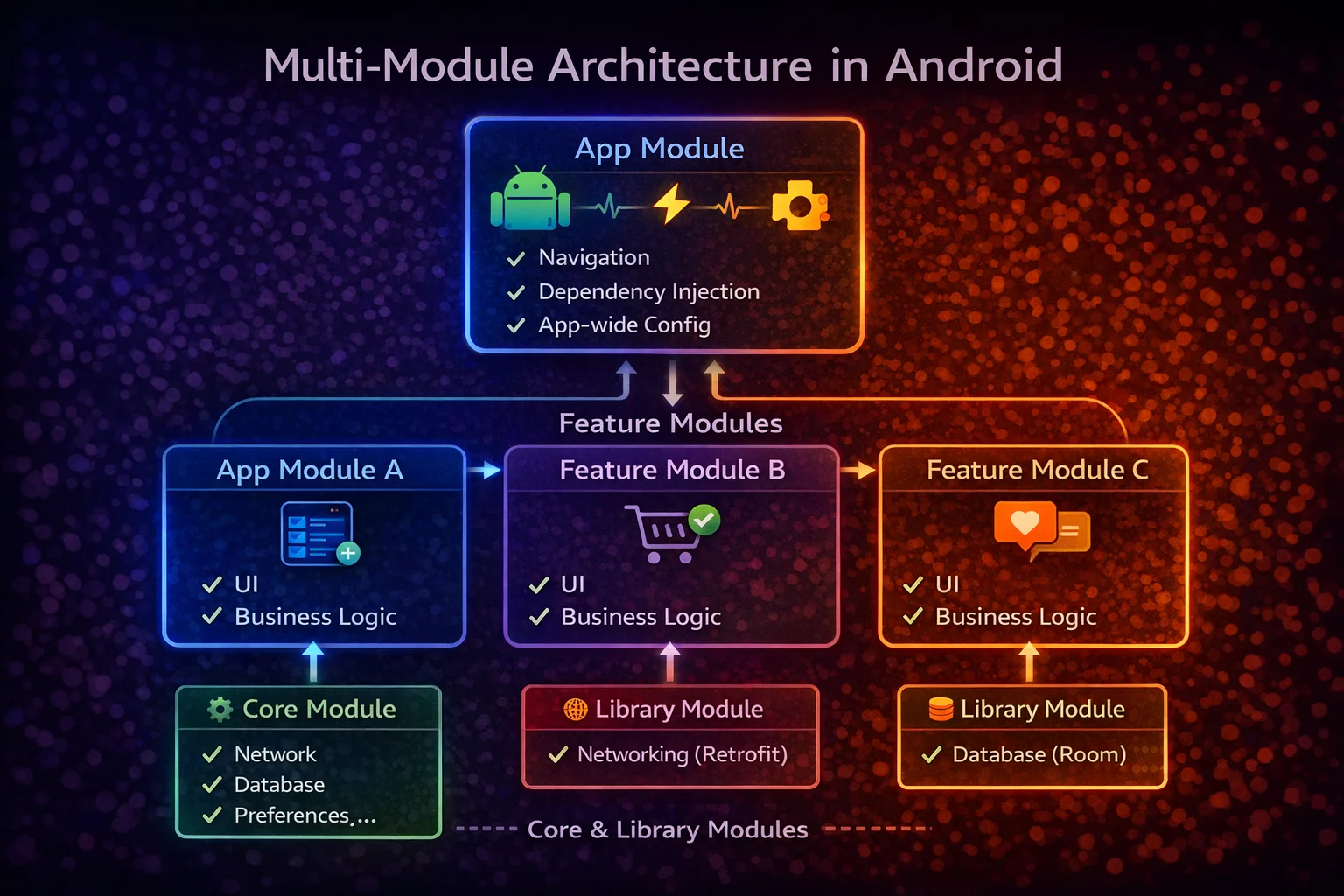
As your Android app grows, a single-module project becomes a bottleneck — slow builds, tangled dependencies, merge conflicts, and code that anyone can access from anywhere. Multi-module architecture splits your app into focused, independent modules with clear boundaries. The result: faster builds (only changed modules recompile), enforced dependency rules (modules can’t access what they don’t depend on), better team collaboration (teams own modules), and cleaner architecture. This guide covers how to structure modules, the dependency graph, Hilt wiring, and real production patterns.
Why Multi-Module?
// SINGLE MODULE — everything in :app
//
// :app
// ├── ArticleApi.kt
// ├── ArticleDao.kt
// ├── ArticleRepository.kt
// ├── ArticleViewModel.kt
// ├── ArticleScreen.kt
// ├── UserApi.kt
// ├── UserDao.kt
// ├── UserRepository.kt
// ├── UserViewModel.kt
// ├── UserScreen.kt
// ├── ... 500 more files
//
// Problems:
// ❌ SLOW BUILDS — change one file → entire app recompiles
// ❌ NO BOUNDARIES — UserScreen can import ArticleDao (shouldn't!)
// ❌ MERGE CONFLICTS — everyone edits the same module
// ❌ HARD TO TEST — can't test features in isolation
// ❌ TANGLED DEPENDENCIES — everything depends on everything

// MULTI-MODULE — focused, independent modules
//
// :app                    → application entry point
// :feature:articles       → article list and detail screens
// :feature:profile        → user profile screens
// :feature:settings       → settings screens
// :core:data              → repositories, data sources
// :core:domain            → use cases, domain models
// :core:network           → Retrofit, API definitions
// :core:database          → Room, DAOs, entities
// :core:ui                → shared composables, theme
// :core:common            → utilities, extensions
//
// Benefits:
// ✅ FAST BUILDS — change :feature:articles → only that module recompiles
// ✅ ENFORCED BOUNDARIES — :feature:profile can't access :feature:articles internals
// ✅ PARALLEL BUILDS — independent modules compile simultaneously
// ✅ TEAM OWNERSHIP — each team owns their feature modules
// ✅ TESTABLE — test :core:data without any UI code
// ✅ REUSABLE — :core:network can be shared across apps
Module Types
App Module
// :app — the APPLICATION module (only ONE per project)
// This is the entry point — it assembles all other modules

// build.gradle.kts
plugins {
    alias(libs.plugins.android.application)
    // com.android.application is a GRADLE PLUGIN — builds an APK/AAB
    // Only ONE module uses this plugin — all others use android.library
    alias(libs.plugins.kotlin.android)
    alias(libs.plugins.hilt)
    alias(libs.plugins.ksp)
}

android {
    namespace = "com.example.myapp"
    defaultConfig {
        applicationId = "com.example.myapp"
        versionCode = 1
        versionName = "1.0.0"
    }
}

dependencies {
    // App module depends on feature modules (for navigation)
    implementation(project(":feature:articles"))
    implementation(project(":feature:profile"))
    implementation(project(":feature:settings"))

    // App module depends on core modules (for DI wiring)
    implementation(project(":core:data"))
    implementation(project(":core:network"))
    implementation(project(":core:database"))

    // Hilt
    implementation(libs.hilt.android)
    ksp(libs.hilt.compiler)
}

// App module contains:
// - Application class (@HiltAndroidApp)
// - MainActivity (single Activity, setContent with NavHost)
// - Hilt modules that wire everything together
// - Navigation graph (connects feature screens)
// - NO business logic, NO UI screens (those are in feature modules)
Feature Modules
// :feature:articles — ONE feature, complete (UI + ViewModel)
// Each feature module is self-contained for one user-facing feature

// build.gradle.kts
plugins {
    alias(libs.plugins.android.library)
    // com.android.library is a GRADLE PLUGIN — builds an AAR (not APK)
    // Feature modules are LIBRARIES — they're assembled by :app
    alias(libs.plugins.kotlin.android)
    alias(libs.plugins.kotlin.compose)
    alias(libs.plugins.hilt)
    alias(libs.plugins.ksp)
}

android {
    namespace = "com.example.feature.articles"
}

dependencies {
    // Feature depends on core modules (NOT on other features!)
    implementation(project(":core:domain"))
    implementation(project(":core:ui"))
    implementation(project(":core:common"))

    // Compose
    implementation(platform(libs.compose.bom))
    implementation(libs.compose.ui)
    implementation(libs.compose.material3)

    // Hilt
    implementation(libs.hilt.android)
    ksp(libs.hilt.compiler)
    implementation(libs.hilt.navigation.compose)

    // Navigation
    implementation(libs.navigation.compose)
}

// Feature module contains:
// - Screen composables (ArticleListScreen, ArticleDetailScreen)
// - ViewModels (ArticleListViewModel, ArticleDetailViewModel)
// - Navigation routes (@Serializable objects/data classes)
// - Feature-specific UI components
// - NO Repository, NO API, NO Database (those are in core modules)
Core Modules
// Core modules provide SHARED functionality used by multiple feature modules

// :core:domain — pure Kotlin, NO Android
plugins {
    kotlin("jvm")
    // kotlin("jvm") is a GRADLE PLUGIN — pure JVM Kotlin module
    // No Android dependencies — can be used in KMP, backend, tests
}
dependencies {
    implementation(libs.kotlinx.coroutines.core)
    // ONLY coroutines — no Android, no Retrofit, no Room
}
// Contains: domain models, repository interfaces, use cases

// :core:data — Android library, implements domain interfaces
plugins {
    alias(libs.plugins.android.library)
    alias(libs.plugins.hilt)
    alias(libs.plugins.ksp)
}
dependencies {
    implementation(project(":core:domain"))
    implementation(project(":core:network"))
    implementation(project(":core:database"))
    implementation(libs.hilt.android)
    ksp(libs.hilt.compiler)
}
// Contains: repository implementations, data source classes, mappers

// :core:network — Retrofit and API definitions
plugins {
    alias(libs.plugins.android.library)
    alias(libs.plugins.hilt)
    alias(libs.plugins.ksp)
}
dependencies {
    implementation(libs.retrofit)
    implementation(libs.retrofit.gson)
    implementation(libs.okhttp.logging)
    implementation(libs.hilt.android)
    ksp(libs.hilt.compiler)
}
// Contains: API interfaces, DTOs, Retrofit setup, NetworkModule

// :core:database — Room and local storage
plugins {
    alias(libs.plugins.android.library)
    alias(libs.plugins.hilt)
    alias(libs.plugins.ksp)
}
dependencies {
    implementation(project(":core:domain"))
    implementation(libs.room.runtime)
    implementation(libs.room.ktx)
    ksp(libs.room.compiler)
    implementation(libs.hilt.android)
    ksp(libs.hilt.compiler)
}
// Contains: Room database, DAOs, entities, DatabaseModule

// :core:ui — shared Compose components and theme
plugins {
    alias(libs.plugins.android.library)
    alias(libs.plugins.kotlin.compose)
}
dependencies {
    implementation(platform(libs.compose.bom))
    implementation(libs.compose.ui)
    implementation(libs.compose.material3)
    implementation(libs.coil.compose)
}
// Contains: theme (MyAppTheme, colors, typography), shared composables
// (LoadingScreen, ErrorScreen, ArticleCard), common modifiers

// :core:common — utilities shared across everything
plugins {
    kotlin("jvm")
}
dependencies {
    implementation(libs.kotlinx.coroutines.core)
}
// Contains: extension functions, date formatters, constants, Result wrapper
The Dependency Graph
// ═══ MODULE DEPENDENCY GRAPH ═════════════════════════════════════════
//
//                          :app
//                     ╱     │      ╲
//                   ╱       │        ╲
//          :feature:     :feature:    :feature:
//          articles      profile      settings
//              │  ╲       │  ╲        │
//              │    ╲     │    ╲      │
//          :core:ui  :core:domain  :core:common
//                     │       │
//                  :core:data
//                  ╱         ╲
//          :core:network  :core:database
//
//
// RULES:
// 1. :app depends on ALL feature modules and core modules
// 2. :feature modules depend on :core modules ONLY (never on other features)
// 3. :core:data depends on :core:domain (implements interfaces)
// 4. :core:domain depends on NOTHING (pure Kotlin)
// 5. :core:network and :core:database are independent of each other
// 6. FEATURE → FEATURE dependency is FORBIDDEN (keeps features independent)

// Why no feature → feature dependencies?
// If :feature:articles depends on :feature:profile:
// - Articles can't compile without Profile
// - Circular dependencies become likely
// - Features can't be developed/tested independently
// - Can't remove a feature without breaking others
//
// Instead, features communicate through:
// - Navigation (navigate to another feature's screen via route)
// - Shared core modules (both use :core:domain models)
// - Event bus or shared ViewModel (rare, for specific cases)
Project Structure — File Layout
// my-app/
// ├── app/
// │   ├── build.gradle.kts
// │   └── src/main/java/com/example/myapp/
// │       ├── MyApplication.kt           (@HiltAndroidApp)
// │       ├── MainActivity.kt            (single Activity, NavHost)
// │       └── navigation/
// │           └── AppNavigation.kt       (connects all feature screens)
// │
// ├── feature/
// │   ├── articles/
// │   │   ├── build.gradle.kts
// │   │   └── src/main/java/com/example/feature/articles/
// │   │       ├── navigation/
// │   │       │   └── ArticleRoutes.kt   (@Serializable routes)
// │   │       ├── screen/
// │   │       │   ├── ArticleListScreen.kt
// │   │       │   └── ArticleDetailScreen.kt
// │   │       └── viewmodel/
// │   │           ├── ArticleListViewModel.kt
// │   │           └── ArticleDetailViewModel.kt
// │   ├── profile/
// │   │   ├── build.gradle.kts
// │   │   └── src/main/java/com/example/feature/profile/
// │   │       └── ...
// │   └── settings/
// │       └── ...
// │
// ├── core/
// │   ├── domain/
// │   │   ├── build.gradle.kts           (kotlin("jvm") — pure Kotlin)
// │   │   └── src/main/java/com/example/core/domain/
// │   │       ├── model/
// │   │       │   ├── Article.kt
// │   │       │   └── User.kt
// │   │       ├── repository/
// │   │       │   ├── ArticleRepository.kt   (interface)
// │   │       │   └── UserRepository.kt      (interface)
// │   │       └── usecase/
// │   │           ├── GetArticlesUseCase.kt
// │   │           └── ToggleBookmarkUseCase.kt
// │   ├── data/
// │   │   ├── build.gradle.kts
// │   │   └── src/main/java/com/example/core/data/
// │   │       ├── repository/
// │   │       │   └── ArticleRepositoryImpl.kt
// │   │       ├── mapper/
// │   │       │   └── ArticleMapper.kt
// │   │       └── di/
// │   │           └── RepositoryModule.kt    (@Binds)
// │   ├── network/
// │   │   ├── build.gradle.kts
// │   │   └── src/main/java/com/example/core/network/
// │   │       ├── api/
// │   │       │   └── ArticleApi.kt
// │   │       ├── dto/
// │   │       │   └── ArticleDto.kt
// │   │       ├── datasource/
// │   │       │   └── ArticleRemoteDataSource.kt
// │   │       └── di/
// │   │           └── NetworkModule.kt       (@Provides Retrofit)
// │   ├── database/
// │   │   ├── build.gradle.kts
// │   │   └── src/main/java/com/example/core/database/
// │   │       ├── dao/
// │   │       │   └── ArticleDao.kt
// │   │       ├── entity/
// │   │       │   └── ArticleEntity.kt
// │   │       ├── datasource/
// │   │       │   └── ArticleLocalDataSource.kt
// │   │       ├── AppDatabase.kt
// │   │       └── di/
// │   │           └── DatabaseModule.kt      (@Provides Room)
// │   ├── ui/
// │   │   ├── build.gradle.kts
// │   │   └── src/main/java/com/example/core/ui/
// │   │       ├── theme/
// │   │       │   ├── Theme.kt               (MyAppTheme)
// │   │       │   ├── Color.kt
// │   │       │   └── Typography.kt
// │   │       └── components/
// │   │           ├── LoadingScreen.kt
// │   │           ├── ErrorScreen.kt
// │   │           └── ArticleCard.kt         (shared composable)
// │   └── common/
// │       ├── build.gradle.kts               (kotlin("jvm"))
// │       └── src/main/java/com/example/core/common/
// │           ├── Result.kt
// │           └── Extensions.kt
// │
// ├── settings.gradle.kts                    (declares all modules)
// ├── build.gradle.kts                       (root — plugins)
// └── gradle/
//     └── libs.versions.toml                 (version catalog)
settings.gradle.kts — Declaring Modules
// settings.gradle.kts — the FIRST file Gradle reads
// Declares every module in the project

pluginManagement {
    repositories {
        google()
        mavenCentral()
        gradlePluginPortal()
    }
}

dependencyResolutionManagement {
    repositoriesMode.set(RepositoriesMode.FAIL_ON_PROJECT_REPOS)
    // FAIL_ON_PROJECT_REPOS is an ENUM VALUE on RepositoriesMode
    // Forces all repos to be declared here — modules can't add their own
    repositories {
        google()
        mavenCentral()
    }
}

rootProject.name = "MyApp"

// Declare every module
include(":app")

// Feature modules
include(":feature:articles")
include(":feature:profile")
include(":feature:settings")

// Core modules
include(":core:domain")
include(":core:data")
include(":core:network")
include(":core:database")
include(":core:ui")
include(":core:common")
Hilt in Multi-Module
// Hilt works across modules — each module provides its own bindings

// :app — Application class
@HiltAndroidApp
// @HiltAndroidApp is an ANNOTATION from dagger.hilt.android
// Triggers Hilt code generation and serves as the parent component
class MyApplication : Application()

// :app — MainActivity
@AndroidEntryPoint
// @AndroidEntryPoint is an ANNOTATION from dagger.hilt.android
// Enables Hilt injection in this Activity
class MainActivity : ComponentActivity() {
    override fun onCreate(savedInstanceState: Bundle?) {
        super.onCreate(savedInstanceState)
        setContent { MyAppTheme { AppNavigation() } }
    }
}

// :core:network — provides Retrofit
@Module
@InstallIn(SingletonComponent::class)
object NetworkModule {
    @Provides
    @Singleton
    fun provideRetrofit(): Retrofit { /* ... */ }

    @Provides
    @Singleton
    fun provideArticleApi(retrofit: Retrofit): ArticleApi {
        return retrofit.create(ArticleApi::class.java)
    }
}

// :core:database — provides Room
@Module
@InstallIn(SingletonComponent::class)
object DatabaseModule {
    @Provides
    @Singleton
    fun provideDatabase(@ApplicationContext context: Context): AppDatabase { /* ... */ }

    @Provides
    fun provideArticleDao(db: AppDatabase): ArticleDao = db.articleDao()
}

// :core:data — binds Repository interface to implementation
@Module
@InstallIn(SingletonComponent::class)
abstract class RepositoryModule {
    @Binds
    @Singleton
    abstract fun bindArticleRepository(impl: ArticleRepositoryImpl): ArticleRepository
    // @Binds is an ANNOTATION from Dagger — more efficient than @Provides for interfaces
}

// :feature:articles — ViewModel uses @HiltViewModel
@HiltViewModel
class ArticleListViewModel @Inject constructor(
    private val getArticlesUseCase: GetArticlesUseCase
) : ViewModel()

// HOW IT ALL CONNECTS:
// Hilt scans ALL modules for @Module classes at compile time
// :app includes all modules → Hilt sees all bindings → complete dependency graph
// ArticleListViewModel needs GetArticlesUseCase
//   → GetArticlesUseCase needs ArticleRepository (interface)
//     → RepositoryModule provides ArticleRepositoryImpl
//       → ArticleRepositoryImpl needs RemoteDataSource + LocalDataSource
//         → NetworkModule provides ArticleApi
//         → DatabaseModule provides ArticleDao
// Everything is wired automatically across module boundaries!
Navigation Across Modules
// Feature modules define their OWN routes
// :app connects them in the NavHost

// :feature:articles — defines its routes
// com/example/feature/articles/navigation/ArticleRoutes.kt
@Serializable object ArticleList
// @Serializable is an ANNOTATION from kotlinx.serialization
@Serializable data class ArticleDetail(val articleId: String)

// :feature:articles — provides a NavGraphBuilder extension
fun NavGraphBuilder.articlesNavGraph(
    onNavigateToDetail: (String) -> Unit,
    onNavigateToProfile: (String) -> Unit
) {
    // NavGraphBuilder is a CLASS from navigation-compose
    // Extension function pattern — each feature adds its own destinations
    composable<ArticleList> {
        val viewModel: ArticleListViewModel = hiltViewModel()
        ArticleListScreen(
            viewModel = viewModel,
            onArticleClick = onNavigateToDetail,
            onAuthorClick = onNavigateToProfile
        )
    }

    composable<ArticleDetail> {
        val viewModel: ArticleDetailViewModel = hiltViewModel()
        ArticleDetailScreen(viewModel = viewModel)
    }
}

// :feature:profile — defines its routes
@Serializable data class UserProfile(val userId: String)

fun NavGraphBuilder.profileNavGraph() {
    composable<UserProfile> {
        val viewModel: ProfileViewModel = hiltViewModel()
        ProfileScreen(viewModel = viewModel)
    }
}

// :app — connects everything in NavHost
@Composable
fun AppNavigation() {
    val navController = rememberNavController()

    NavHost(navController = navController, startDestination = ArticleList) {
        // Each feature registers its destinations
        articlesNavGraph(
            onNavigateToDetail = { id -> navController.navigate(ArticleDetail(id)) },
            onNavigateToProfile = { id -> navController.navigate(UserProfile(id)) }
        )
        profileNavGraph()
        settingsNavGraph()
    }
}

// Why this pattern?
// ✅ Feature modules don't know about NavController — they receive callbacks
// ✅ Feature modules don't know about OTHER features' routes
// ✅ :app is the only module that knows ALL routes — single wiring point
// ✅ Features can be added/removed by adding/removing the navGraph call
Build Performance
// Multi-module dramatically improves build times

// SINGLE MODULE:
// Change any file → entire module recompiles → 2-5 minutes
//
// MULTI-MODULE:
// Change ArticleListScreen.kt → only :feature:articles recompiles → 15-30 seconds
// :core:data, :core:network, :feature:profile → UNTOUCHED (cached)

// Gradle builds modules in PARALLEL when possible:
// :core:network and :core:database have no dependency on each other
// → Gradle compiles them SIMULTANEOUSLY

// Enable in gradle.properties:
org.gradle.parallel=true
org.gradle.caching=true
org.gradle.configuration-cache=true

// implementation vs api — affects recompilation
// implementation: dependency is PRIVATE — change doesn't cascade
// api: dependency is PUBLIC — change forces all consumers to recompile

// ❌ Using api everywhere — change in Retrofit forces :feature:articles to recompile
// :core:network
dependencies {
    api(libs.retrofit)   // ❌ Retrofit API exposed to all consumers
}

// ✅ Using implementation — change in Retrofit only recompiles :core:network
// :core:network
dependencies {
    implementation(libs.retrofit)   // ✅ private — consumers don't see Retrofit
}

// Rule: use implementation by default, api ONLY when consumers need the types
// api(libs.room.runtime) in :core:database is valid if consumers use @Entity types
Convention Plugins — Shared Build Logic
// Without convention plugins:
// Every module's build.gradle.kts repeats the same config
// compileSdk, minSdk, jvmTarget, Compose setup, testing config — copy-pasted!

// Convention plugins centralise shared build config

// build-logic/convention/build.gradle.kts
plugins {
    `kotlin-dsl`
    // kotlin-dsl is a GRADLE PLUGIN that lets you write plugins in Kotlin
}

dependencies {
    compileOnly(libs.android.gradlePlugin)
    compileOnly(libs.kotlin.gradlePlugin)
    compileOnly(libs.compose.gradlePlugin)
}

// build-logic/convention/src/main/kotlin/AndroidLibraryConventionPlugin.kt
class AndroidLibraryConventionPlugin : Plugin<Project> {
    // Plugin is an INTERFACE from Gradle
    override fun apply(target: Project) {
        with(target) {
            pluginManager.apply("com.android.library")
            pluginManager.apply("org.jetbrains.kotlin.android")

            extensions.configure<LibraryExtension> {
                compileSdk = 35
                defaultConfig {
                    minSdk = 26
                    testInstrumentationRunner = "androidx.test.runner.AndroidJUnitRunner"
                }
                compileOptions {
                    sourceCompatibility = JavaVersion.VERSION_17
                    targetCompatibility = JavaVersion.VERSION_17
                }
            }
        }
    }
}

// Register the plugin in build-logic/convention/build.gradle.kts:
gradlePlugin {
    plugins {
        register("androidLibrary") {
            id = "myapp.android.library"
            implementationClass = "AndroidLibraryConventionPlugin"
        }
    }
}

// Usage in any module — one line replaces 20+ lines of config:
// :feature:articles/build.gradle.kts
plugins {
    id("myapp.android.library")      // applies all shared Android config
    id("myapp.android.compose")      // applies Compose config
    id("myapp.android.hilt")         // applies Hilt config
}
// Clean, consistent, DRY — change config once, all modules update
When to Go Multi-Module
// ❌ DON'T go multi-module when:
// - Solo developer, small app (<10 screens)
// - Prototype or MVP — speed matters more than structure
// - Team is new to Gradle — multi-module adds build complexity
// - Build times are already fast (<30 seconds)

// ✅ DO go multi-module when:
// - Build times are slow (>2 minutes for incremental builds)
// - Multiple developers/teams working on the same codebase
// - You need enforced boundaries between features
// - You want to share core libraries across apps
// - App has 20+ screens or 100+ files
// - You're adopting Clean Architecture (Domain module = enforced purity)

// GRADUAL approach:
// 1. Start with single module (just :app)
// 2. Extract :core:domain when you want pure Kotlin business logic
// 3. Extract :core:data when Repository grows complex
// 4. Extract :core:ui when you have shared composables
// 5. Extract :feature:xxx when features become independent
// 6. Add convention plugins when module count exceeds 5-6
Common Mistakes to Avoid
Mistake 1: Feature modules depending on each other
// ❌ Circular or cross-feature dependency
// :feature:articles depends on :feature:profile
// Now articles can't compile without profile → tightly coupled

// ✅ Features are independent — communicate through navigation
// :feature:articles knows the ROUTE to profile, not the module
// onAuthorClick = { userId -> navController.navigate(UserProfile(userId)) }
// :app wires the navigation — features don't know about each other
Mistake 2: Using api instead of implementation
// ❌ api leaks transitive dependencies — slows builds, breaks encapsulation
// :core:data/build.gradle.kts
dependencies {
    api(project(":core:network"))     // ❌ everyone sees Retrofit types
    api(project(":core:database"))    // ❌ everyone sees Room types
}

// ✅ implementation keeps dependencies private
dependencies {
    implementation(project(":core:network"))     // ✅ only :core:data sees Retrofit
    implementation(project(":core:database"))    // ✅ only :core:data sees Room
}
Mistake 3: God module that everything depends on
// ❌ :core:common has Android, Compose, Retrofit, Room — everything depends on it
// Change anything in :core:common → ENTIRE project recompiles

// ✅ Split into focused modules
// :core:common — pure Kotlin utilities only (extensions, Result, constants)
// :core:ui — Compose components and theme
// :core:network — Retrofit only
// :core:database — Room only
// Each module is small and focused — changes cascade minimally
Mistake 4: Too many modules too early
// ❌ Starting a new project with 15 modules — overengineered
// Solo developer, 5 screens, but 15 Gradle modules
// Build files to maintain outnumber actual code files!

// ✅ Start simple, extract when needed
// Phase 1: :app (single module — just get it working)
// Phase 2: :app + :core:domain (extract pure Kotlin logic)
// Phase 3: :app + :core:domain + :core:data (extract data layer)
// Phase 4: :app + :feature:* + :core:* (full multi-module when justified)
Mistake 5: Forgetting to add module to settings.gradle.kts
// ❌ Created a new module folder but forgot to declare it
// Project compiles but the module is invisible — confusing!

// ✅ Always add to settings.gradle.kts when creating a module
include(":feature:newfeature")   // must be here for Gradle to see it

// Android Studio: File → New → New Module handles this automatically
// But if you create folders manually, don't forget settings.gradle.kts
Summary
- Multi-module architecture splits your app into focused, independent modules with clear boundaries
- :app module (uses
com.android.applicationplugin) assembles everything — only one per project - :feature:* modules (use
com.android.libraryplugin) contain UI + ViewModel for one feature — depend on :core only, never on other features - :core:domain (uses
kotlin("jvm")plugin) is pure Kotlin — domain models, interfaces, use cases, zero Android dependencies - :core:data implements domain interfaces; :core:network wraps Retrofit; :core:database wraps Room; :core:ui has shared theme and composables
- Dependency rule: features → core, never feature → feature; :core:domain depends on nothing
- Use
implementationby default,apionly when consumers need the exposed types — minimises recompilation cascade - Hilt works across modules — each module provides its own
@Module, Hilt assembles the complete graph in :app - Navigation: each feature provides a
NavGraphBuilderextension function; :app connects them in NavHost - Convention plugins centralise shared build config (compileSdk, Compose, Hilt) — one change updates all modules
- Multi-module improves build speed (parallel + incremental), enforces boundaries (compiler-level), and enables team ownership
- Start simple: single module → extract gradually as the project grows — don’t over-engineer on day one
Multi-module architecture is the natural evolution of a growing Android app. It doesn’t change your architecture pattern (MVVM or MVI still applies inside each module) — it enforces it at the build system level. Features can’t access each other’s internals because Gradle won’t let them. Domain stays pure because it’s a JVM module with no Android dependency. And builds are fast because only changed modules recompile. Start simple, extract when justified, and your codebase stays clean as it scales.
Happy coding!
Comments (0)