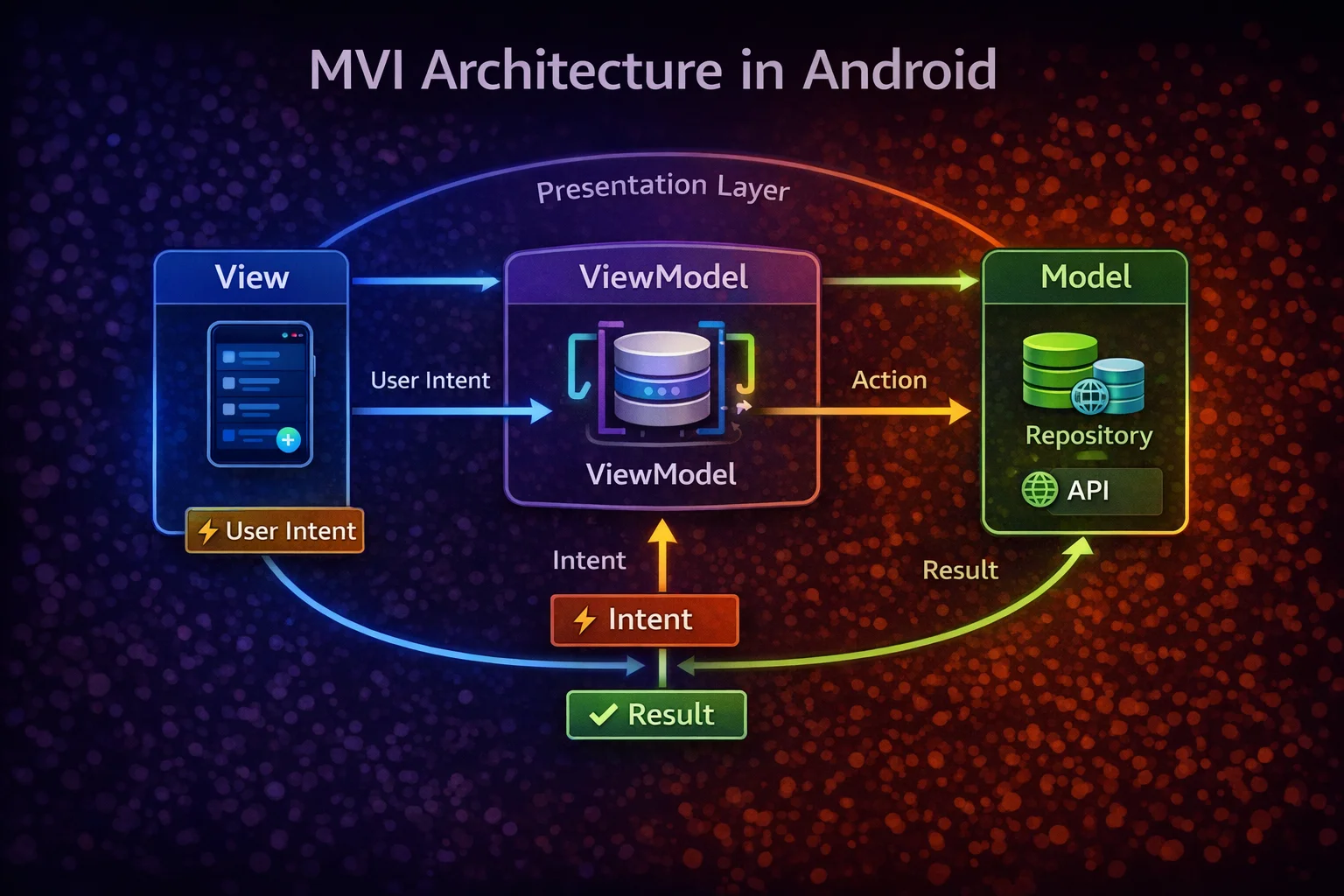
MVI (Model-View-Intent) is the strictest architecture pattern for Android UI. While MVVM gives you freedom to structure your ViewModel however you want, MVI enforces a unidirectional data flow with a single state object, explicit user intents, and a pure reducer function. The result is UI that’s predictable, testable, and impossible to get into inconsistent states. This guide covers what MVI is, how it differs from MVVM, a complete implementation, and when the extra structure is worth it.
What is MVI?
// MVI has THREE concepts:
//
// MODEL  — a SINGLE immutable state object representing the entire screen
//          data class ArticleScreenState(isLoading, articles, error, ...)
//
// VIEW   — renders the state and captures user actions
//          Composable or Fragment that observes state and sends intents
//
// INTENT — a user action or event that describes WHAT happened (not how to handle it)
//          UserIntent.RefreshClicked, UserIntent.ArticleTapped(id), UserIntent.SearchQueryChanged(q)

// The MVI cycle:
//
//  ┌──────────────────────────────────────────────────────────┐
//  │                                                          │
//  │   VIEW ────── Intent ──────→ VIEWMODEL                   │
//  │    │                          │                          │
//  │    │                     Reduces intent                  │
//  │    │                     + current state                 │
//  │    │                     → new state                     │
//  │    │                          │                          │
//  │    │                          ↓                          │
//  │    └────── State ────────── MODEL                        │
//  │           (single                                        │
//  │            StateFlow)                                    │
//  │                                                          │
//  └──────────────────────────────────────────────────────────┘
//
//  1. VIEW renders the current State
//  2. User does something → VIEW sends an Intent
//  3. VIEWMODEL receives Intent + current State → produces NEW State
//  4. New State flows back to VIEW → UI updates
//  5. Repeat
//
//  This is UNIDIRECTIONAL DATA FLOW — state goes one way, intents go the other
MVI vs MVVM — What’s Different?
// ┌──────────────────────────┬───────────────────────┬───────────────────────┐
// │                          │ MVVM                  │ MVI                   │
// ├──────────────────────────┼───────────────────────┼───────────────────────┤
// │ State                    │ Multiple StateFlows   │ ONE state object      │
// │                          │ (isLoading, articles, │ (single StateFlow     │
// │                          │  error — separate)    │  of sealed/data class)│
// │                          │                       │                       │
// │ User actions             │ Direct function calls │ Sealed Intent objects │
// │                          │ viewModel.refresh()   │ sendIntent(Refresh)   │
// │                          │                       │                       │
// │ State updates            │ Set individual fields │ Reduce: old state +   │
// │                          │ _isLoading.value=true │ intent → new state    │
// │                          │                       │                       │
// │ Impossible states        │ Possible              │ Impossible            │
// │                          │ (isLoading=true AND   │ (single state object  │
// │                          │  error="fail"?)       │  is always consistent)│
// │                          │                       │                       │
// │ Boilerplate              │ Less                  │ More (intents, reduce)│
// │ Testability              │ Good                  │ Great (pure reducer)  │
// │ Debugging                │ Track multiple flows  │ Track single state    │
// │ Complexity               │ Lower                 │ Higher                │
// │ Learning curve           │ Lower                 │ Higher                │
// └──────────────────────────┴───────────────────────┴───────────────────────┘

// Key insight: MVI trades BOILERPLATE for PREDICTABILITY
// Every state change is explicit, traceable, and testable
The Three Components
1. State — the single source of truth for the screen
// State is a DATA CLASS that holds EVERYTHING the screen needs to render
// ONE object, IMMUTABLE, always consistent

data class ArticleScreenState(
    val isLoading: Boolean = false,
    val articles: List<Article> = emptyList(),
    val searchQuery: String = "",
    val selectedCategory: Category? = null,
    val isRefreshing: Boolean = false,
    val error: String? = null
) {
    // Derived properties — computed from state, not stored separately
    val filteredArticles: List<Article>
        get() = articles.filter { article ->
            val matchesCategory = selectedCategory == null || article.category == selectedCategory
            val matchesQuery = searchQuery.isBlank() ||
                article.title.contains(searchQuery, ignoreCase = true)
            matchesCategory && matchesQuery
        }

    val isEmpty: Boolean
        get() = !isLoading && filteredArticles.isEmpty() && error == null

    val hasContent: Boolean
        get() = filteredArticles.isNotEmpty()
}

// Why ONE state object?
// ❌ MVVM with separate fields → possible inconsistent state:
//    isLoading = true, error = "Network fail", articles = [stale data]
//    Which one is the "real" state? All three say something different!
//
// ✅ MVI with single state → always consistent:
//    State(isLoading = false, error = "Network fail", articles = [cached])
//    Clear: we have an error, we're not loading, and we have cached data
//    The UI can decide to show error banner + cached articles
2. Intent — what happened (user actions and events)
// Intent is a SEALED INTERFACE (or sealed class) that represents
// ALL possible user actions and events for this screen

sealed interface ArticleIntent {
    // sealed interface — the compiler knows ALL possible intents
    // Makes when() exhaustive — you can't forget to handle one

    // User actions
    data object LoadArticles : ArticleIntent
    data object RefreshArticles : ArticleIntent
    data object RetryClicked : ArticleIntent
    data class SearchQueryChanged(val query: String) : ArticleIntent
    data class CategorySelected(val category: Category?) : ArticleIntent
    data class ArticleClicked(val articleId: String) : ArticleIntent
    data class BookmarkToggled(val articleId: String) : ArticleIntent
    data class ArticleSwiped(val articleId: String) : ArticleIntent

    // Internal events (from data layer)
    data class ArticlesLoaded(val articles: List<Article>) : ArticleIntent
    data class LoadError(val message: String) : ArticleIntent
    data object RefreshComplete : ArticleIntent
}

// Why sealed interface?
// ✅ Exhaustive when() — compiler warns if you forget one
// ✅ Type-safe — can't send a String or Int as an intent
// ✅ Self-documenting — all possible actions are listed in one place
// ✅ data class — carries data (query string, article ID)
// ✅ data object — no data needed (just the action itself)
3. Reducer — how state changes
// The REDUCER is a PURE FUNCTION that takes:
// - Current state
// - An intent (what happened)
// And returns:
// - New state
//
// old state + intent = new state
// It's PURE — no side effects, no network calls, no database queries
// Given the same input, it always returns the same output

// Reducer as a function:
fun reduce(currentState: ArticleScreenState, intent: ArticleIntent): ArticleScreenState {
    return when (intent) {
        is ArticleIntent.LoadArticles ->
            currentState.copy(isLoading = true, error = null)

        is ArticleIntent.ArticlesLoaded ->
            currentState.copy(isLoading = false, articles = intent.articles)

        is ArticleIntent.LoadError ->
            currentState.copy(isLoading = false, error = intent.message)

        is ArticleIntent.RefreshArticles ->
            currentState.copy(isRefreshing = true)

        is ArticleIntent.RefreshComplete ->
            currentState.copy(isRefreshing = false)

        is ArticleIntent.SearchQueryChanged ->
            currentState.copy(searchQuery = intent.query)

        is ArticleIntent.CategorySelected ->
            currentState.copy(selectedCategory = intent.category)

        is ArticleIntent.BookmarkToggled -> {
            val updated = currentState.articles.map { article ->
                if (article.id == intent.articleId)
                    article.copy(isBookmarked = !article.isBookmarked)
                else article
            }
            currentState.copy(articles = updated)
        }

        is ArticleIntent.ArticleClicked ->
            currentState   // no state change — side effect handled separately

        is ArticleIntent.ArticleSwiped -> {
            val filtered = currentState.articles.filter { it.id != intent.articleId }
            currentState.copy(articles = filtered)
        }

        is ArticleIntent.RetryClicked ->
            currentState.copy(isLoading = true, error = null)
    }
}

// Why is a pure reducer valuable?
// ✅ TESTABLE — just call reduce(state, intent) and assert the result
// ✅ PREDICTABLE — same input always produces same output
// ✅ DEBUGGABLE — log every (state, intent) pair to trace bugs
// ✅ TIME-TRAVEL — store history of states, replay for debugging
Complete MVI ViewModel
@HiltViewModel
// @HiltViewModel is an ANNOTATION from dagger.hilt.android.lifecycle
class ArticleViewModel @Inject constructor(
    private val repository: ArticleRepository,
    private val savedStateHandle: SavedStateHandle
    // SavedStateHandle is a CLASS — auto-provided by Hilt
) : ViewModel() {
    // ViewModel is an ABSTRACT CLASS from androidx.lifecycle

    // ═══ STATE ═══════════════════════════════════════════════════════

    private val _state = MutableStateFlow(ArticleScreenState())
    // MutableStateFlow constructor is a TOP-LEVEL FUNCTION
    val state: StateFlow<ArticleScreenState> = _state.asStateFlow()
    // asStateFlow() is an EXTENSION FUNCTION on MutableStateFlow → read-only

    // ═══ SIDE EFFECTS (one-time events) ══════════════════════════════

    private val _sideEffects = MutableSharedFlow<SideEffect>()
    // MutableSharedFlow constructor is a TOP-LEVEL FUNCTION
    val sideEffects: SharedFlow<SideEffect> = _sideEffects.asSharedFlow()

    sealed interface SideEffect {
        data class ShowSnackbar(val message: String) : SideEffect
        data class NavigateToDetail(val articleId: String) : SideEffect
    }

    // ═══ INTENT PROCESSING ═══════════════════════════════════════════

    init {
        processIntent(ArticleIntent.LoadArticles)
    }

    fun processIntent(intent: ArticleIntent) {
        // Step 1: REDUCE — update state (pure, synchronous)
        val newState = reduce(_state.value, intent)
        _state.value = newState

        // Step 2: HANDLE SIDE EFFECTS — async operations triggered by the intent
        handleSideEffects(intent)
    }

    private fun reduce(
        currentState: ArticleScreenState,
        intent: ArticleIntent
    ): ArticleScreenState {
        return when (intent) {
            is ArticleIntent.LoadArticles ->
                currentState.copy(isLoading = true, error = null)
            is ArticleIntent.ArticlesLoaded ->
                currentState.copy(isLoading = false, articles = intent.articles)
            is ArticleIntent.LoadError ->
                currentState.copy(isLoading = false, error = intent.message)
            is ArticleIntent.RefreshArticles ->
                currentState.copy(isRefreshing = true)
            is ArticleIntent.RefreshComplete ->
                currentState.copy(isRefreshing = false)
            is ArticleIntent.SearchQueryChanged ->
                currentState.copy(searchQuery = intent.query)
            is ArticleIntent.CategorySelected ->
                currentState.copy(selectedCategory = intent.category)
            is ArticleIntent.BookmarkToggled -> {
                val updated = currentState.articles.map { article ->
                    if (article.id == intent.articleId)
                        article.copy(isBookmarked = !article.isBookmarked)
                    else article
                }
                currentState.copy(articles = updated)
            }
            is ArticleIntent.ArticleClicked ->
                currentState   // side effect only
            is ArticleIntent.ArticleSwiped -> {
                val filtered = currentState.articles.filter { it.id != intent.articleId }
                currentState.copy(articles = filtered)
            }
            is ArticleIntent.RetryClicked ->
                currentState.copy(isLoading = true, error = null)
        }
    }

    private fun handleSideEffects(intent: ArticleIntent) {
        viewModelScope.launch {
            // viewModelScope is an EXTENSION PROPERTY on ViewModel
            // launch is an EXTENSION FUNCTION on CoroutineScope (builder)
            when (intent) {
                is ArticleIntent.LoadArticles,
                is ArticleIntent.RetryClicked -> {
                    try {
                        val articles = repository.getArticles()
                        processIntent(ArticleIntent.ArticlesLoaded(articles))
                    } catch (e: CancellationException) { throw e }
                    catch (e: Exception) {
                        processIntent(ArticleIntent.LoadError(e.message ?: "Unknown error"))
                    }
                }

                is ArticleIntent.RefreshArticles -> {
                    try {
                        repository.refreshArticles()
                        val articles = repository.getArticles()
                        processIntent(ArticleIntent.ArticlesLoaded(articles))
                    } catch (e: CancellationException) { throw e }
                    catch (e: Exception) {
                        _sideEffects.emit(SideEffect.ShowSnackbar("Refresh failed"))
                        // emit() is a SUSPEND FUNCTION on MutableSharedFlow
                    } finally {
                        processIntent(ArticleIntent.RefreshComplete)
                    }
                }

                is ArticleIntent.ArticleClicked -> {
                    _sideEffects.emit(SideEffect.NavigateToDetail(intent.articleId))
                }

                is ArticleIntent.BookmarkToggled -> {
                    try {
                        repository.toggleBookmark(intent.articleId)
                    } catch (e: CancellationException) { throw e }
                    catch (e: Exception) {
                        _sideEffects.emit(SideEffect.ShowSnackbar("Bookmark failed"))
                    }
                }

                is ArticleIntent.ArticleSwiped -> {
                    try {
                        repository.deleteArticle(intent.articleId)
                    } catch (e: CancellationException) { throw e }
                    catch (e: Exception) {
                        _sideEffects.emit(SideEffect.ShowSnackbar("Delete failed"))
                        // Re-load to restore the article
                        processIntent(ArticleIntent.LoadArticles)
                    }
                }

                // These intents only change state — no side effects
                is ArticleIntent.SearchQueryChanged,
                is ArticleIntent.CategorySelected,
                is ArticleIntent.ArticlesLoaded,
                is ArticleIntent.LoadError,
                is ArticleIntent.RefreshComplete -> { /* state already updated in reduce */ }
            }
        }
    }
}
MVI View — Compose
@Composable
fun ArticleScreen(
    viewModel: ArticleViewModel = hiltViewModel(),
    // hiltViewModel() is a COMPOSABLE FUNCTION from hilt-navigation-compose
    onNavigateToDetail: (String) -> Unit
) {
    val state by viewModel.state.collectAsStateWithLifecycle()
    // collectAsStateWithLifecycle() is an EXTENSION FUNCTION on StateFlow

    val snackbarHostState = remember { SnackbarHostState() }

    // Handle side effects
    LaunchedEffect(Unit) {
        // LaunchedEffect is a COMPOSABLE FUNCTION for side effects
        viewModel.sideEffects.collect { effect ->
            when (effect) {
                is ArticleViewModel.SideEffect.ShowSnackbar ->
                    snackbarHostState.showSnackbar(effect.message)
                is ArticleViewModel.SideEffect.NavigateToDetail ->
                    onNavigateToDetail(effect.articleId)
            }
        }
    }

    Scaffold(snackbarHost = { SnackbarHost(snackbarHostState) }) { padding ->
        ArticleScreenContent(
            state = state,
            // Pass the ENTIRE state object — View renders it
            onIntent = viewModel::processIntent,
            // Pass ONE function for ALL intents
            // View doesn't call viewModel.refresh(), viewModel.search(), etc.
            // View sends INTENTS — ViewModel decides what to do
            modifier = Modifier.padding(padding)
        )
    }
}

@Composable
private fun ArticleScreenContent(
    state: ArticleScreenState,
    onIntent: (ArticleIntent) -> Unit,
    // Single callback for ALL user actions — clean and uniform
    modifier: Modifier = Modifier
) {
    Column(modifier = modifier.fillMaxSize()) {
        // Search bar
        OutlinedTextField(
            value = state.searchQuery,
            onValueChange = { onIntent(ArticleIntent.SearchQueryChanged(it)) },
            // User types → Intent sent → reduce updates searchQuery → UI updates
            label = { Text("Search") },
            modifier = Modifier.fillMaxWidth().padding(16.dp)
        )

        // Category chips
        LazyRow(
            contentPadding = PaddingValues(horizontal = 16.dp),
            horizontalArrangement = Arrangement.spacedBy(8.dp)
        ) {
            item {
                FilterChip(
                    selected = state.selectedCategory == null,
                    onClick = { onIntent(ArticleIntent.CategorySelected(null)) },
                    label = { Text("All") }
                )
            }
            items(Category.entries.toList()) { category ->
                FilterChip(
                    selected = state.selectedCategory == category,
                    onClick = { onIntent(ArticleIntent.CategorySelected(category)) },
                    label = { Text(category.name) }
                )
            }
        }

        // Content
        when {
            state.isLoading -> {
                CircularProgressIndicator(
                    modifier = Modifier.fillMaxSize().wrapContentSize()
                )
            }
            state.error != null -> {
                ErrorContent(
                    message = state.error,
                    onRetry = { onIntent(ArticleIntent.RetryClicked) }
                )
            }
            state.isEmpty -> {
                EmptyContent()
            }
            state.hasContent -> {
                SwipeRefresh(
                    state = rememberSwipeRefreshState(state.isRefreshing),
                    onRefresh = { onIntent(ArticleIntent.RefreshArticles) }
                ) {
                    LazyColumn(
                        contentPadding = PaddingValues(16.dp),
                        verticalArrangement = Arrangement.spacedBy(8.dp)
                    ) {
                        items(state.filteredArticles, key = { it.id }) { article ->
                            ArticleCard(
                                article = article,
                                onClick = { onIntent(ArticleIntent.ArticleClicked(article.id)) },
                                onBookmark = { onIntent(ArticleIntent.BookmarkToggled(article.id)) }
                            )
                        }
                    }
                }
            }
        }
    }
}
Testing MVI — The Big Payoff
// The REDUCER is a pure function — easiest thing to test in all of programming

class ArticleReducerTest {

    @Test
    fun `LoadArticles sets loading and clears error`() {
        val currentState = ArticleScreenState(isLoading = false, error = "old error")
        val intent = ArticleIntent.LoadArticles

        val newState = reduce(currentState, intent)

        assertTrue(newState.isLoading)
        assertNull(newState.error)
    }

    @Test
    fun `ArticlesLoaded sets articles and stops loading`() {
        val currentState = ArticleScreenState(isLoading = true)
        val articles = listOf(Article(id = "1", title = "Test"))
        val intent = ArticleIntent.ArticlesLoaded(articles)

        val newState = reduce(currentState, intent)

        assertFalse(newState.isLoading)
        assertEquals(1, newState.articles.size)
        assertEquals("Test", newState.articles[0].title)
    }

    @Test
    fun `SearchQueryChanged updates query`() {
        val currentState = ArticleScreenState()
        val intent = ArticleIntent.SearchQueryChanged("kotlin")

        val newState = reduce(currentState, intent)

        assertEquals("kotlin", newState.searchQuery)
    }

    @Test
    fun `BookmarkToggled flips bookmark state`() {
        val article = Article(id = "1", title = "Test", isBookmarked = false)
        val currentState = ArticleScreenState(articles = listOf(article))
        val intent = ArticleIntent.BookmarkToggled("1")

        val newState = reduce(currentState, intent)

        assertTrue(newState.articles[0].isBookmarked)
    }

    @Test
    fun `CategorySelected filters articles via derived property`() {
        val articles = listOf(
            Article(id = "1", title = "A", category = Category.TECHNOLOGY),
            Article(id = "2", title = "B", category = Category.SCIENCE)
        )
        val state = ArticleScreenState(
            articles = articles,
            selectedCategory = Category.TECHNOLOGY
        )

        assertEquals(1, state.filteredArticles.size)
        assertEquals("A", state.filteredArticles[0].title)
    }
}

// Testing is TRIVIAL because:
// - reduce() is a pure function — no mocking, no coroutines, no Android
// - Input: state + intent → Output: new state
// - No need for runTest, TestDispatcher, or any test framework magic
// - You can write 50 reducer tests in minutes
MVI with Channel-Based Intent Processing
// Alternative: process intents through a Channel for sequential processing
// This ensures intents are handled one at a time — no race conditions

@HiltViewModel
class ArticleViewModel @Inject constructor(
    private val repository: ArticleRepository
) : ViewModel() {

    private val _state = MutableStateFlow(ArticleScreenState())
    val state: StateFlow<ArticleScreenState> = _state.asStateFlow()

    private val _sideEffects = MutableSharedFlow<SideEffect>()
    val sideEffects: SharedFlow<SideEffect> = _sideEffects.asSharedFlow()

    private val intentChannel = Channel<ArticleIntent>(Channel.UNLIMITED)
    // Channel is an INTERFACE from kotlinx.coroutines.channels
    // Channel() is a TOP-LEVEL FUNCTION that creates a Channel
    // UNLIMITED capacity — send never suspends

    init {
        // Process intents sequentially from the channel
        viewModelScope.launch {
            intentChannel.consumeEach { intent ->
                // consumeEach is an EXTENSION FUNCTION on ReceiveChannel
                // Iterates over channel values until it's closed
                val newState = reduce(_state.value, intent)
                _state.value = newState
                handleSideEffects(intent)
            }
        }

        processIntent(ArticleIntent.LoadArticles)
    }

    fun processIntent(intent: ArticleIntent) {
        intentChannel.trySend(intent)
        // trySend() is a FUNCTION on SendChannel — non-suspending
        // With UNLIMITED capacity, this always succeeds
    }

    // ... reduce() and handleSideEffects() same as before
}
When to Use MVI vs MVVM
// USE MVI when:
// ✅ Complex screens with many user interactions (e-commerce, social feeds)
// ✅ Screens where state consistency is critical (payment, forms, multi-step flows)
// ✅ Teams that value strict patterns and code reviews
// ✅ Apps that need comprehensive state logging/debugging
// ✅ Large teams — MVI's structure prevents "creative" state management

// USE MVVM when:
// ✅ Simple screens (settings, profile, about)
// ✅ Small teams or solo developers
// ✅ Prototypes and MVPs — less boilerplate, faster iteration
// ✅ Screens with minimal user interaction (display-only)
// ✅ When MVI's overhead isn't justified by the screen's complexity

// HYBRID approach (most common in production):
// Simple screens → MVVM (ViewModel with StateFlow, direct functions)
// Complex screens → MVI (single state, intents, reducer)
// You don't have to pick ONE for the entire app!
Common Mistakes to Avoid
Mistake 1: State object that’s too granular
// ❌ Separate state for every tiny thing — explosion of intents
sealed interface Intent {
    data class TitleChanged(val title: String) : Intent
    data class SubtitleChanged(val subtitle: String) : Intent
    data class IsLoadingChanged(val isLoading: Boolean) : Intent
    // 50 more intents for each field...
}
// This is MVVM with extra steps — defeats the purpose of MVI

// ✅ Group related state, use meaningful intents
sealed interface Intent {
    data class FormUpdated(val title: String, val subtitle: String) : Intent
    data object SubmitClicked : Intent
    data class ContentLoaded(val data: Content) : Intent
}
Mistake 2: Side effects in the reducer
// ❌ Reducer makes API calls — it's no longer pure!
fun reduce(state: State, intent: Intent): State {
    return when (intent) {
        is Intent.Load -> {
            val data = repository.getData()   // ❌ side effect in reducer!
            state.copy(data = data)
        }
    }
}

// ✅ Reducer is pure — side effects handled separately
fun reduce(state: State, intent: Intent): State {
    return when (intent) {
        is Intent.Load -> state.copy(isLoading = true)   // ✅ pure state change
        is Intent.DataLoaded -> state.copy(isLoading = false, data = intent.data)
    }
}

// handleSideEffects:
when (intent) {
    is Intent.Load -> {
        val data = repository.getData()
        processIntent(Intent.DataLoaded(data))   // feed result back as intent
    }
}
Mistake 3: Huge monolithic state class
// ❌ One state object for the entire app — unmaintainable
data class AppState(
    val articles: List<Article>,
    val user: User?,
    val settings: Settings,
    val notifications: List<Notification>,
    val cart: Cart,
    // ... 50 more fields
)

// ✅ One state per SCREEN — scoped and manageable
data class ArticleScreenState(val articles: List<Article>, ...)
data class ProfileScreenState(val user: User, ...)
data class SettingsScreenState(val settings: Settings, ...)
Mistake 4: Not separating state changes from side effects
// ❌ Mixing state and navigation in one place
fun processIntent(intent: Intent) {
    when (intent) {
        is Intent.ArticleClicked -> {
            _state.value = _state.value.copy(selectedId = intent.id)   // state
            navController.navigate("detail/${intent.id}")               // side effect
            // NavController in ViewModel? ❌ Bad!
        }
    }
}

// ✅ State changes in reducer, side effects via SharedFlow
fun reduce(state: State, intent: Intent): State = when (intent) {
    is Intent.ArticleClicked -> state   // no state change needed
    // ...
}

fun handleSideEffects(intent: Intent) {
    when (intent) {
        is Intent.ArticleClicked ->
            _sideEffects.emit(SideEffect.NavigateToDetail(intent.id))
    }
}
// View handles the navigation: onNavigateToDetail(id)
Summary
- MVI (Model-View-Intent) enforces unidirectional data flow: View → Intent → ViewModel → State → View
- Model: a single immutable data class holding the entire screen state — always consistent, no impossible states
- Intent: a sealed interface representing all possible user actions and events — exhaustive, type-safe
- Reducer: a pure function that takes (current state + intent) → new state — no side effects, trivially testable
- Side Effects (navigation, snackbar, API calls) are handled separately from state reduction via SharedFlow
- The View sends intents through one function (
onIntent) instead of multiple callbacks — uniform and clean - processIntent() is the single entry point: reduces state, then handles side effects
- Optional: use a Channel (interface from kotlinx.coroutines.channels) for sequential intent processing
- Testing is the big payoff: reducer is a pure function — test with simple assertions, no mocking, no coroutines
- MVI trades more boilerplate for more predictability — every state change is explicit and traceable
- Use MVI for complex screens (e-commerce, forms, multi-step); MVVM for simple screens (settings, profile)
- Hybrid approach is common: MVI for complex screens, MVVM for simple ones, in the same app
MVI gives you something MVVM doesn’t: absolute confidence about your screen’s state. Every state is a data class. Every change goes through a reducer. Every user action is a sealed intent. When something goes wrong, you can trace the exact sequence of intents that led to the bug — and write a test that reproduces it in one line. That predictability is worth the extra boilerplate for complex screens.
Happy coding!
Comments (0)