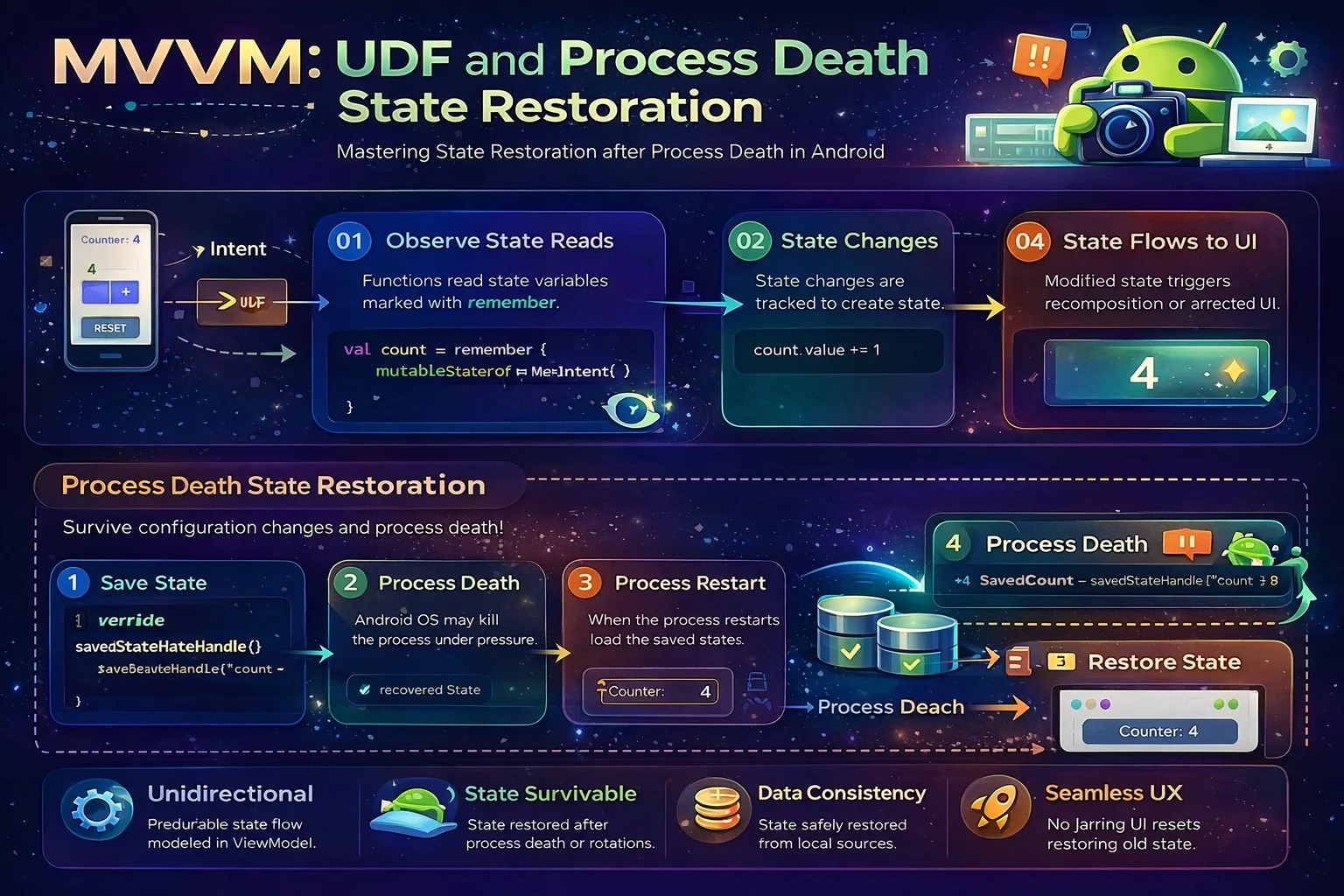
You’ve built your MVVM app — ViewModel holds state, UI observes it, everything works. Then your tester says: “I filled out the form, switched to another app, came back, and everything was gone.” That’s process death — Android killed your app to free memory, and your ViewModel (with all its state) was destroyed. This guide covers two things most MVVM tutorials skip: Unidirectional Data Flow (how state should flow in a well-structured app) and process death survival (how to keep user state alive when Android kills your process).
Part 1: Unidirectional Data Flow (UDF)
The mental model — why direction matters
// Think of state like WATER in a fountain:
//
// BIDIRECTIONAL (water goes everywhere — chaos):
//   UI can modify state directly
//   Repository can modify state directly
//   Multiple sources change the same state
//   You never know WHO changed WHAT or WHEN
//   Bug: "why is isLoading true when articles are already loaded?"
//
// UNIDIRECTIONAL (water flows one way — predictable):
//
//  ┌───────────────────────────────────────────────────┐
//  │                                                     │
//  │    State flows DOWN ↓                               │
//  │    ViewModel → UI                                   │
//  │    (StateFlow emits, UI observes)                   │
//  │                                                     │
//  │    Events flow UP ↑                                 │
//  │    UI → ViewModel                                   │
//  │    (click, type, swipe → function calls)            │
//  │                                                     │
//  └───────────────────────────────────────────────────┘
//
//  State: ViewModel → UI (ONE direction, ONE source of truth)
//  Events: UI → ViewModel (user actions go UP)
//  ViewModel processes events → produces NEW state → UI renders it
//
//  The UI NEVER modifies state directly — it only OBSERVES and SENDS EVENTS
//  The ViewModel is the SINGLE SOURCE OF TRUTH for screen state
UDF with a single state object
// The BEST way to implement UDF: ONE sealed state object per screen

// ❌ MULTIPLE separate state fields — can be INCONSISTENT
class ArticleViewModel : ViewModel() {
    val isLoading = MutableStateFlow(false)
    val articles = MutableStateFlow<List<Article>>(emptyList())
    val error = MutableStateFlow<String?>(null)
    // PROBLEM: isLoading=true AND error="fail" AND articles=[stale data]
    // Which one is the "real" state? All three say something different!
    // Easy to forget updating one field when changing another
}

// ✅ SINGLE state object — ALWAYS consistent
class ArticleViewModel : ViewModel() {
    private val _uiState = MutableStateFlow<ArticleUiState>(ArticleUiState.Loading)
    val uiState: StateFlow<ArticleUiState> = _uiState.asStateFlow()

    sealed interface ArticleUiState {
        data object Loading : ArticleUiState
        data class Success(
            val articles: List<Article>,
            val isRefreshing: Boolean = false
        ) : ArticleUiState
        data class Error(val message: String) : ArticleUiState
    }
    // At any moment, the screen is in EXACTLY ONE state
    // Loading? Then there's no error and no articles
    // Success? Then there's no error and isLoading is false
    // Error? Then there's no articles and isLoading is false
    // IMPOSSIBLE to be in two states at once!
}
The UDF cycle in practice
@HiltViewModel
class ArticleViewModel @Inject constructor(
    private val repository: ArticleRepository
) : ViewModel() {

    // ═══ STATE (flows DOWN to UI) ════════════════════════════════════
    private val _uiState = MutableStateFlow<ArticleUiState>(ArticleUiState.Loading)
    val uiState: StateFlow<ArticleUiState> = _uiState.asStateFlow()
    // Read-only — UI can observe but NOT modify

    // ═══ EVENTS (one-time actions, flow DOWN to UI) ══════════════════
    private val _events = MutableSharedFlow<UiEvent>()
    val events: SharedFlow<UiEvent> = _events.asSharedFlow()

    sealed interface UiEvent {
        data class ShowSnackbar(val message: String) : UiEvent
        data class NavigateTo(val route: String) : UiEvent
    }

    // ═══ USER ACTIONS (flow UP from UI) ══════════════════════════════
    // Each action is a function — UI calls these, ViewModel processes them
    fun loadArticles() {
        viewModelScope.launch {
            _uiState.value = ArticleUiState.Loading
            try {
                val articles = repository.getArticles()
                _uiState.value = ArticleUiState.Success(articles)
            } catch (e: CancellationException) { throw e }
            catch (e: Exception) {
                _uiState.value = ArticleUiState.Error(e.message ?: "Unknown error")
            }
        }
    }

    fun refresh() {
        viewModelScope.launch {
            _uiState.update { currentState ->
                if (currentState is ArticleUiState.Success)
                    currentState.copy(isRefreshing = true)
                else currentState
            }
            try {
                repository.refreshArticles()
                val articles = repository.getArticles()
                _uiState.value = ArticleUiState.Success(articles)
            } catch (e: CancellationException) { throw e }
            catch (e: Exception) {
                _events.emit(UiEvent.ShowSnackbar("Refresh failed"))
                _uiState.update { currentState ->
                    if (currentState is ArticleUiState.Success)
                        currentState.copy(isRefreshing = false)
                    else currentState
                }
            }
        }
    }

    fun onArticleClicked(articleId: String) {
        viewModelScope.launch {
            _events.emit(UiEvent.NavigateTo("detail/$articleId"))
        }
    }

    fun retry() {
        loadArticles()
    }

    init { loadArticles() }
}

// ═══ THE UDF CYCLE ═══════════════════════════════════════════════════
//
//  ① UI observes uiState (StateFlow)
//     val uiState by viewModel.uiState.collectAsStateWithLifecycle()
//
//  ② UI renders based on state
//     when (uiState) {
//         Loading → show spinner
//         Success → show articles
//         Error → show error + retry button
//     }
//
//  ③ User taps "Retry"
//     Button(onClick = { viewModel.retry() })
//
//  ④ ViewModel processes the event
//     fun retry() { loadArticles() }
//     _uiState.value = Loading → then Success or Error
//
//  ⑤ UI observes new state → renders again (back to step ②)
//
// State always flows: ViewModel → UI
// Events always flow: UI → ViewModel
// ONE direction. ONE source of truth. PREDICTABLE.
The UI side of UDF
@Composable
fun ArticleScreen(
    viewModel: ArticleViewModel = hiltViewModel(),
    onNavigate: (String) -> Unit
) {
    // OBSERVE state (flows DOWN)
    val uiState by viewModel.uiState.collectAsStateWithLifecycle()

    // HANDLE one-time events
    LaunchedEffect(Unit) {
        viewModel.events.collect { event ->
            when (event) {
                is ArticleViewModel.UiEvent.ShowSnackbar -> { /* show snackbar */ }
                is ArticleViewModel.UiEvent.NavigateTo -> onNavigate(event.route)
            }
        }
    }

    // RENDER based on state (UI is a FUNCTION of state)
    when (val state = uiState) {
        is ArticleUiState.Loading -> {
            LoadingScreen()
        }
        is ArticleUiState.Success -> {
            ArticleListContent(
                articles = state.articles,
                isRefreshing = state.isRefreshing,
                onRefresh = viewModel::refresh,              // event flows UP
                onArticleClick = viewModel::onArticleClicked // event flows UP
            )
        }
        is ArticleUiState.Error -> {
            ErrorScreen(
                message = state.message,
                onRetry = viewModel::retry   // event flows UP
            )
        }
    }
    // The UI:
    // ✅ OBSERVES state — never modifies it
    // ✅ SENDS events — via callback functions to ViewModel
    // ✅ Is a PURE FUNCTION of state — same state = same UI
    // ❌ Does NOT contain business logic (filtering, sorting, validation)
    // ❌ Does NOT call Repository or API directly
}
Part 2: Process Death — The Silent Killer
Understanding what survives what
// Android can KILL your app's process at ANY time when it's in the background
// When the user comes back, Android recreates your Activity FROM SCRATCH
// Your ViewModel? GONE. Your in-memory state? GONE.
//
// But the user expects: "I was filling out a form, I switched apps,
// I came back — my form should still be there!"
//
// ┌──────────────────────────┬──────────────┬─────────────┬──────────────┐
// │ Storage                  │ Config Change│ Process Death│ App Uninstall│
// │                          │ (rotation)   │ (system kill)│              │
// ├──────────────────────────┼──────────────┼─────────────┼──────────────┤
// │ Local variable           │ ❌ Lost       │ ❌ Lost      │ ❌ Lost       │
// │ remember { }             │ ❌ Lost       │ ❌ Lost      │ ❌ Lost       │
// │ ViewModel field          │ ✅ Survives   │ ❌ Lost      │ ❌ Lost       │
// │ rememberSaveable { }     │ ✅ Survives   │ ✅ Survives  │ ❌ Lost       │
// │ SavedStateHandle         │ ✅ Survives   │ ✅ Survives  │ ❌ Lost       │
// │ DataStore / SharedPrefs  │ ✅ Survives   │ ✅ Survives  │ ❌ Lost       │
// │ Room database            │ ✅ Survives   │ ✅ Survives  │ ❌ Lost       │
// └──────────────────────────┴──────────────┴─────────────┴──────────────┘
//
// KEY INSIGHT:
// ViewModel survives ROTATION but NOT process death
// SavedStateHandle survives BOTH rotation AND process death
// For data that MUST survive process death → SavedStateHandle or Room/DataStore

// HOW PROCESS DEATH WORKS:
// 1. User opens your app → Activity created → ViewModel created
// 2. User switches to another app → your app goes to background
// 3. Android needs memory → KILLS your app's process
//    → Activity DESTROYED, ViewModel DESTROYED, all in-memory state GONE
//    → BUT: Android saves the Activity's state to a Bundle (saved instance state)
//    → SavedStateHandle data is saved in this Bundle
// 4. User switches back to your app
//    → Android RECREATES the Activity with the saved Bundle
//    → ViewModel is RECREATED (new instance)
//    → SavedStateHandle is RESTORED from the Bundle
//    → rememberSaveable values are RESTORED from the Bundle
// 5. Your app looks like it was never killed (if you saved state properly)
//    → User's form data, scroll position, selected tab — all restored
When does process death actually happen?
// Process death is NOT rare — it happens when:
//
// 1. LOW MEMORY — system needs RAM for the foreground app
//    Common on: budget phones, phones with many background apps
//
// 2. BATTERY OPTIMIZATION — system kills background apps to save battery
//    Doze mode, App Standby, manufacturer-specific optimizations
//
// 3. DEVELOPER OPTIONS — "Don't keep activities" or "Background process limit"
//    These simulate process death for testing
//
// 4. SYSTEM UPDATE or OOM killer
//
// On a typical day, ~30-50% of your background sessions experience process death
// If you don't handle it, ~30-50% of users who switch away and come back
// see their state lost — terrible UX!

// HOW TO TEST process death:
// Method 1: Developer Options
//   Settings → Developer Options → "Don't keep activities" → ON
//   Every time you leave your app → Activity is destroyed
//   Come back → Activity recreated → tests SavedStateHandle/rememberSaveable
//   ⚠️ This destroys the Activity but not necessarily the ViewModel
//   For true process death, use Method 2

// Method 2: adb command (most accurate)
//   1. Open your app, fill out a form
//   2. Press Home (don't press Back!)
//   3. Run: adb shell am kill com.example.yourapp
//   4. Open your app from the recent apps list
//   5. Your app is RECREATED — check if state was restored

// Method 3: Android Studio
//   Run your app
//   Press Home
//   In Android Studio: click "Terminate Application" (stop button) in Logcat
//   Then resume your app from recent apps
SavedStateHandle — ViewModel State That Survives Process Death
// SavedStateHandle is a CLASS from androidx.lifecycle
// It's a key-value map that is AUTOMATICALLY saved to the Bundle
// and RESTORED when the process is recreated

// Hilt provides SavedStateHandle automatically to @HiltViewModel:
@HiltViewModel
class SearchViewModel @Inject constructor(
    private val repository: ArticleRepository,
    private val savedStateHandle: SavedStateHandle
    // SavedStateHandle is auto-provided by Hilt
    // Contains: navigation arguments + saved state
) : ViewModel() {

    // ═══ PATTERN 1: Simple get/set ══════════════════════════════════
    private val searchQuery: String
        get() = savedStateHandle.get<String>("query") ?: ""
        // get() is a FUNCTION on SavedStateHandle — reads by key
        // Returns null if key doesn't exist

    fun onQueryChanged(query: String) {
        savedStateHandle["query"] = query
        // [] set operator stores the value
        // This is AUTOMATICALLY saved to the Bundle
        // Process death → recreate → SavedStateHandle has "query" restored!
    }

    // ═══ PATTERN 2: getStateFlow — reactive + survives process death ═
    val query: StateFlow<String> = savedStateHandle.getStateFlow("query", "")
    // getStateFlow() is a FUNCTION on SavedStateHandle
    // Returns StateFlow<String> that:
    // 1. Has the current value (or default "")
    // 2. Emits when the value changes
    // 3. SURVIVES process death (backed by SavedStateHandle)
    // This is the BEST pattern for UI state that must survive

    fun onQueryChanged(query: String) {
        savedStateHandle["query"] = query
        // Updates the StateFlow AND saves to Bundle — one line!
    }

    // ═══ PATTERN 3: saveable MutableState (for Compose) ═════════════
    var selectedTab by savedStateHandle.saveable { mutableStateOf(0) }
    // saveable {} is an EXTENSION FUNCTION on SavedStateHandle
    // Creates a MutableState that is BACKED by SavedStateHandle
    // Read/write like a normal state variable
    // Survives process death automatically!

    // ═══ COMBINING with regular state ════════════════════════════════
    // Some state needs SavedStateHandle (user input, selections)
    // Some state is loaded from data (articles, user profile) — no need to save

    val query: StateFlow<String> = savedStateHandle.getStateFlow("query", "")
    // ↑ survives process death (user typed this — must keep it)

    val articles: StateFlow<List<Article>> = repository.getArticlesFlow()
        .stateIn(viewModelScope, SharingStarted.WhileSubscribed(5000), emptyList())
    // ↑ does NOT need SavedStateHandle — loaded from database (already persistent)
    // Process death → ViewModel recreated → articles re-loaded from Room
    // Room data survives process death naturally (it's on disk)
}
What to save vs what NOT to save
// SavedStateHandle uses a Bundle — same rules apply:
// MAX ~1 MB total per Activity (shared across all fragments/ViewModels)
// Exceeding this → TransactionTooLargeException → crash!

// ✅ SAVE in SavedStateHandle (small, user-generated, not loadable):
// - Search query text (String)
// - Selected tab index (Int)
// - Selected filter (String/Enum)
// - Scroll position (Int)
// - Form input (text fields, toggles)
// - Dialog open/closed state (Boolean)
// - Navigation arguments (automatically available)

// ❌ DON'T SAVE in SavedStateHandle (large, loadable from source):
// - List of articles (load from Room — it's on disk!)
// - User profile (load from API/database)
// - Images/bitmaps (way too large for Bundle)
// - Full API responses (too large, reload instead)
// - Complex objects with nested lists (use Room or DataStore)

// RULE OF THUMB:
// "Can I reload this from the database or API?"
//   YES → don't save, just reload
//   NO (user typed it, user selected it) → save in SavedStateHandle
Complete Process Death-Safe ViewModel
@HiltViewModel
class ArticleSearchViewModel @Inject constructor(
    private val repository: ArticleRepository,
    private val savedStateHandle: SavedStateHandle
) : ViewModel() {

    // ═══ STATE THAT SURVIVES PROCESS DEATH ═══════════════════════════

    // Search query — user typed this, MUST survive
    val searchQuery: StateFlow<String> = savedStateHandle.getStateFlow("query", "")

    // Selected category — user chose this, MUST survive
    val selectedCategory: StateFlow<String> = savedStateHandle.getStateFlow("category", "all")

    // Sort order — user preference, MUST survive
    val sortOrder: StateFlow<SortOrder> = savedStateHandle.getStateFlow("sort", SortOrder.NEWEST)

    // ═══ STATE LOADED FROM DATA (doesn't need SavedStateHandle) ══════

    // Articles — loaded from Room (persistent database)
    // Process death → ViewModel recreated → Flow re-collects → articles loaded from disk
    private val _searchResults = MutableStateFlow<SearchState>(SearchState.Initial)

    val searchState: StateFlow<SearchState> = combine(
        searchQuery,
        selectedCategory,
        sortOrder,
        _searchResults
    ) { query, category, sort, results ->
        // combine is a TOP-LEVEL FUNCTION from kotlinx.coroutines.flow
        // Emits when ANY source changes
        results   // for now, just pass through results
    }.stateIn(viewModelScope, SharingStarted.WhileSubscribed(5000), SearchState.Initial)

    // ═══ EVENTS ══════════════════════════════════════════════════════
    private val _events = MutableSharedFlow<UiEvent>()
    val events: SharedFlow<UiEvent> = _events.asSharedFlow()

    // ═══ USER ACTIONS ════════════════════════════════════════════════

    fun onQueryChanged(query: String) {
        savedStateHandle["query"] = query
        // Saves to SavedStateHandle AND updates the StateFlow
        performSearch()
    }

    fun onCategorySelected(category: String) {
        savedStateHandle["category"] = category
        performSearch()
    }

    fun onSortOrderChanged(order: SortOrder) {
        savedStateHandle["sort"] = order
        performSearch()
    }

    private var searchJob: Job? = null

    private fun performSearch() {
        searchJob?.cancel()
        searchJob = viewModelScope.launch {
            delay(300)   // debounce
            val query = searchQuery.value
            val category = selectedCategory.value

            if (query.length < 2 && category == "all") {
                _searchResults.value = SearchState.Initial
                return@launch
            }

            _searchResults.value = SearchState.Loading
            try {
                val articles = repository.searchArticles(query, category, sortOrder.value)
                _searchResults.value = if (articles.isEmpty()) SearchState.Empty
                    else SearchState.Success(articles)
            } catch (e: CancellationException) { throw e }
            catch (e: Exception) {
                _searchResults.value = SearchState.Error(e.message ?: "Search failed")
            }
        }
    }

    init {
        // On ViewModel creation (including AFTER process death):
        // savedStateHandle already has restored query/category/sort
        // If there was an active search → re-perform it
        if (searchQuery.value.length >= 2 || selectedCategory.value != "all") {
            performSearch()
        }
    }

    sealed interface SearchState {
        data object Initial : SearchState
        data object Loading : SearchState
        data object Empty : SearchState
        data class Success(val articles: List<Article>) : SearchState
        data class Error(val message: String) : SearchState
    }

    sealed interface UiEvent {
        data class ShowSnackbar(val message: String) : UiEvent
    }
}

// WHAT HAPPENS ON PROCESS DEATH:
//
// BEFORE death:
// User typed "kotlin" in search, selected "tech" category, sorted by "popular"
// Results showing 15 articles
//
// Process death → everything destroyed
//
// AFTER recreation:
// 1. Activity recreated with saved Bundle
// 2. ViewModel recreated → SavedStateHandle gets restored values:
//    query = "kotlin", category = "tech", sort = POPULAR
// 3. init {} runs → sees query.length >= 2 → calls performSearch()
// 4. Search runs with restored query/category/sort
// 5. Results loaded → UI shows articles
//
// User sees: search query "kotlin" still typed, category "tech" selected,
// articles loaded — as if nothing happened! ✅
rememberSaveable — Process Death Safety in Compose
// For state that lives in COMPOSABLES (not ViewModel), use rememberSaveable

@Composable
fun ArticleListScreen(viewModel: ArticleSearchViewModel = hiltViewModel()) {
    // ═══ ViewModel state (survives process death via SavedStateHandle) ═══
    val query by viewModel.searchQuery.collectAsStateWithLifecycle()
    val searchState by viewModel.searchState.collectAsStateWithLifecycle()

    // ═══ UI-only state (survives process death via rememberSaveable) ═══
    var isFilterSheetOpen by rememberSaveable { mutableStateOf(false) }
    // rememberSaveable saves to the Bundle automatically
    // Boolean, String, Int, Parcelable — all supported

    val listState = rememberLazyListState()
    // ⚠️ rememberLazyListState does NOT survive process death by default!
    // LazyListState is restored by Compose's own mechanism (if key is stable)

    // ═══ UI-only state that does NOT need to survive ═════════════════
    var isAnimating by remember { mutableStateOf(false) }
    // Animation state → doesn't matter if lost on process death
    // Use remember (not rememberSaveable) for transient UI state

    Column {
        SearchBar(
            query = query,
            onQueryChange = viewModel::onQueryChanged
        )

        when (val state = searchState) {
            SearchState.Loading -> CircularProgressIndicator()
            is SearchState.Success -> ArticleList(state.articles, listState)
            is SearchState.Error -> ErrorScreen(state.message)
            else -> { /* initial or empty */ }
        }
    }

    if (isFilterSheetOpen) {
        FilterBottomSheet(onDismiss = { isFilterSheetOpen = false })
        // If process death happens while sheet is open:
        // rememberSaveable restores isFilterSheetOpen = true
        // Sheet is shown again automatically!
    }
}
State Restoration Strategy — Decision Framework
// For each piece of state in your app, ask these questions:
//
// Q1: Does this need to survive CONFIGURATION CHANGE (rotation)?
// ├── NO → local variable or remember { }
// └── YES → continue to Q2
//
// Q2: Does this need to survive PROCESS DEATH?
// ├── NO → ViewModel field (MutableStateFlow)
// │        Examples: loading state, API responses, computed values
// │        (These are RE-LOADED when ViewModel is recreated)
// │
// └── YES → continue to Q3
//
// Q3: Is this USER-GENERATED content that can't be re-loaded?
// ├── YES → SavedStateHandle or rememberSaveable
// │        Examples: typed text, selected filter, scroll position,
// │                  dialog open state, unsaved form data
// │
// └── NO → Room/DataStore (persistent storage)
//          Examples: bookmarks, read articles, user settings
//          (Already on disk — survive everything except uninstall)
//
// SUMMARY:
// Transient animation/UI state     → remember { }
// Screen-level loaded data         → ViewModel StateFlow (re-load on recreate)
// User input/selection/UI position → SavedStateHandle / rememberSaveable
// Persistent data                  → Room / DataStore
Testing Process Death
// Unit test: verify ViewModel uses SavedStateHandle correctly

class ArticleSearchViewModelTest {

    @Test
    fun `query survives process death via SavedStateHandle`() = runTest {
        // SIMULATE: ViewModel with a restored SavedStateHandle
        val restoredHandle = SavedStateHandle(mapOf("query" to "kotlin"))
        // SavedStateHandle constructor takes a Map — simulates restored state
        val viewModel = ArticleSearchViewModel(
            repository = FakeArticleRepository(),
            savedStateHandle = restoredHandle
        )

        // VERIFY: query is restored
        assertEquals("kotlin", viewModel.searchQuery.value)
    }

    @Test
    fun `changing query updates SavedStateHandle`() = runTest {
        val handle = SavedStateHandle()
        val viewModel = ArticleSearchViewModel(
            repository = FakeArticleRepository(),
            savedStateHandle = handle
        )

        viewModel.onQueryChanged("android")

        // VERIFY: SavedStateHandle was updated
        assertEquals("android", handle.get<String>("query"))
        // If process death happens now, "android" will be restored
    }

    @Test
    fun `init re-searches if restored query exists`() = runTest {
        val restoredHandle = SavedStateHandle(mapOf(
            "query" to "compose",
            "category" to "tech"
        ))
        val fakeRepo = FakeArticleRepository()
        fakeRepo.searchResultsToReturn = listOf(testArticle)

        val viewModel = ArticleSearchViewModel(
            repository = fakeRepo,
            savedStateHandle = restoredHandle
        )

        // Wait for search to complete
        advanceUntilIdle()

        // VERIFY: search was performed with restored values
        val state = viewModel.searchState.value
        assertTrue(state is SearchState.Success)
        assertEquals(1, (state as SearchState.Success).articles.size)
    }
}

// Manual testing on device:
// 1. Open your search screen
// 2. Type "kotlin" and select "tech" category
// 3. Press Home
// 4. Run: adb shell am kill com.example.yourapp
// 5. Open your app from recent apps
// 6. CHECK: "kotlin" is still in the search box, "tech" is still selected
//    If yes → process death handled correctly ✅
//    If no → you forgot to use SavedStateHandle for that state ❌
Common Mistakes to Avoid
Mistake 1: Assuming ViewModel survives process death
// ❌ Storing user input only in ViewModel — lost on process death!
class FormViewModel : ViewModel() {
    var name = MutableStateFlow("")    // ❌ gone on process death!
    var email = MutableStateFlow("")   // ❌ gone on process death!
}

// ✅ Use SavedStateHandle for user input
class FormViewModel @Inject constructor(
    private val savedStateHandle: SavedStateHandle
) : ViewModel() {
    val name = savedStateHandle.getStateFlow("name", "")     // ✅ survives!
    val email = savedStateHandle.getStateFlow("email", "")   // ✅ survives!
    fun onNameChanged(name: String) { savedStateHandle["name"] = name }
    fun onEmailChanged(email: String) { savedStateHandle["email"] = email }
}
Mistake 2: Saving too much in SavedStateHandle
// ❌ Saving entire article list — too large for Bundle!
savedStateHandle["articles"] = articles   // might be 500 KB+!
// Bundle limit is ~1 MB for entire Activity → TransactionTooLargeException

// ✅ Save the QUERY, reload the RESULTS
savedStateHandle["query"] = "kotlin"   // few bytes — fine!
// On recreation: init {} re-performs the search with restored query
// Articles come from Room or API — no need to bundle them
Mistake 3: UI modifying state directly (breaking UDF)
// ❌ UI modifies ViewModel state directly — bidirectional, unpredictable
@Composable
fun Screen(viewModel: ArticleViewModel) {
    viewModel._uiState.value = ArticleUiState.Loading   // ❌ direct state change!
}

// ✅ UI sends EVENTS, ViewModel produces STATE
@Composable
fun Screen(viewModel: ArticleViewModel) {
    Button(onClick = { viewModel.retry() }) { Text("Retry") }
    // UI sends event (retry) → ViewModel processes → produces new state
}
Mistake 4: Not testing process death
// ❌ "It works on my phone" — you never tested process death
// 30-50% of background sessions experience process death on real devices
// Your app loses user state for those sessions — and you don't know it

// ✅ Test EVERY screen with "adb shell am kill"
// Enable "Don't keep activities" in Developer Options during development
// Write unit tests with pre-populated SavedStateHandle
// CI: test with process death simulation
Mistake 5: Using multiple state fields instead of sealed state
// ❌ Multiple fields — impossible states are possible
val isLoading = MutableStateFlow(true)
val error = MutableStateFlow("Network error")
val articles = MutableStateFlow(listOf(article1))
// isLoading=true AND error="Network error" AND articles=[data]??? ← WHAT STATE IS THIS?

// ✅ Sealed state — one state at a time, always consistent
sealed interface UiState {
    data object Loading : UiState             // loading, nothing else
    data class Success(val articles: List<Article>) : UiState  // data, not loading
    data class Error(val message: String) : UiState             // error, no data
}
Summary
- Unidirectional Data Flow (UDF): state flows DOWN (ViewModel → UI via StateFlow), events flow UP (UI → ViewModel via function calls)
- Use a single sealed interface for UI state — Loading, Success, Error are mutually exclusive, impossible states are impossible
- UI is a pure function of state — observes state, renders it, never modifies it directly
- UI sends events via ViewModel functions (not by modifying state) — ViewModel is the single state owner
- Process death kills your app’s process when in background — ViewModel and all in-memory state is destroyed
- ViewModel survives rotation but NOT process death; SavedStateHandle survives both
- SavedStateHandle (class from lifecycle) stores key-value data that’s saved to the Activity’s Bundle automatically
getStateFlow(key, default)(function on SavedStateHandle) returns a reactive StateFlow backed by saved statesavedStateHandle[key] = valuestores and auto-saves;savedStateHandle.get<T>(key)reads- rememberSaveable (composable function) does the same for Compose UI state — survives process death
- Save user input and selections in SavedStateHandle; reload data from Room/API on recreation — don’t save large data
- Bundle limit is ~1 MB per Activity — save only small values (strings, IDs, booleans), not lists or objects
- Test with
adb shell am killor “Don’t keep activities” in Developer Options - Write unit tests with pre-populated SavedStateHandle to verify restoration logic
- ~30-50% of background sessions experience process death — always handle it
UDF and process death handling are what separate a demo app from a production app. UDF makes your state predictable — one source of truth, one direction, one sealed state. Process death handling makes your app reliable — users fill out forms, switch apps, come back, and everything is still there. Save user input in SavedStateHandle, load data from persistent storage, test with adb kill, and your app works correctly in every real-world scenario.
Happy coding!
Comments (0)