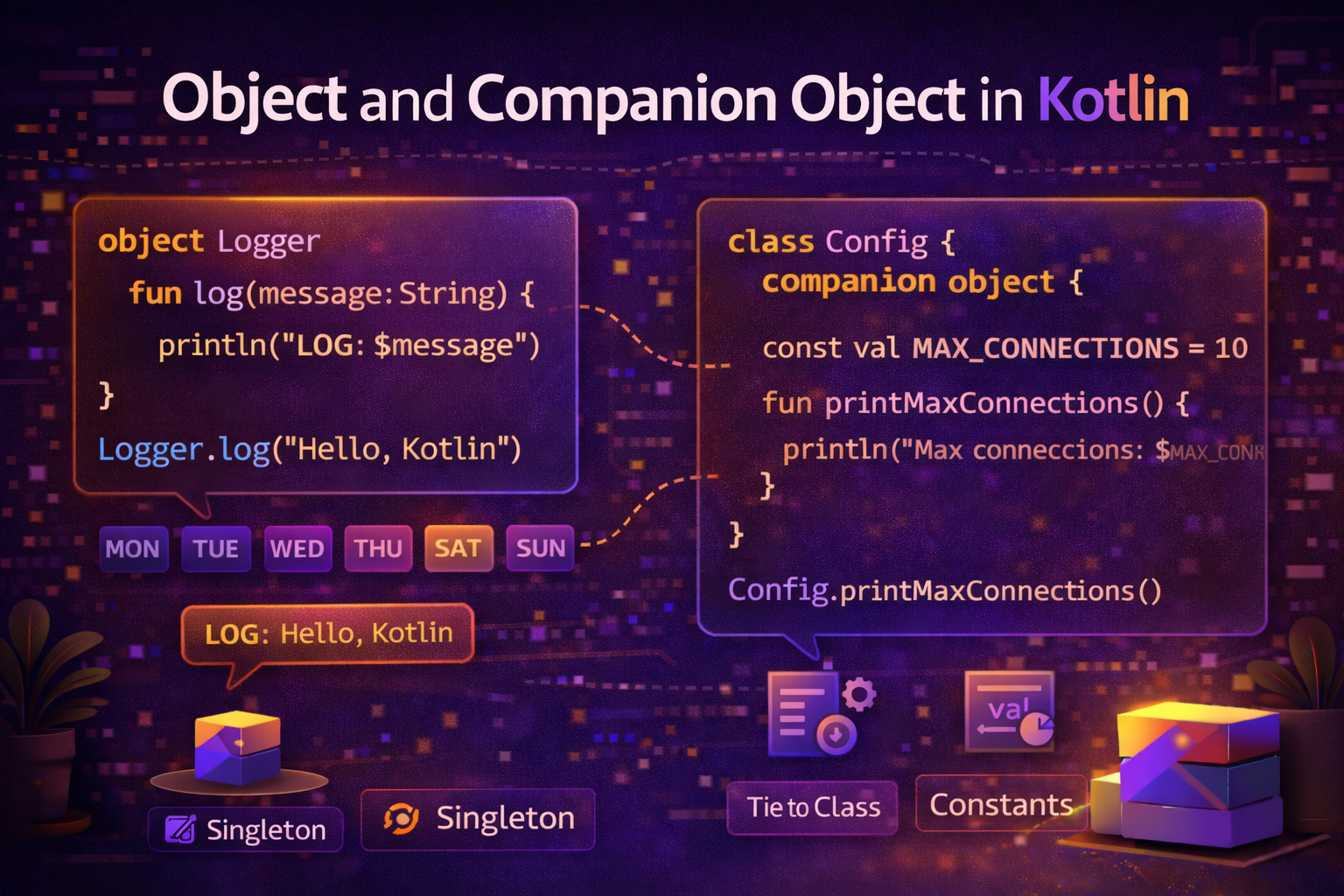
Two of the most commonly misunderstood features in Kotlin are object and companion object. They look similar but serve different purposes. This guide explains both clearly — what they are, when to use them, and how they appear in real Android code every day.
The Problem They Solve
In Java, you use the static keyword for class-level members — constants, factory methods, utility functions, and singletons. Kotlin has no static keyword. Instead, it gives you two cleaner mechanisms:
object— for singletons and anonymous objectscompanion object— for class-level members (Kotlin's replacement forstatic)
object Declaration — Singleton
The object keyword creates a singleton — a class that has exactly one instance, created automatically the first time it's accessed.
object AppConfig {
    const val BASE_URL = "https://api.androidnewworld.com"
    const val TIMEOUT_SECONDS = 30
    const val MAX_RETRY_COUNT = 3
    var isDebugMode = false

    fun getFullUrl(endpoint: String): String {
        return "$BASE_URL/$endpoint"
    }
}
You access it directly without creating an instance:
println(AppConfig.BASE_URL)                    // https://api.androidnewworld.com
println(AppConfig.getFullUrl("articles"))      // https://api.androidnewworld.com/articles
AppConfig.isDebugMode = true
Real-world analogy: Think of
objectlike a government — there is exactly one Government of India. You don't create a new one each time you need it. You just reference the one that exists. That's a singleton.
How Singleton Works Under the Hood
The Kotlin compiler turns an object declaration into a class with a private constructor and a public static INSTANCE field — the classic Java singleton pattern, but done automatically.
// What Kotlin generates (roughly)
public final class AppConfig {
    public static final AppConfig INSTANCE = new AppConfig();
    private AppConfig() { }
    // ... members
}
You get thread-safe, lazy initialization for free — no double-checked locking needed.
object — Common Use Cases
1. Application-Wide Configuration
object NetworkConfig {
    const val BASE_URL = "https://api.androidnewworld.com/v1/"
    const val CONNECT_TIMEOUT = 30L
    const val READ_TIMEOUT = 30L
    const val WRITE_TIMEOUT = 30L

    val defaultHeaders = mapOf(
        "Content-Type" to "application/json",
        "Accept" to "application/json"
    )
}
2. Utility / Helper Object
object DateUtils {
    private val formatter = SimpleDateFormat("MMM dd, yyyy", Locale.getDefault())

    fun formatDate(timestamp: Long): String {
        return formatter.format(Date(timestamp))
    }

    fun formatRelativeTime(timestamp: Long): String {
        val diff = System.currentTimeMillis() - timestamp
        val minutes = diff / 60_000
        val hours = minutes / 60
        val days = hours / 24

        return when {
            minutes < 1  -> "just now"
            minutes < 60 -> "${minutes}m ago"
            hours < 24   -> "${hours}h ago"
            days < 7     -> "${days}d ago"
            else         -> formatDate(timestamp)
        }
    }

    fun isToday(timestamp: Long): Boolean {
        val today = Calendar.getInstance()
        val date = Calendar.getInstance().apply { timeInMillis = timestamp }
        return today.get(Calendar.DAY_OF_YEAR) == date.get(Calendar.DAY_OF_YEAR) &&
               today.get(Calendar.YEAR) == date.get(Calendar.YEAR)
    }
}

// Usage
println(DateUtils.formatRelativeTime(someTimestamp))
println(DateUtils.isToday(System.currentTimeMillis()))  // true
3. Event Bus / App-Level State
object UserSession {
    var currentUser: User? = null
    var authToken: String? = null
    var isLoggedIn: Boolean = false

    fun login(user: User, token: String) {
        currentUser = user
        authToken = token
        isLoggedIn = true
    }

    fun logout() {
        currentUser = null
        authToken = null
        isLoggedIn = false
    }
}

// Anywhere in the app
if (UserSession.isLoggedIn) {
    showDashboard()
}
UserSession.login(user, "token_abc123")
4. Constants File
object Constants {
    // API
    const val BASE_URL = "https://api.androidnewworld.com/"
    const val API_KEY = "your_api_key_here"

    // SharedPreferences keys
    const val PREF_USER_ID = "pref_user_id"
    const val PREF_AUTH_TOKEN = "pref_auth_token"
    const val PREF_THEME = "pref_theme"

    // Bundle keys
    const val KEY_ARTICLE_ID = "article_id"
    const val KEY_USER_ID = "user_id"

    // Request codes
    const val REQUEST_CAMERA = 1001
    const val REQUEST_STORAGE = 1002
    const val REQUEST_LOCATION = 1003

    // Timeouts
    const val SPLASH_DELAY = 2000L
    const val DEBOUNCE_DELAY = 300L
}
object Extending Classes and Interfaces
An object can extend a class or implement interfaces:
interface Greeter {
    fun greet(name: String): String
}

object EnglishGreeter : Greeter {
    override fun greet(name: String) = "Hello, $name!"
}

object HindiGreeter : Greeter {
    override fun greet(name: String) = "Namaste, $name!"
}

fun greetUser(greeter: Greeter, name: String) {
    println(greeter.greet(name))
}

greetUser(EnglishGreeter, "Alice")   // Hello, Alice!
greetUser(HindiGreeter, "Bob")       // Namaste, Bob!
Anonymous Object — One-Time Object Without a Name
You can create an object on the fly without declaring a named class. This is commonly used for implementing listeners and callbacks:
// Implementing an interface inline
val clickListener = object : View.OnClickListener {
    override fun onClick(v: View?) {
        println("View clicked!")
    }
}
button.setOnClickListener(clickListener)

// Anonymous object with multiple interface implementations
val handler = object : TextWatcher, View.OnFocusChangeListener {
    override fun beforeTextChanged(s: CharSequence?, start: Int, count: Int, after: Int) {}
    override fun onTextChanged(s: CharSequence?, start: Int, before: Int, count: Int) {
        validateInput(s.toString())
    }
    override fun afterTextChanged(s: Editable?) {}
    override fun onFocusChange(v: View?, hasFocus: Boolean) {
        if (!hasFocus) validateInput(editText.text.toString())
    }
}
In practice, single-method interfaces are more commonly replaced with lambdas:
// Lambda is cleaner when interface has only one method
button.setOnClickListener { println("View clicked!") }
companion object — Class-Level Members
A companion object lives inside a class and provides members that belong to the class itself, not to instances. It's Kotlin's replacement for Java's static.
class User(val name: String, val email: String) {

    companion object {
        // Class-level constant
        const val MAX_NAME_LENGTH = 50

        // Factory function — creates User from different sources
        fun fromJson(json: String): User {
            // parse JSON
            return User("Parsed Name", "parsed@email.com")
        }

        fun guest(): User = User("Guest", "guest@anonymous.com")
    }
}

// Access companion members on the class name, not instance
println(User.MAX_NAME_LENGTH)          // 50
val user = User.fromJson("{...}")
val guest = User.guest()
companion object — Common Use Cases
1. Factory Functions
Factory functions create objects in ways the constructor alone can't express clearly:
class Article private constructor(
    val id: String,
    val title: String,
    val content: String,
    val type: String
) {
    companion object {
        fun createBlogPost(title: String, content: String): Article {
            return Article(
                id = UUID.randomUUID().toString(),
                title = title,
                content = content,
                type = "blog"
            )
        }

        fun createNewsItem(title: String, content: String): Article {
            return Article(
                id = UUID.randomUUID().toString(),
                title = title,
                content = content,
                type = "news"
            )
        }

        fun fromMap(map: Map<String, String>): Article {
            return Article(
                id = map["id"] ?: "",
                title = map["title"] ?: "",
                content = map["content"] ?: "",
                type = map["type"] ?: "blog"
            )
        }
    }
}

val post = Article.createBlogPost("Kotlin Guide", "Everything about Kotlin...")
val news = Article.createNewsItem("Android 16 Released", "Google announces...")
2. TAG Constant for Logging
One of the most common uses of companion object in Android:
class HomeFragment : Fragment() {

    companion object {
        private const val TAG = "HomeFragment"
    }

    override fun onViewCreated(view: View, savedInstanceState: Bundle?) {
        super.onViewCreated(view, savedInstanceState)
        Log.d(TAG, "onViewCreated called")
    }
}
3. Fragment/Activity Factory — newInstance Pattern
The recommended way to pass arguments to a Fragment:
class ArticleDetailFragment : Fragment() {

    companion object {
        private const val ARG_ARTICLE_ID = "article_id"
        private const val ARG_CATEGORY = "category"

        // Factory function — ensures required arguments are always provided
        fun newInstance(articleId: String, category: String): ArticleDetailFragment {
            return ArticleDetailFragment().apply {
                arguments = Bundle().apply {
                    putString(ARG_ARTICLE_ID, articleId)
                    putString(ARG_CATEGORY, category)
                }
            }
        }
    }

    private val articleId: String by lazy {
        requireArguments().getString(ARG_ARTICLE_ID) ?: error("Article ID required")
    }

    private val category: String by lazy {
        requireArguments().getString(ARG_CATEGORY) ?: "general"
    }

    override fun onViewCreated(view: View, savedInstanceState: Bundle?) {
        super.onViewCreated(view, savedInstanceState)
        viewModel.loadArticle(articleId)
    }
}

// Usage — from another Fragment or Activity
val fragment = ArticleDetailFragment.newInstance(
    articleId = "article_001",
    category = "kotlin"
)
4. Providing Dependencies / Injection
class UserRepository private constructor(
    private val apiService: ApiService,
    private val userDao: UserDao
) {
    companion object {
        @Volatile
        private var instance: UserRepository? = null

        fun getInstance(apiService: ApiService, userDao: UserDao): UserRepository {
            return instance ?: synchronized(this) {
                instance ?: UserRepository(apiService, userDao).also {
                    instance = it
                }
            }
        }
    }
}
Naming a companion object
By default, companion objects are accessed as Companion. You can give them a custom name:
class MyClass {
    companion object Factory {
        fun create(): MyClass = MyClass()
    }
}

// Access via class name (most common)
val obj = MyClass.create()

// Access via companion name (less common)
val obj = MyClass.Factory.create()
companion object Implementing an Interface
interface JsonParser<T> {
    fun fromJson(json: String): T
}

class User(val name: String, val email: String) {

    companion object : JsonParser<User> {
        override fun fromJson(json: String): User {
            // parse JSON
            return User("Parsed", "parsed@email.com")
        }
    }
}

// Can be passed where JsonParser<User> is expected
fun <T> parseData(json: String, parser: JsonParser<T>): T {
    return parser.fromJson(json)
}

val user = parseData("{...}", User)  // User's companion object is passed
object vs companion object — Key Differences
object |
companion object |
|
|---|---|---|
| Standalone | ✅ Declared on its own | ❌ Must be inside a class |
| Access | Via its own name | Via the enclosing class name |
| One per file | Can have many | One per class |
| Use for | Singletons, utils, constants | Class-level members, factories, TAG |
| Inherits from | Can extend class/interface | Can extend class/interface |
| Java equivalent | Singleton class | static members |
Common Mistakes to Avoid
Mistake 1: Using object when you need multiple instances
// ❌ Wrong — object is singleton, only one user can exist
object User {
    var name = ""
    var email = ""
}

// ✅ Use class for things you need multiple of
class User(val name: String, val email: String)
Mistake 2: Putting mutable shared state in object carelessly
// ❌ Dangerous in multi-threaded code
object Counter {
    var count = 0  // not thread-safe
}

// ✅ Use atomic operations or synchronization
object Counter {
    private val _count = AtomicInteger(0)
    val count: Int get() = _count.get()
    fun increment() = _count.incrementAndGet()
}
Mistake 3: Accessing companion members via instance
class User(val name: String) {
    companion object {
        fun guest() = User("Guest")
    }
}

val user = User("Alice")
val guest = user.guest()   // ❌ Works but misleading — looks like instance method
val guest = User.guest()   // ✅ Clear — this is a class-level operation
Mistake 4: Not using const for compile-time constants
companion object {
    val MAX_SIZE = 100       // ❌ val — runtime constant, slightly less efficient
    const val MAX_SIZE = 100 // ✅ const val — compile-time constant, inlined by compiler
}
Summary
objectcreates a singleton — one instance for the entire app, accessed by name- Use
objectfor app-wide config, utilities, constants, and event buses companion objectprovides class-level members — Kotlin's replacement for Javastatic- Use
companion objectfor factory functions,TAGconstants, andnewInstancepatterns - Anonymous
objectlets you implement interfaces inline without naming a class - Both
objectandcompanion objectcan extend classes and implement interfaces - Always access
companion objectmembers via the class name, not an instance - Use
const valin companion objects for compile-time constants - Avoid mutable shared state in
objectwithout thread safety consideration
These two features replace the static keyword entirely in Kotlin and do it in a much cleaner, more object-oriented way. You'll see them in practically every Android codebase.
Happy coding!
Comments (0)