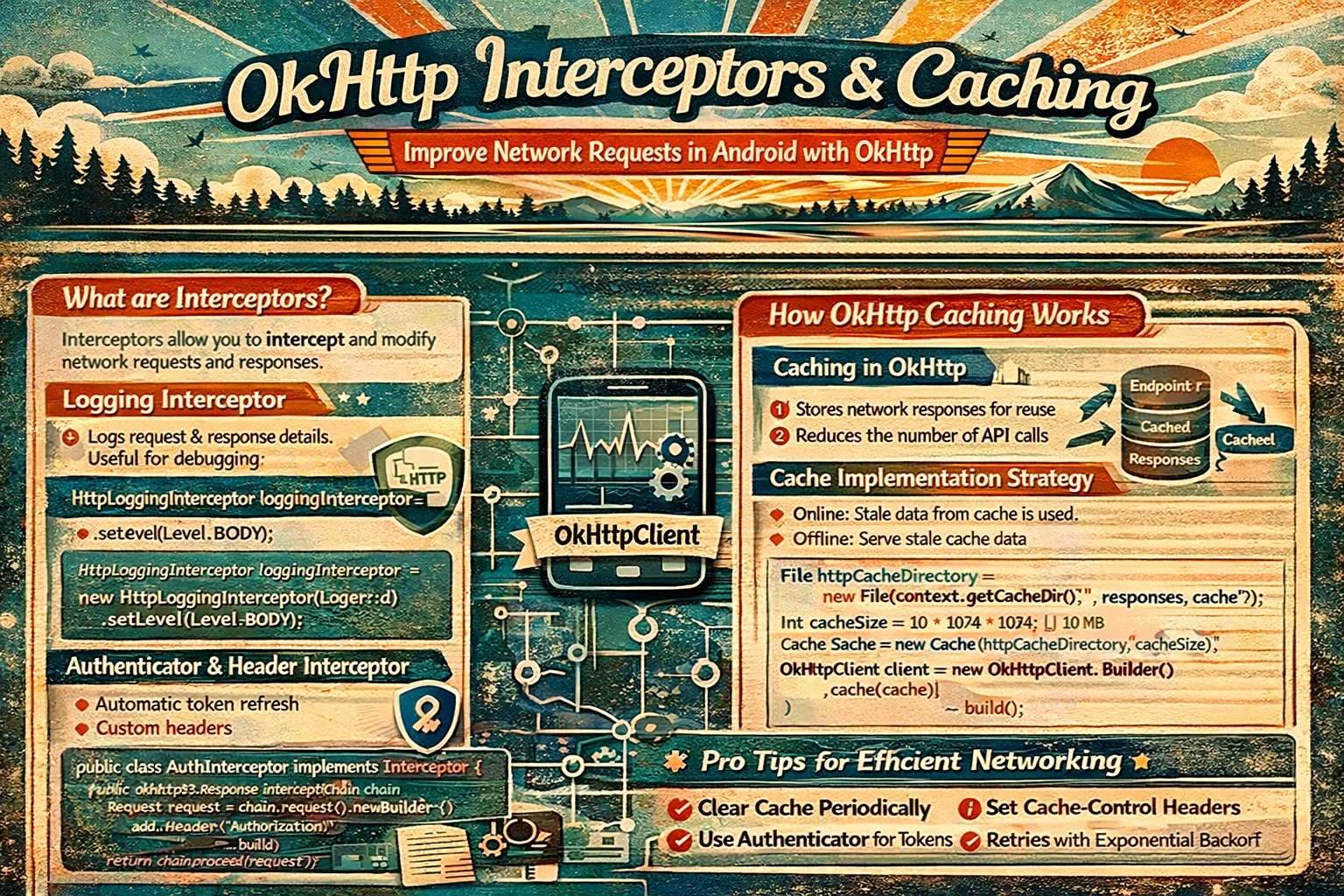
Every HTTP request your app makes passes through OkHttp — the engine underneath Retrofit. OkHttp has a powerful feature called interceptors: they can inspect, modify, or short-circuit every request and response. Want to add an auth token to every request? Interceptor. Log all network traffic? Interceptor. Cache responses so the app works offline? Interceptor. Retry failed requests? Interceptor. This guide covers how interceptors work, the difference between application and network interceptors, built-in caching, and the patterns production apps actually use.
The Mental Model — What Are Interceptors?
// Think of interceptors like AIRPORT SECURITY CHECKPOINTS:
//
// Your request is a PASSENGER going to the server (the plane):
//
//  Your Code
//    ↓
//  [Checkpoint 1: Add boarding pass]     ← Application Interceptor
//    ↓                                      (adds auth token)
//  [Checkpoint 2: Log the passenger]     ← Application Interceptor
//    ↓                                      (logging)
//  ─── airport security line ───
//  [Checkpoint 3: Check cache]           ← Network Interceptor
//    ↓                                      (return cached response?)
//  [Checkpoint 4: Compress luggage]      ← Network Interceptor
//    ↓                                      (gzip)
//  ✈️ FLIES TO SERVER
//    ↓
//  Server responds
//    ↓
//  [Checkpoint 4: Decompress]            ← same interceptors in REVERSE
//  [Checkpoint 3: Store in cache]
//  [Checkpoint 2: Log the response]
//  [Checkpoint 1: Check auth errors]
//    ↓
//  Your Code receives the response
//
// Each interceptor sees the request GOING OUT and the response COMING BACK
// It can modify either one, or even SKIP the server entirely (return cached)
How Interceptors Work
// An interceptor is a CLASS that implements the Interceptor INTERFACE from OkHttp
// It has ONE function: intercept(chain)

class MyInterceptor : Interceptor {
    // Interceptor is an INTERFACE from okhttp3

    override fun intercept(chain: Interceptor.Chain): Response {
        // chain is an Interceptor.Chain — an INTERFACE from OkHttp
        // It represents the CHAIN of interceptors
        // You MUST call chain.proceed() to pass the request to the next interceptor

        // Step 1: Get the original request
        val request = chain.request()
        // request() is a FUNCTION on Chain — returns the current Request
        // Request is a CLASS from OkHttp

        // Step 2: (Optional) Modify the request
        val modifiedRequest = request.newBuilder()
            // newBuilder() is a FUNCTION on Request — creates a mutable copy
            .addHeader("Custom-Header", "value")
            .build()

        // Step 3: Pass to next interceptor and get the response
        val response = chain.proceed(modifiedRequest)
        // proceed() is a FUNCTION on Chain
        // Sends the request to the next interceptor in the chain
        // Eventually reaches the server → returns the Response
        // Response is a CLASS from OkHttp

        // Step 4: (Optional) Inspect or modify the response
        val responseCode = response.code
        // code is a PROPERTY on Response — HTTP status code (200, 404, 500, etc.)

        // Step 5: Return the response
        return response
    }
}

// Register the interceptor:
OkHttpClient.Builder()
    .addInterceptor(MyInterceptor())
    // addInterceptor() is a FUNCTION on OkHttpClient.Builder
    .build()
Application vs Network Interceptors
OkHttp has two types of interceptors. The difference is where in the chain they sit:
// ═══ THE INTERCEPTOR CHAIN ═══════════════════════════════════════════
//
//  Your Code
//    │
//    ↓
//  ┌─────────────────────────────────┐
//  │  APPLICATION INTERCEPTORS       │  ← addInterceptor()
//  │  (your custom interceptors)     │
//  │  • See the original request     │
//  │  • Called ONCE per call          │
//  │  • Don't see redirects/retries  │
//  │  • Can short-circuit (no server)│
//  └─────────────────────────────────┘
//    │
//    ↓
//  ┌─────────────────────────────────┐
//  │  OkHttp CORE                    │
//  │  (handles redirects, retries,   │
//  │   connection pooling, cache)    │
//  └─────────────────────────────────┘
//    │
//    ↓
//  ┌─────────────────────────────────┐
//  │  NETWORK INTERCEPTORS           │  ← addNetworkInterceptor()
//  │  (close to the wire)            │
//  │  • See the ACTUAL request       │
//  │  • Called per server interaction │
//  │  • SEE redirects (called again) │
//  │  • Can access Connection info   │
//  └─────────────────────────────────┘
//    │
//    ↓
//  Server

// WHICH TO USE:
// Application interceptor (addInterceptor):
// ✅ Add auth tokens (should happen once, not per redirect)
// ✅ Logging (see original request, not retried requests)
// ✅ Retry logic (control retries yourself)
// ✅ Modify request headers or body
//
// Network interceptor (addNetworkInterceptor):
// ✅ Cache control headers
// ✅ See actual network requests (including redirects)
// ✅ Access connection details (TLS, IP address)
// ✅ Compress/decompress at the network level
// Concrete example — the difference matters:
// Server redirects: GET /old → 301 → GET /new → 200
// Application interceptor:
// Called ONCE for GET /old
// Sees final response (200 from /new)
// Does NOT see the redirect
// Network interceptor:
// Called TWICE:
// 1. GET /old → sees 301 redirect
// 2. GET /new → sees 200 response
OkHttpClient.Builder()
.addInterceptor(authInterceptor) // APPLICATION level
.addInterceptor(loggingInterceptor) // APPLICATION level
.addNetworkInterceptor(cacheInterceptor) // NETWORK level
.build()Production Interceptors
1. Auth token interceptor
// Adds the Authorization header to EVERY request automatically
// No need to pass token in every API call

class AuthInterceptor @Inject constructor(
    private val tokenManager: TokenManager
    // TokenManager is YOUR class that stores/retrieves auth tokens
) : Interceptor {

    override fun intercept(chain: Interceptor.Chain): Response {
        val token = tokenManager.accessToken

        val request = if (token != null) {
            chain.request().newBuilder()
                .header("Authorization", "Bearer $token")
                // header() is a FUNCTION on Request.Builder
                // REPLACES any existing Authorization header
                // (vs addHeader which adds a duplicate)
                .build()
        } else {
            chain.request()
            // No token → send request without auth header
        }

        return chain.proceed(request)
    }
}

// Register as APPLICATION interceptor — called once per request:
OkHttpClient.Builder()
    .addInterceptor(AuthInterceptor(tokenManager))
    .build()

// Now EVERY Retrofit call automatically includes the token:
// api.getArticles() → includes Authorization: Bearer eyJhbG...
// api.getProfile()  → includes Authorization: Bearer eyJhbG...
// No manual @Header("Authorization") needed on each endpoint!
2. Logging interceptor
// See every HTTP request and response in Logcat
// Essential for debugging, dangerous in production

val loggingInterceptor = HttpLoggingInterceptor().apply {
    // HttpLoggingInterceptor is a CLASS from okhttp3.logging
    // It logs HTTP traffic to Logcat

    level = if (BuildConfig.DEBUG) {
        HttpLoggingInterceptor.Level.BODY
        // BODY — logs EVERYTHING:
        // Request: method, URL, headers, body
        // Response: code, headers, body
        // ⚠️ Logs auth tokens and user data — NEVER use in production!
    } else {
        HttpLoggingInterceptor.Level.NONE
        // NONE — logs nothing in production
    }
}

// Logging levels explained:
// Level.NONE    → nothing (production)
// Level.BASIC   → request method, URL, response code, timing
//                 "→ GET https://api.example.com/articles"
//                 "← 200 OK (120ms, 4.5kb)"
// Level.HEADERS → BASIC + all headers
// Level.BODY    → HEADERS + request/response bodies (full JSON)

// Custom logger (send to analytics instead of Logcat):
val loggingInterceptor = HttpLoggingInterceptor { message ->
    // message is each line of the log output
    Timber.tag("OkHttp").d(message)
    // Or: analytics.logNetworkEvent(message)
}.apply {
    level = HttpLoggingInterceptor.Level.BASIC
}

OkHttpClient.Builder()
    .addInterceptor(loggingInterceptor)   // APPLICATION level
    .build()
3. Retry interceptor
// Automatically retry failed requests (network glitches, 5xx errors)

class RetryInterceptor(
    private val maxRetries: Int = 3,
    private val retryDelayMs: Long = 1000
) : Interceptor {

    override fun intercept(chain: Interceptor.Chain): Response {
        val request = chain.request()
        var response: Response? = null
        var lastException: IOException? = null

        for (attempt in 0..maxRetries) {
            try {
                // Close previous failed response to avoid connection leak
                response?.close()
                // close() is a FUNCTION on Response — releases resources

                response = chain.proceed(request)

                // If successful (2xx) or client error (4xx) → don't retry
                if (response.isSuccessful || response.code in 400..499) {
                    return response
                }
                // isSuccessful is a PROPERTY on Response → true if code is 200-299

                // Server error (5xx) → retry
                if (attempt < maxRetries) {
                    response.close()
                    Thread.sleep(retryDelayMs * (attempt + 1))
                    // Exponential-ish backoff: 1s, 2s, 3s
                }

            } catch (e: IOException) {
                // Network error → retry
                lastException = e
                if (attempt < maxRetries) {
                    Thread.sleep(retryDelayMs * (attempt + 1))
                }
            }
        }

        // All retries exhausted
        return response ?: throw lastException ?: IOException("Unknown error after $maxRetries retries")
    }
}

OkHttpClient.Builder()
    .addInterceptor(RetryInterceptor(maxRetries = 3))
    .build()

// ⚠️ Only retry IDEMPOTENT requests (GET, PUT, DELETE)
// DON'T retry POST requests blindly — could create duplicate data!
// For POST: the server should handle idempotency (idempotency keys)
4. Connectivity interceptor
// Check network connectivity BEFORE making a request
// Gives a clear error message instead of a timeout

class ConnectivityInterceptor @Inject constructor(
    @ApplicationContext private val context: Context
) : Interceptor {

    override fun intercept(chain: Interceptor.Chain): Response {
        if (!isNetworkAvailable()) {
            throw NoConnectivityException()
            // Custom exception → ViewModel catches this and shows "No internet" message
        }
        return chain.proceed(chain.request())
    }

    private fun isNetworkAvailable(): Boolean {
        val connectivityManager = context.getSystemService(Context.CONNECTIVITY_SERVICE) as ConnectivityManager
        // ConnectivityManager is a CLASS from android.net
        val network = connectivityManager.activeNetwork ?: return false
        // activeNetwork is a PROPERTY — the currently active network
        val capabilities = connectivityManager.getNetworkCapabilities(network) ?: return false
        // getNetworkCapabilities() is a FUNCTION — returns network info
        return capabilities.hasCapability(NetworkCapabilities.NET_CAPABILITY_INTERNET)
        // hasCapability() is a FUNCTION — checks if network has internet access
    }
}

class NoConnectivityException : IOException("No internet connection")
// Custom exception → easy to catch in Repository/ViewModel
HTTP Caching — Offline Support
OkHttp has a built-in HTTP cache that stores responses on disk. When properly configured, your app can show cached data when offline:
How HTTP caching works
// The HTTP caching flow:
//
// FIRST REQUEST (cache is empty):
//  App → OkHttp → Server
//  Server responds: 200 OK, Cache-Control: max-age=3600
//  OkHttp STORES the response in the cache
//
// SECOND REQUEST (within 1 hour):
//  App → OkHttp → checks cache → "still fresh!" → returns cached response
//  Server is NEVER contacted — instant response, zero network!
//
// THIRD REQUEST (after 1 hour):
//  App → OkHttp → checks cache → "stale!" → contacts server
//  OkHttp sends: If-None-Match: "etag-value" (conditional request)
//  Server responds: 304 Not Modified (data hasn't changed)
//  OkHttp returns cached response (saves bandwidth!)
//
// OFFLINE REQUEST:
//  App → OkHttp → no network → checks cache → returns cached (even if stale)
//  (Only works if cache headers allow it)

// Cache-Control headers (set by the SERVER):
// Cache-Control: max-age=3600        → cache for 1 hour
// Cache-Control: no-cache            → always validate with server
// Cache-Control: no-store            → never cache this response
// Cache-Control: public              → any cache can store this
// Cache-Control: private             → only browser/app cache (not CDN)
Setting up the cache
// Step 1: Create a Cache directory and size limit
val cacheDir = File(context.cacheDir, "http_cache")
// cacheDir is a PROPERTY on Context — app's private cache directory
val cacheSize = 50L * 1024 * 1024   // 50 MB
val cache = Cache(cacheDir, cacheSize)
// Cache is a CLASS from OkHttp
// Stores HTTP responses as files on disk

// Step 2: Add cache to OkHttpClient
OkHttpClient.Builder()
    .cache(cache)
    // cache() is a FUNCTION on OkHttpClient.Builder
    // Enables HTTP caching — OkHttp respects Cache-Control headers from server
    .build()

// That's the basic setup!
// If the server sends proper Cache-Control headers,
// OkHttp caches responses automatically
When the server doesn’t send cache headers
// PROBLEM: many APIs don't send Cache-Control headers
// Without headers, OkHttp doesn't cache anything
//
// SOLUTION: use a NETWORK interceptor to ADD cache headers to responses

class CacheInterceptor : Interceptor {
    override fun intercept(chain: Interceptor.Chain): Response {
        val response = chain.proceed(chain.request())

        val cacheControl = CacheControl.Builder()
            // CacheControl is a CLASS from OkHttp
            // CacheControl.Builder builds a cache-control directive
            .maxAge(1, TimeUnit.HOURS)
            // maxAge() is a FUNCTION on Builder — how long to cache
            .build()

        return response.newBuilder()
            // newBuilder() is a FUNCTION on Response — creates a mutable copy
            .header("Cache-Control", cacheControl.toString())
            // Replace the Cache-Control header with our own
            .removeHeader("Pragma")
            // Remove Pragma header (old HTTP 1.0 no-cache directive)
            .build()
    }
}

// Register as NETWORK interceptor (modifies the actual server response):
OkHttpClient.Builder()
    .cache(cache)
    .addNetworkInterceptor(CacheInterceptor())
    // addNetworkInterceptor() — runs at the network level
    // Important: NETWORK, not APPLICATION
    // Cache interceptors MUST be network interceptors to work correctly
    .build()
Force cache when offline
// When the device is offline, force OkHttp to use cached responses
// even if they're "stale" (past max-age)

class OfflineCacheInterceptor @Inject constructor(
    @ApplicationContext private val context: Context
) : Interceptor {

    override fun intercept(chain: Interceptor.Chain): Response {
        var request = chain.request()

        if (!isNetworkAvailable(context)) {
            // Force cache — accept stale responses up to 7 days old
            val cacheControl = CacheControl.Builder()
                .maxStale(7, TimeUnit.DAYS)
                // maxStale() is a FUNCTION on CacheControl.Builder
                // Accept cached responses that are up to 7 days old
                .build()

            request = request.newBuilder()
                .cacheControl(cacheControl)
                // cacheControl() is a FUNCTION on Request.Builder
                // Sets the Cache-Control header on the REQUEST
                .build()
        }

        return chain.proceed(request)
    }
}

// Register as APPLICATION interceptor (modifies the request before cache check):
OkHttpClient.Builder()
    .cache(cache)
    .addInterceptor(OfflineCacheInterceptor(context))         // APPLICATION level
    .addNetworkInterceptor(CacheInterceptor())                 // NETWORK level
    .build()

// How this works:
// ONLINE: request goes to server, response is cached with max-age=1h
// OFFLINE: request has max-stale=7d → OkHttp returns cached response even if stale
// User sees data even without internet!
Cache-Control on specific requests
// Sometimes you want to control caching PER REQUEST
// "Force refresh this request" or "Only use cache for this one"

// In your Retrofit API interface:
interface ArticleApi {

    // Normal request — uses default caching
    @GET("articles")
    suspend fun getArticles(): List<ArticleDto>

    // Force network — skip cache even if fresh
    @Headers("Cache-Control: no-cache")
    @GET("articles")
    suspend fun getArticlesForceRefresh(): List<ArticleDto>
    // no-cache tells OkHttp: always validate with server

    // Force cache — don't hit network
    @GET("articles")
    suspend fun getArticlesCacheOnly(
        @Header("Cache-Control") cacheControl: String = "only-if-cached, max-stale=86400"
    ): List<ArticleDto>
    // only-if-cached: return cache or fail (don't hit network)
    // max-stale=86400: accept responses up to 24 hours old
}

// Or use CacheControl class for cleaner syntax:
val forceNetwork = CacheControl.Builder().noCache().build()
// noCache() is a FUNCTION on Builder — always validate with server

val forceCache = CacheControl.Builder()
    .onlyIfCached()
    // onlyIfCached() is a FUNCTION on Builder — never hit network
    .maxStale(1, TimeUnit.DAYS)
    .build()

val request = Request.Builder()
    .url("https://api.example.com/articles")
    .cacheControl(forceCache)
    .build()
Complete OkHttp Setup — Production
@Module
@InstallIn(SingletonComponent::class)
object NetworkModule {

    @Provides
    @Singleton
    fun provideCache(@ApplicationContext context: Context): Cache {
        val cacheDir = File(context.cacheDir, "http_cache")
        return Cache(cacheDir, 50L * 1024 * 1024)   // 50 MB
    }

    @Provides
    @Singleton
    fun provideOkHttpClient(
        cache: Cache,
        authInterceptor: AuthInterceptor,
        connectivityInterceptor: ConnectivityInterceptor,
        offlineCacheInterceptor: OfflineCacheInterceptor
    ): OkHttpClient {
        return OkHttpClient.Builder()
            // === APPLICATION INTERCEPTORS (order matters!) ===
            .addInterceptor(connectivityInterceptor)
            // First: check if network is available
            .addInterceptor(authInterceptor)
            // Second: add auth token
            .addInterceptor(offlineCacheInterceptor)
            // Third: modify request for offline cache
            .addInterceptor(
                HttpLoggingInterceptor().apply {
                    level = if (BuildConfig.DEBUG)
                        HttpLoggingInterceptor.Level.BODY
                    else HttpLoggingInterceptor.Level.NONE
                }
            )
            // Last app interceptor: logging (sees the final request)

            // === NETWORK INTERCEPTORS ===
            .addNetworkInterceptor(CacheInterceptor())
            // Add cache headers to server responses

            // === CACHE ===
            .cache(cache)

            // === TIMEOUTS ===
            .connectTimeout(30, TimeUnit.SECONDS)
            .readTimeout(30, TimeUnit.SECONDS)
            .writeTimeout(30, TimeUnit.SECONDS)

            // === CONNECTION POOL ===
            .connectionPool(ConnectionPool(5, 5, TimeUnit.MINUTES))
            // ConnectionPool is a CLASS from OkHttp
            // Reuses TCP connections — faster subsequent requests
            // 5 idle connections, kept alive for 5 minutes

            .build()
    }

    @Provides
    @Singleton
    fun provideRetrofit(okHttpClient: OkHttpClient): Retrofit {
        return Retrofit.Builder()
            .baseUrl("https://api.example.com/")
            .client(okHttpClient)
            .addConverterFactory(GsonConverterFactory.create())
            .build()
    }
}
Interceptor Order — Why It Matters
// Interceptors run in the ORDER you add them
// Request goes FORWARD through the chain, response comes BACK in reverse
//
// Request flow:
// Connectivity → Auth → OfflineCache → Logging → [Core] → CacheNetwork → Server
//
// Response flow:
// Server → CacheNetwork → [Core] → Logging → OfflineCache → Auth → Connectivity
//
// WHY order matters:
//
// 1. ConnectivityInterceptor FIRST
//    → Fails fast with clear error if no internet
//    → Other interceptors don't run (no point adding auth to a dead request)
//
// 2. AuthInterceptor SECOND
//    → Adds token before logging sees the request
//    → Logging shows the auth header (useful for debugging)
//
// 3. LoggingInterceptor LAST (among app interceptors)
//    → Sees the FINAL request with all modifications (auth, cache headers)
//    → Shows exactly what goes to the network
//
// If logging was FIRST:
//    → Logs the original request WITHOUT auth header
//    → Confusing when debugging auth issues!
Common Mistakes to Avoid
Mistake 1: Cache interceptor as application interceptor
// ❌ Cache interceptor at application level — doesn't work with OkHttp cache
OkHttpClient.Builder()
    .addInterceptor(CacheInterceptor())   // ❌ wrong level!
    .cache(cache)
    .build()
// OkHttp's cache sits between application and network interceptors
// Cache headers need to be on the NETWORK side to affect the cache

// ✅ Cache interceptor at NETWORK level
OkHttpClient.Builder()
    .addNetworkInterceptor(CacheInterceptor())   // ✅ correct level
    .cache(cache)
    .build()
Mistake 2: Not closing responses in retry interceptors
// ❌ Failed response not closed — connection leak!
override fun intercept(chain: Interceptor.Chain): Response {
    var response = chain.proceed(chain.request())
    if (!response.isSuccessful) {
        // response from first attempt is NOT closed!
        response = chain.proceed(chain.request())   // retry
        // Old response's connection is leaked — exhausts connection pool
    }
    return response
}

// ✅ Always close before retrying
override fun intercept(chain: Interceptor.Chain): Response {
    var response = chain.proceed(chain.request())
    if (!response.isSuccessful) {
        response.close()   // ✅ close the failed response first
        response = chain.proceed(chain.request())
    }
    return response
}
Mistake 3: Logging BODY in production
// ❌ Logs auth tokens, user data, passwords in production Logcat
HttpLoggingInterceptor().apply { level = Level.BODY }

// ✅ Conditional logging
HttpLoggingInterceptor().apply {
    level = if (BuildConfig.DEBUG) Level.BODY else Level.NONE
}
// Or use Level.BASIC in production for timing info without sensitive data
Mistake 4: Using header() when you need addHeader()
// header() REPLACES existing header with same name
// addHeader() ADDS a new header (allows duplicates)

request.newBuilder()
    .header("Authorization", "Bearer new_token")
    // If request already has Authorization → REPLACED with new one ✅
    // This is what you want for auth tokens

    .addHeader("Accept-Language", "en")
    .addHeader("Accept-Language", "fr")
    // BOTH headers are sent — server sees: Accept-Language: en, Accept-Language: fr
    // Use addHeader when multiple values are valid
Mistake 5: Not setting a cache size limit
// ❌ No size limit — cache grows forever, fills storage
val cache = Cache(cacheDir, Long.MAX_VALUE)   // no practical limit!

// ✅ Set a reasonable limit — OkHttp evicts old entries when full
val cache = Cache(cacheDir, 50L * 1024 * 1024)   // 50 MB
// OkHttp uses LRU eviction — least recently used responses are removed first
// 50 MB is enough for most apps — adjust based on your API response sizes
Summary
- Interceptors inspect and modify every HTTP request and response passing through OkHttp
- Interceptor (interface from OkHttp) has one function:
intercept(chain)wherechain.proceed()passes to the next interceptor - Application interceptors (
addInterceptor()) run once per call, see original request — use for auth, logging, retry - Network interceptors (
addNetworkInterceptor()) run per network interaction, see actual request — use for cache headers - AuthInterceptor adds auth token to every request via
request.newBuilder().header("Authorization", token) - HttpLoggingInterceptor (class from okhttp3.logging) logs HTTP traffic — use
Level.BODYin debug,Level.NONEin production - RetryInterceptor retries failed requests — only retry idempotent requests (GET/PUT/DELETE, not POST)
- ConnectivityInterceptor checks network before sending — fails fast with clear error
- Cache (class from OkHttp) stores responses on disk — pass to
OkHttpClient.Builder().cache() - CacheControl (class from OkHttp) controls cache behavior:
maxAge(),maxStale(),noCache(),onlyIfCached() - Add cache headers via network interceptor when the server doesn’t send Cache-Control
- Use OfflineCacheInterceptor (application level) to force stale cache when offline
- ConnectionPool (class from OkHttp) reuses TCP connections for faster subsequent requests
- Interceptor order matters: connectivity → auth → offline cache → logging → [core] → cache network
- Always close() responses before retrying to avoid connection leaks
header()replaces existing header;addHeader()adds alongside existing ones
Interceptors are OkHttp’s superpower. Auth tokens, logging, caching, retry, connectivity checks — all handled by small, composable interceptors that you add to the chain once and forget. The built-in HTTP cache gives you offline support almost for free. Get the interceptor order right, use network interceptors for cache headers, and your app’s networking layer handles every scenario — fast connections, slow connections, and no connection at all.
Happy coding!


Comments (0)