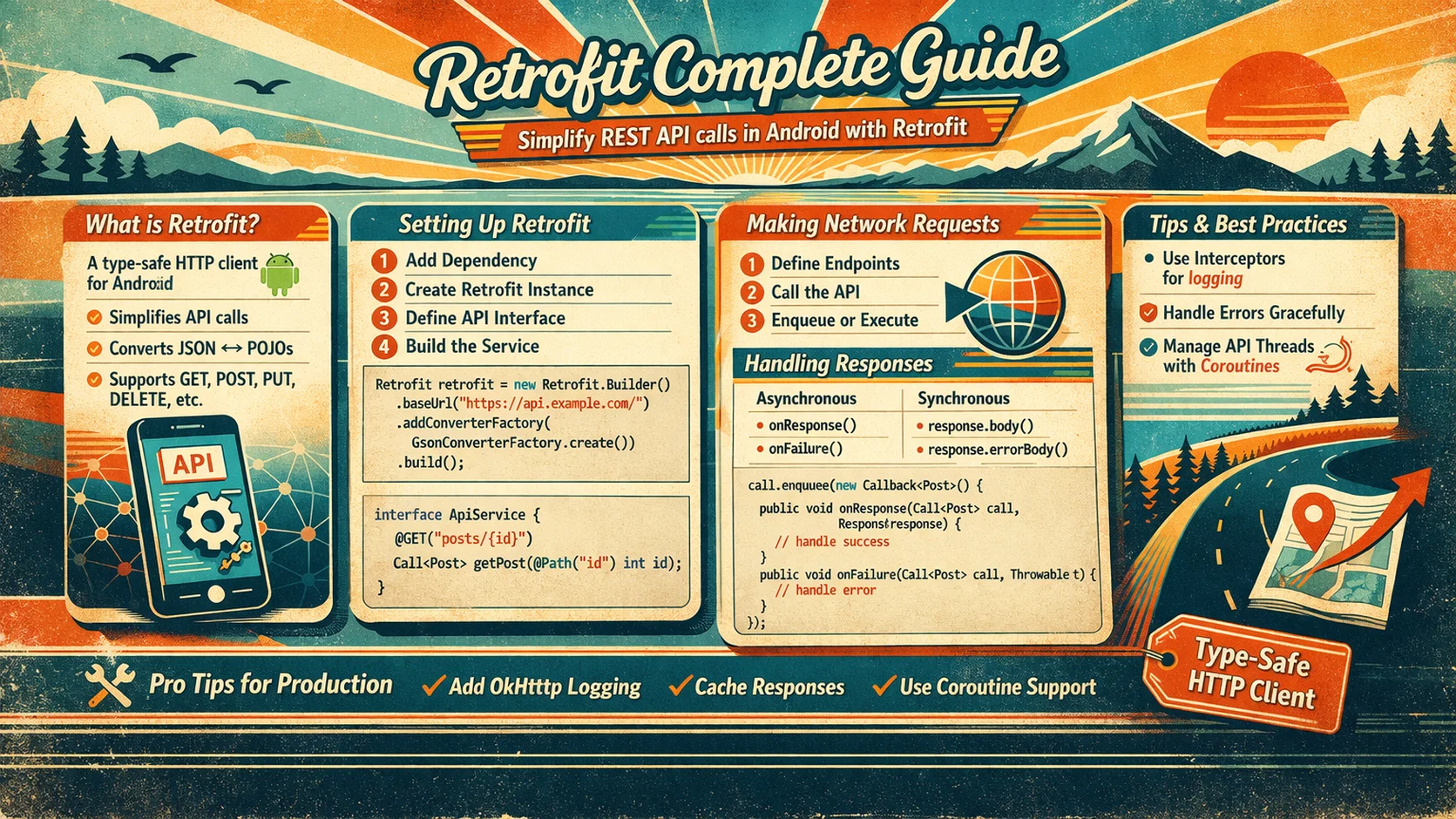
Almost every Android app talks to a server. You fetch articles, upload photos, log in, sync data — all through HTTP requests. Retrofit is the library that makes this easy. Instead of manually building URLs, parsing JSON, and handling threads, you define an interface with annotated functions, and Retrofit generates all the networking code for you. It’s been the standard for Android networking since 2013, and with Kotlin coroutines, it’s better than ever. This guide covers Retrofit from zero to production.
The Mental Model — What Happens When Your App Talks to a Server
// Think of it like ordering food at a restaurant:
//
// YOU (the app)          WAITER (Retrofit)         KITCHEN (Server/API)
//
// "I'd like the         → Waiter takes your        → Kitchen receives
//  article list,           order, formats it           the order
//  sorted by newest"       as an HTTP request
//
//                        ← Waiter brings back       ← Kitchen prepares
//                          the food (JSON response)    the data
//
// "Here are your        ← Waiter converts the
//  articles as            JSON into Kotlin objects
//  Kotlin objects"        you can use
//
// You never go to the kitchen yourself — the waiter handles everything
// You just describe WHAT you want (the interface)
// Retrofit handles HOW to get it (HTTP, JSON, threads)

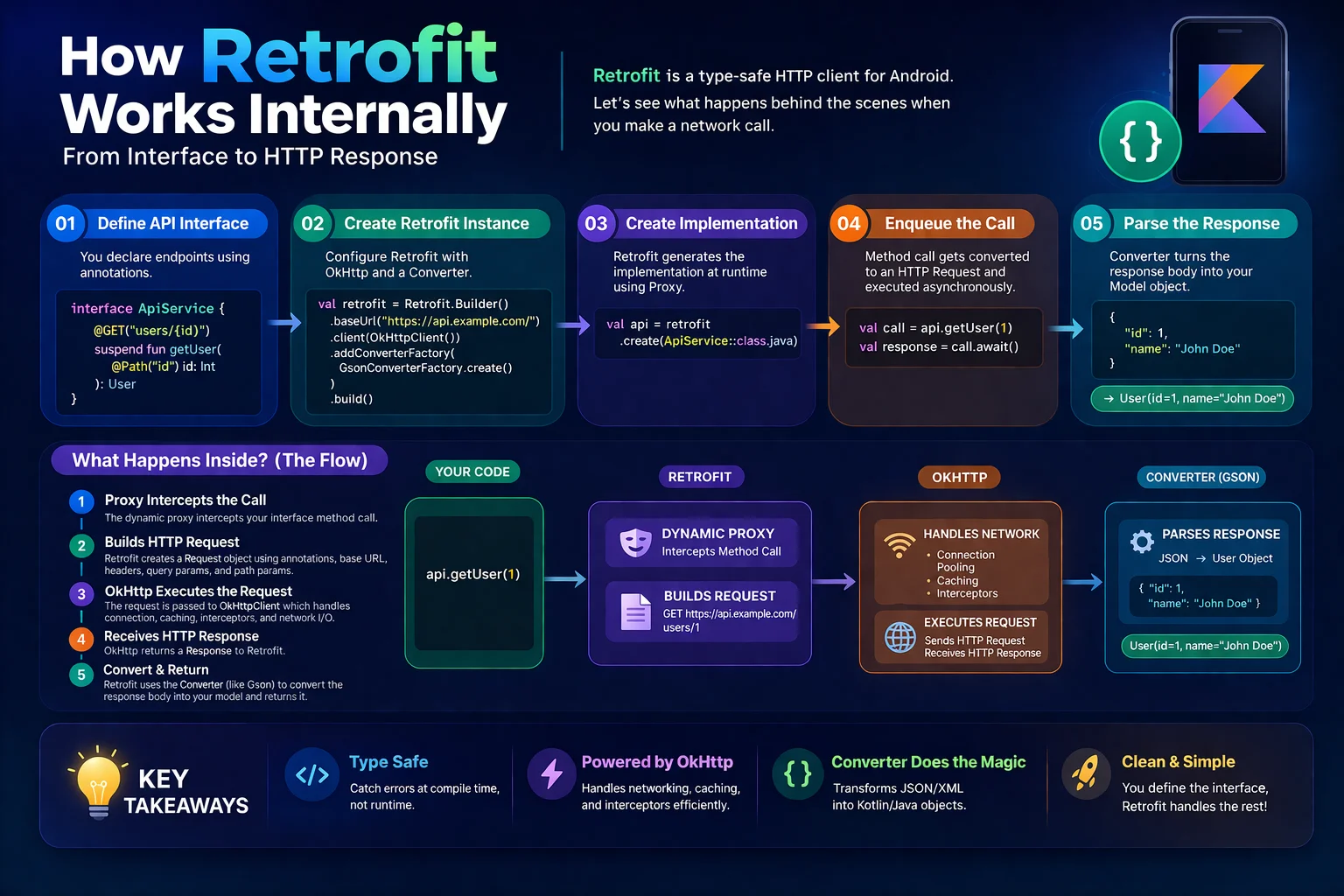
// In code terms:
// 1. You define an INTERFACE with functions describing each API call
// 2. Retrofit GENERATES the implementation at runtime
// 3. You call the function → Retrofit sends HTTP request → returns Kotlin objects
//
// The HTTP request cycle:
//
// Your Code → Retrofit → OkHttp → Internet → Server
//                                     ↓
// Your Code ← Retrofit ← OkHttp ← Internet ← Server
//  (Kotlin      (JSON        (HTTP         (JSON
//   objects)     → objects)    response)     response)
Setup
// build.gradle.kts
dependencies {
    // Retrofit — the HTTP client library
    implementation("com.squareup.retrofit2:retrofit:2.11.0")
    // retrofit is a LIBRARY from Square

    // JSON converter — converts JSON ↔ Kotlin objects
    // Choose ONE: Gson OR Moshi (Moshi is newer and more Kotlin-friendly)

    // Option A: Gson (older, more common in existing codebases)
    implementation("com.squareup.retrofit2:converter-gson:2.11.0")

    // Option B: Moshi (recommended for new projects)
    implementation("com.squareup.retrofit2:converter-moshi:2.11.0")
    implementation("com.squareup.moshi:moshi-kotlin:1.15.1")
    ksp("com.squareup.moshi:moshi-kotlin-codegen:1.15.1")

    // OkHttp logging — see actual HTTP requests/responses in Logcat
    implementation("com.squareup.okhttp3:logging-interceptor:4.12.0")

    // Coroutines support is BUILT-IN since Retrofit 2.6.0
    // No extra dependency needed for suspend functions!
}
Step 1 — Define Your Data Classes (DTOs)
First, describe what the server sends back as Kotlin data classes:
// The server returns JSON like this:
// {
//   "id": "abc-123",
//   "title": "Kotlin Basics",
//   "author": "Alice",
//   "published_at": 1700000000,
//   "image_url": "https://example.com/photo.jpg",
//   "tags": ["kotlin", "android"]
// }

// With Gson:
data class ArticleDto(
    // DTO = Data Transfer Object — represents the JSON from the server
    @SerializedName("id") val id: String,
    // @SerializedName is an ANNOTATION from Gson
    // Maps JSON key "id" to Kotlin property "id"
    // If names match, you can skip @SerializedName:
    // val id: String  → automatically maps to "id" in JSON

    @SerializedName("title") val title: String,

    @SerializedName("author") val author: String,

    @SerializedName("published_at") val publishedAt: Long,
    // JSON key is "published_at" (snake_case)
    // Kotlin property is "publishedAt" (camelCase)
    // @SerializedName bridges the naming difference

    @SerializedName("image_url") val imageUrl: String?,
    // Nullable — some articles might not have an image
    // If JSON has "image_url": null → imageUrl = null

    @SerializedName("tags") val tags: List<String>
)

// With Moshi (recommended for new projects):
@JsonClass(generateAdapter = true)
// @JsonClass is an ANNOTATION from Moshi
// generateAdapter = true → Moshi generates efficient code via KSP
// No reflection needed (faster, smaller APK)
data class ArticleDto(
    @Json(name = "id") val id: String,
    // @Json is an ANNOTATION from Moshi — maps JSON key to property
    @Json(name = "title") val title: String,
    @Json(name = "author") val author: String,
    @Json(name = "published_at") val publishedAt: Long,
    @Json(name = "image_url") val imageUrl: String?,
    @Json(name = "tags") val tags: List<String>
)

// API response wrappers (common patterns):
// Single object response:
// { "id": "123", "title": "..." }
// → ArticleDto directly

// List response:
// [{ "id": "1", ... }, { "id": "2", ... }]
// → List<ArticleDto>

// Wrapped response:
// { "data": [{ "id": "1", ... }], "total": 100, "page": 1 }
data class ArticleListResponse(
    @SerializedName("data") val articles: List<ArticleDto>,
    @SerializedName("total") val total: Int,
    @SerializedName("page") val page: Int
)
Step 2 — Define the API Interface
This is the heart of Retrofit — an interface that describes every API call:
interface ArticleApi {
    // ArticleApi is an INTERFACE — you define the contract
    // Retrofit GENERATES the implementation at runtime
    // Each function = one HTTP request

    // ═══ GET requests — fetch data ══════════════════════════════════

    @GET("articles")
    // @GET is an ANNOTATION from Retrofit
    // "articles" is the URL PATH (appended to base URL)
    // Full URL: https://api.example.com/articles
    suspend fun getArticles(): List<ArticleDto>
    // suspend KEYWORD — this function runs asynchronously
    // Retrofit automatically calls this on a background thread
    // Returns the parsed JSON as List<ArticleDto>
    // If HTTP error → throws HttpException
    // If network error → throws IOException

    @GET("articles/{id}")
    // {id} is a PATH PARAMETER — replaced with the actual value
    suspend fun getArticle(
        @Path("id") articleId: String
        // @Path is an ANNOTATION from Retrofit
        // Replaces {id} in the URL with the value of articleId
        // getArticle("abc-123") → GET /articles/abc-123
    ): ArticleDto

    @GET("articles")
    suspend fun searchArticles(
        @Query("q") query: String,
        // @Query is an ANNOTATION from Retrofit
        // Adds a query parameter to the URL
        // searchArticles("kotlin") → GET /articles?q=kotlin

        @Query("page") page: Int = 1,
        // Default value — if not provided, page=1

        @Query("limit") limit: Int = 20
    ): ArticleListResponse
    // searchArticles("kotlin", 2, 10) → GET /articles?q=kotlin&page=2&limit=10

    @GET("articles")
    suspend fun getArticlesByCategory(
        @Query("category") category: String,
        @Query("sort") sort: String = "newest"
    ): List<ArticleDto>

    // ═══ POST requests — send data ══════════════════════════════════

    @POST("articles")
    // @POST is an ANNOTATION from Retrofit — HTTP POST request
    suspend fun createArticle(
        @Body article: CreateArticleRequest
        // @Body is an ANNOTATION from Retrofit
        // Converts the Kotlin object to JSON and sends it as the request body
        // Retrofit uses the converter (Gson/Moshi) to serialize it
    ): ArticleDto
    // Returns the created article (server response)

    // ═══ PUT requests — update data ═════════════════════════════════

    @PUT("articles/{id}")
    // @PUT is an ANNOTATION from Retrofit — HTTP PUT request (full update)
    suspend fun updateArticle(
        @Path("id") articleId: String,
        @Body article: UpdateArticleRequest
    ): ArticleDto

    @PATCH("articles/{id}")
    // @PATCH is an ANNOTATION from Retrofit — HTTP PATCH request (partial update)
    suspend fun patchArticle(
        @Path("id") articleId: String,
        @Body updates: Map<String, Any>
        // Can send partial updates as a Map
    ): ArticleDto

    // ═══ DELETE requests — remove data ═══════════════════════════════

    @DELETE("articles/{id}")
    // @DELETE is an ANNOTATION from Retrofit — HTTP DELETE request
    suspend fun deleteArticle(@Path("id") articleId: String)
    // Returns Unit (nothing) — server returns 204 No Content

    // ═══ Headers ═════════════════════════════════════════════════════

    @GET("user/profile")
    suspend fun getProfile(
        @Header("Authorization") token: String
        // @Header is an ANNOTATION from Retrofit
        // Adds a header to THIS specific request
        // getProfile("Bearer eyJhbG...") → Authorization: Bearer eyJhbG...
    ): UserDto

    @Headers("Accept: application/json", "X-Api-Version: 2")
    // @Headers is an ANNOTATION from Retrofit — static headers for this endpoint
    @GET("articles")
    suspend fun getArticlesV2(): List<ArticleDto>
}

data class CreateArticleRequest(
    val title: String,
    val content: String,
    val category: String,
    val tags: List<String>
)

data class UpdateArticleRequest(
    val title: String,
    val content: String
)
Step 3 — Build the Retrofit Instance
// Create Retrofit with a builder — configure base URL, converter, and client

val retrofit = Retrofit.Builder()
    // Retrofit.Builder is a CLASS — configures and creates a Retrofit instance
    .baseUrl("https://api.example.com/")
    // baseUrl() is a FUNCTION on Builder — the root URL for all requests
    // ALL @GET/@POST paths are APPENDED to this base URL
    // "articles" → https://api.example.com/articles
    // ⚠️ Base URL must end with /

    .addConverterFactory(GsonConverterFactory.create())
    // addConverterFactory() is a FUNCTION on Builder
    // GsonConverterFactory is a CLASS from converter-gson
    // Tells Retrofit: "use Gson to convert JSON ↔ Kotlin objects"
    // For Moshi: MoshiConverterFactory.create(moshi)

    .client(okHttpClient)
    // client() is a FUNCTION on Builder — provide a custom OkHttpClient
    // OkHttp is the actual HTTP engine — Retrofit sits on top of it

    .build()
    // build() is a FUNCTION on Builder — creates the Retrofit instance

// Create the API implementation:
val articleApi = retrofit.create(ArticleApi::class.java)
// create() is a FUNCTION on Retrofit
// Takes your INTERFACE class → returns a GENERATED IMPLEMENTATION
// This is dynamic proxy magic — Retrofit reads annotations and generates HTTP code
// articleApi is now a fully working HTTP client!
Step 4 — OkHttp Client and Interceptors
Interceptors let you modify every request and response — add auth tokens, log traffic, retry failures:
val okHttpClient = OkHttpClient.Builder()
    // OkHttpClient.Builder is a CLASS from OkHttp

    // Logging interceptor — see HTTP traffic in Logcat
    .addInterceptor(HttpLoggingInterceptor().apply {
        // HttpLoggingInterceptor is a CLASS from okhttp3.logging
        level = HttpLoggingInterceptor.Level.BODY
        // Level is an ENUM: NONE, BASIC, HEADERS, BODY
        // BODY shows everything — request URL, headers, body, response body
        // ⚠️ Use NONE or BASIC in production (BODY logs sensitive data!)
    })

    // Auth interceptor — add token to every request
    .addInterceptor { chain ->
        // chain is a Interceptor.Chain — an INTERFACE from OkHttp
        // This lambda is called for EVERY HTTP request
        val original = chain.request()
        // request() is a FUNCTION on Chain — the original request

        val token = tokenProvider.getToken()
        // Get the current auth token from your storage

        val newRequest = original.newBuilder()
            // newBuilder() is a FUNCTION on Request — creates a copy to modify
            .addHeader("Authorization", "Bearer $token")
            // addHeader() is a FUNCTION on Request.Builder
            .build()

        chain.proceed(newRequest)
        // proceed() is a FUNCTION on Chain — sends the request and returns the response
    }

    // Timeout settings
    .connectTimeout(30, TimeUnit.SECONDS)
    // connectTimeout() is a FUNCTION on OkHttpClient.Builder
    // How long to wait for a TCP connection to the server
    .readTimeout(30, TimeUnit.SECONDS)
    // How long to wait for data after connection is established
    .writeTimeout(30, TimeUnit.SECONDS)
    // How long to wait when sending data (uploading)

    .build()
    // build() is a FUNCTION on OkHttpClient.Builder
Token refresh interceptor (advanced)
// Automatically refresh expired tokens and retry the request

class AuthInterceptor @Inject constructor(
    private val tokenManager: TokenManager
) : Interceptor {
    // Interceptor is an INTERFACE from OkHttp — implement intercept()

    override fun intercept(chain: Interceptor.Chain): Response {
        // Add token to request
        val request = chain.request().newBuilder()
            .addHeader("Authorization", "Bearer ${tokenManager.accessToken}")
            .build()

        val response = chain.proceed(request)

        // If 401 Unauthorized → token expired → refresh and retry
        if (response.code == 401) {
            response.close()

            // Refresh the token
            val newToken = runBlocking {
                // runBlocking is a TOP-LEVEL FUNCTION from kotlinx.coroutines
                // ⚠️ Only use in interceptors — blocks the OkHttp thread
                tokenManager.refreshToken()
            }

            if (newToken != null) {
                // Retry with new token
                val retryRequest = chain.request().newBuilder()
                    .addHeader("Authorization", "Bearer $newToken")
                    .build()
                return chain.proceed(retryRequest)
            }
        }

        return response
    }
}

// For a non-blocking approach, use Authenticator instead:
class TokenAuthenticator @Inject constructor(
    private val tokenManager: TokenManager
) : Authenticator {
    // Authenticator is an INTERFACE from OkHttp
    // Called automatically when server returns 401

    override fun authenticate(route: Route?, response: Response): Request? {
        // authenticate() is called when 401 is received
        // Return a new Request with fresh credentials, or null to give up

        val newToken = runBlocking { tokenManager.refreshToken() } ?: return null

        return response.request.newBuilder()
            .header("Authorization", "Bearer $newToken")
            // header() REPLACES the header (vs addHeader which adds duplicate)
            .build()
    }
}

// Register:
OkHttpClient.Builder()
    .authenticator(TokenAuthenticator(tokenManager))
    // authenticator() is a FUNCTION on OkHttpClient.Builder
    .build()
Step 5 — Error Handling
// Retrofit throws two types of exceptions:
//
// 1. HttpException — server returned an error (4xx, 5xx)
//    HttpException is a CLASS from Retrofit
//    Example: 404 Not Found, 401 Unauthorized, 500 Server Error
//
// 2. IOException — network problem (no internet, timeout, DNS failure)
//    IOException is a CLASS from java.io
//    Example: phone is offline, server is unreachable, connection timed out

// Basic error handling in Repository:
class ArticleRepository @Inject constructor(
    private val api: ArticleApi,
    private val dao: ArticleDao
) {
    suspend fun refreshArticles(): Result<Unit> {
        return try {
            val articles = api.getArticles()
            dao.upsertArticles(articles.map { it.toEntity() })
            Result.success(Unit)
        } catch (e: CancellationException) {
            throw e   // ALWAYS re-throw! Never catch CancellationException
        } catch (e: HttpException) {
            // Server error — check the status code
            when (e.code()) {
                // code() is a FUNCTION on HttpException — returns HTTP status code
                401 -> Result.failure(Exception("Unauthorized — please log in again"))
                404 -> Result.failure(Exception("Not found"))
                429 -> Result.failure(Exception("Too many requests — try again later"))
                in 500..599 -> Result.failure(Exception("Server error — try again later"))
                else -> Result.failure(e)
            }
        } catch (e: IOException) {
            // Network error — user probably offline
            Result.failure(Exception("Network error — check your connection"))
        }
    }
}

// Reading the error body (when server returns error details in JSON):
catch (e: HttpException) {
    val errorBody = e.response()?.errorBody()?.string()
    // response() is a FUNCTION on HttpException — returns the Response
    // errorBody() is a FUNCTION on Response — returns the error body
    // string() reads it as a String
    // Example error body: {"error": "Article not found", "code": "NOT_FOUND"}

    // Parse if needed:
    // val errorResponse = Gson().fromJson(errorBody, ErrorResponse::class.java)
}
Complete Hilt Setup — Production Pattern
@Module
@InstallIn(SingletonComponent::class)
object NetworkModule {

    @Provides
    @Singleton
    fun provideMoshi(): Moshi {
        return Moshi.Builder()
            // Moshi.Builder is a CLASS from Moshi
            .addLast(KotlinJsonAdapterFactory())
            // KotlinJsonAdapterFactory is a CLASS from moshi-kotlin
            // Handles Kotlin default values and nullability
            // addLast() adds it as fallback after codegen adapters
            .build()
    }

    @Provides
    @Singleton
    fun provideOkHttpClient(authInterceptor: AuthInterceptor): OkHttpClient {
        return OkHttpClient.Builder()
            .addInterceptor(authInterceptor)
            .addInterceptor(
                HttpLoggingInterceptor().apply {
                    level = if (BuildConfig.DEBUG) HttpLoggingInterceptor.Level.BODY
                            else HttpLoggingInterceptor.Level.NONE
                }
            )
            .connectTimeout(30, TimeUnit.SECONDS)
            .readTimeout(30, TimeUnit.SECONDS)
            .build()
    }

    @Provides
    @Singleton
    fun provideRetrofit(okHttpClient: OkHttpClient, moshi: Moshi): Retrofit {
        return Retrofit.Builder()
            .baseUrl("https://api.example.com/")
            .client(okHttpClient)
            .addConverterFactory(MoshiConverterFactory.create(moshi))
            // MoshiConverterFactory is a CLASS from converter-moshi
            .build()
    }

    @Provides
    @Singleton
    fun provideArticleApi(retrofit: Retrofit): ArticleApi {
        return retrofit.create(ArticleApi::class.java)
    }

    @Provides
    @Singleton
    fun provideUserApi(retrofit: Retrofit): UserApi {
        return retrofit.create(UserApi::class.java)
    }
}

// Now inject the API anywhere:
class ArticleRemoteDataSource @Inject constructor(
    private val api: ArticleApi
    // Hilt provides this automatically from NetworkModule
) {
    suspend fun getArticles(): List<ArticleDto> = api.getArticles()
    suspend fun getArticle(id: String): ArticleDto = api.getArticle(id)
    suspend fun search(query: String, page: Int): ArticleListResponse =
        api.searchArticles(query, page)
}
Multipart Uploads (Images, Files)
interface UploadApi {

    @Multipart
    // @Multipart is an ANNOTATION from Retrofit
    // Tells Retrofit this is a multipart/form-data request (for file uploads)
    @POST("upload/avatar")
    suspend fun uploadAvatar(
        @Part image: MultipartBody.Part
        // @Part is an ANNOTATION from Retrofit
        // MultipartBody.Part is a CLASS from OkHttp — represents one part of the upload
    ): UploadResponse

    @Multipart
    @POST("articles/{id}/images")
    suspend fun uploadArticleImage(
        @Path("id") articleId: String,
        @Part image: MultipartBody.Part,
        @Part("description") description: RequestBody
        // @Part("description") with a name sends a text field alongside the file
        // RequestBody is a CLASS from OkHttp
    ): UploadResponse
}

// Creating a MultipartBody.Part from a file:
fun createImagePart(uri: Uri, context: Context): MultipartBody.Part {
    val inputStream = context.contentResolver.openInputStream(uri)!!
    val bytes = inputStream.readBytes()
    inputStream.close()

    val requestBody = bytes.toRequestBody("image/jpeg".toMediaTypeOrNull())
    // toRequestBody() is an EXTENSION FUNCTION on ByteArray from OkHttp
    // toMediaTypeOrNull() is an EXTENSION FUNCTION on String from OkHttp
    // Creates a RequestBody with the specified MIME type

    return MultipartBody.Part.createFormData("image", "photo.jpg", requestBody)
    // createFormData() is a STATIC FUNCTION on MultipartBody.Part
    // "image" — the form field name (must match server expectation)
    // "photo.jpg" — the file name
}

// Usage:
val imagePart = createImagePart(selectedImageUri, context)
val response = uploadApi.uploadAvatar(imagePart)
Common Mistakes to Avoid
Mistake 1: Base URL not ending with /
// ❌ Missing trailing slash — URL resolution breaks
Retrofit.Builder().baseUrl("https://api.example.com")
// @GET("articles") → https://api.example.com/articles? Maybe not!
// Retrofit's URL resolution can behave unexpectedly

// ✅ Always end base URL with /
Retrofit.Builder().baseUrl("https://api.example.com/")
// @GET("articles") → https://api.example.com/articles ✅
Mistake 2: Not handling CancellationException
// ❌ Catches CancellationException — breaks structured concurrency
try {
    val data = api.getArticles()
} catch (e: Exception) {   // catches CancellationException too!
    showError(e.message)    // swallows cancellation — coroutine can't cancel!
}

// ✅ Always re-throw CancellationException
try {
    val data = api.getArticles()
} catch (e: CancellationException) {
    throw e   // MUST re-throw
} catch (e: Exception) {
    showError(e.message)
}
Mistake 3: Creating multiple Retrofit instances
// ❌ New Retrofit instance in every Repository — wasteful, inconsistent
class ArticleRepo {
    private val api = Retrofit.Builder().baseUrl("...").build().create(ArticleApi::class.java)
}
class UserRepo {
    private val api = Retrofit.Builder().baseUrl("...").build().create(UserApi::class.java)
}

// ✅ One Retrofit instance, shared via Hilt @Singleton
@Provides @Singleton fun provideRetrofit(): Retrofit { /* ... */ }
@Provides @Singleton fun provideArticleApi(r: Retrofit) = r.create(ArticleApi::class.java)
@Provides @Singleton fun provideUserApi(r: Retrofit) = r.create(UserApi::class.java)
Mistake 4: Logging sensitive data in production
// ❌ BODY logging in production — exposes auth tokens, user data in Logcat
HttpLoggingInterceptor().apply { level = Level.BODY }

// ✅ Use BODY only in debug
HttpLoggingInterceptor().apply {
    level = if (BuildConfig.DEBUG) Level.BODY else Level.NONE
}
Mistake 5: Using @Field without @FormUrlEncoded
// ❌ @Field without @FormUrlEncoded → crash
@POST("login")
suspend fun login(@Field("email") email: String, @Field("password") password: String)

// ✅ Add @FormUrlEncoded
@FormUrlEncoded
// @FormUrlEncoded is an ANNOTATION from Retrofit
// Sends data as application/x-www-form-urlencoded (form submission)
@POST("login")
suspend fun login(
    @Field("email") email: String,
    // @Field is an ANNOTATION from Retrofit — form field
    @Field("password") password: String
): LoginResponse
Summary
- Retrofit (library from Square) generates HTTP client code from annotated Kotlin interfaces
- Define API calls with @GET, @POST, @PUT, @PATCH, @DELETE (annotations from Retrofit) on suspend functions
- @Path (annotation) replaces URL placeholders; @Query adds query parameters; @Body sends JSON; @Header adds headers
- @SerializedName (Gson annotation) or @Json (Moshi annotation) maps JSON keys to Kotlin properties
- Retrofit.Builder() (class) configures base URL, converter, and OkHttp client
retrofit.create()(function) generates the implementation from your interface- GsonConverterFactory or MoshiConverterFactory (classes) convert JSON ↔ Kotlin objects
- OkHttpClient.Builder() (class) configures timeouts, interceptors, and authenticators
- Interceptor (interface from OkHttp) modifies every request/response — use for auth tokens, logging
- Authenticator (interface from OkHttp) handles 401 responses — auto-refresh tokens and retry
- HttpLoggingInterceptor (class) logs HTTP traffic — use
Level.BODYin debug only - Retrofit throws HttpException (class) for server errors and IOException for network errors
- Always re-throw CancellationException in catch blocks
- Use @Multipart (annotation) with MultipartBody.Part (class) for file uploads
- Use @FormUrlEncoded (annotation) with @Field for form submissions
- Create one Retrofit instance via Hilt
@Singleton— share across all API interfaces - Base URL must end with /
Retrofit has been the standard for Android networking for over a decade — and for good reason. You define an interface, Retrofit does the rest: HTTP requests, JSON parsing, threading, error propagation. Combined with OkHttp interceptors for auth and logging, and Hilt for dependency injection, you get a production-ready networking layer in under 100 lines of setup code. Define your DTOs, annotate your interface, build the Retrofit instance, and start making API calls.
Happy coding!



Comments (0)