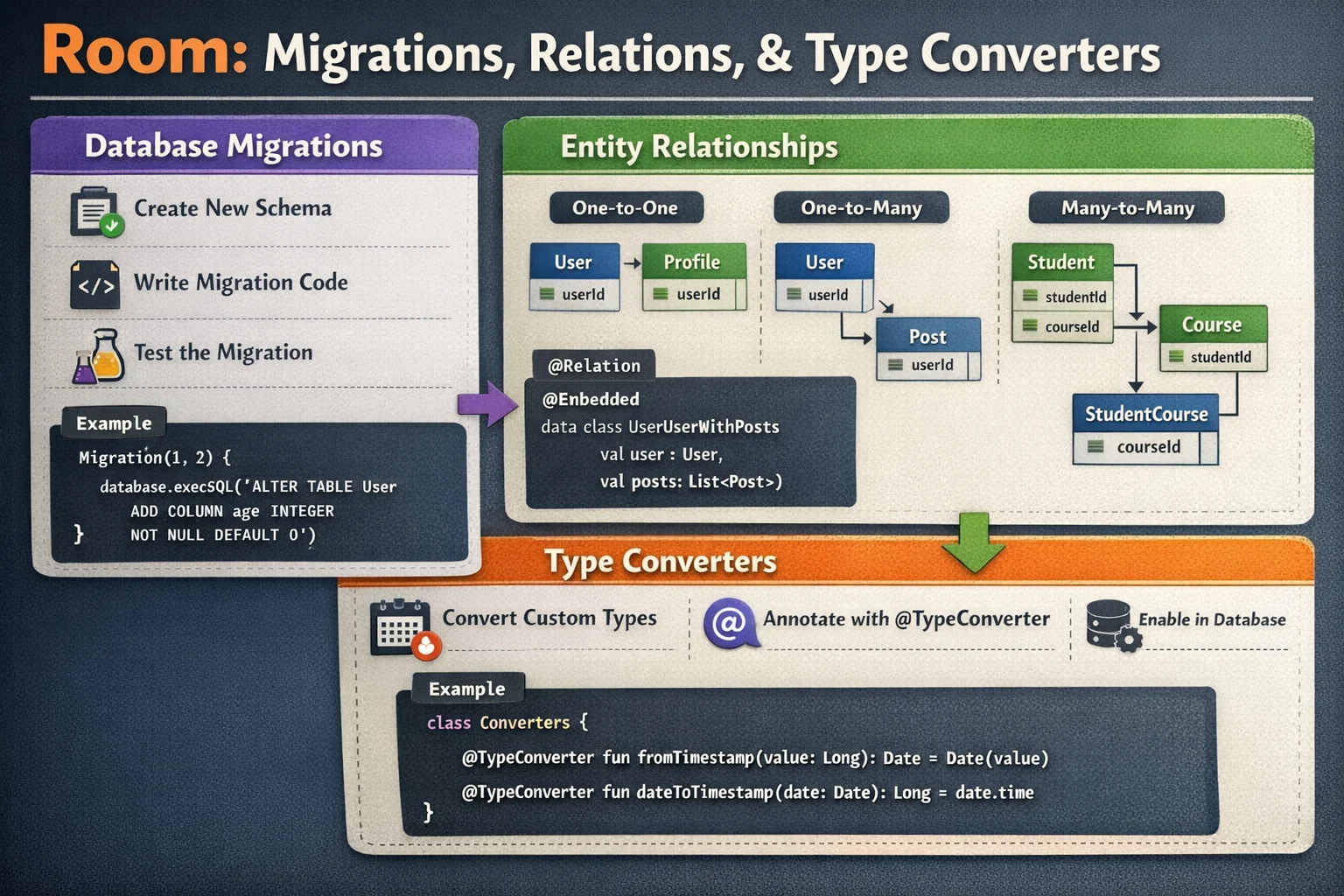
You’ve set up Room, defined your entities, and everything works. Then you need to add a column to an existing table. Or your data model grows and you need relationships between tables — articles have authors, authors have multiple articles, articles have multiple tags. This is where Room gets real. Migrations handle schema changes without losing user data. Relations handle connections between tables cleanly. This guide covers both — from your first migration to complex many-to-many relationships.
Part 1: Migrations — Changing Your Database Schema
The mental model — why migrations exist
// Imagine your database is a FILING CABINET:
//
// Version 1: Cabinet has drawers labeled: id, title, content
// You release the app. Users have data in these drawers.
//
// Version 2: You need a new drawer: "category"
//
// You can't just THROW AWAY the cabinet and build a new one
// (that destroys all user data!)
//
// You need to ADD a new drawer to the EXISTING cabinet
// while keeping all the files (data) in the old drawers intact
//
// That's what a MIGRATION does:
// "Dear SQLite, please ALTER the existing table to ADD a column"
//
// Without migration: app crashes or deletes all data on update
// With migration: schema updates smoothly, data is preserved

// The migration flow:
// 1. You change an @Entity (add column, rename, change type)
// 2. You increment the database version number (1 → 2)
// 3. You write a Migration that tells Room HOW to alter the table
// 4. User updates the app → Room runs the migration → data preserved!
Your first migration — adding a column
// BEFORE (version 1):
@Entity(tableName = "articles")
data class ArticleEntity(
    @PrimaryKey val id: String,
    val title: String,
    val content: String,
    val publishedAt: Long
)

// AFTER (version 2): added "category" column
@Entity(tableName = "articles")
data class ArticleEntity(
    @PrimaryKey val id: String,
    val title: String,
    val content: String,
    val publishedAt: Long,
    val category: String = "general"   // NEW COLUMN with default
)

// Step 1: Increment database version
@Database(
    entities = [ArticleEntity::class],
    version = 2,    // was 1, now 2
    exportSchema = true
)
abstract class AppDatabase : RoomDatabase() {
    abstract fun articleDao(): ArticleDao
}

// Step 2: Write the migration
val MIGRATION_1_2 = object : Migration(1, 2) {
    // Migration is an ABSTRACT CLASS from Room
    // Constructor takes: startVersion (1) and endVersion (2)
    // This migration runs when database is at version 1 and needs to go to version 2

    override fun migrate(db: SupportSQLiteDatabase) {
        // migrate() is an ABSTRACT FUNCTION you must implement
        // db is a SupportSQLiteDatabase — an INTERFACE that wraps SQLite
        // You write RAW SQL to alter the table

        db.execSQL("ALTER TABLE articles ADD COLUMN category TEXT NOT NULL DEFAULT 'general'")
        // ALTER TABLE — SQL command to modify an existing table
        // ADD COLUMN — adds a new column
        // TEXT NOT NULL DEFAULT 'general' — matches your Kotlin property:
        //   String (TEXT), not null (no ?), default "general"
    }
}

// Step 3: Register the migration when building the database
Room.databaseBuilder(context, AppDatabase::class.java, "app.db")
    .addMigrations(MIGRATION_1_2)
    // addMigrations() is a FUNCTION on RoomDatabase.Builder
    // Pass ALL your migrations — Room picks the right one based on versions
    .build()

// What happens when user updates the app:
// 1. Room sees database file is version 1 but code says version 2
// 2. Room finds MIGRATION_1_2 (1 → 2)
// 3. Room runs migrate() — executes ALTER TABLE
// 4. Database is now version 2 — all data preserved!
// 5. New "category" column has "general" for all existing rows
Common migration operations
// ADD a column:
db.execSQL("ALTER TABLE articles ADD COLUMN view_count INTEGER NOT NULL DEFAULT 0")
// For Int → INTEGER, for Boolean → INTEGER (0/1)

// ADD a nullable column:
db.execSQL("ALTER TABLE articles ADD COLUMN image_url TEXT")
// No NOT NULL, no DEFAULT → column is NULL for existing rows

// ADD a new table:
db.execSQL("""
    CREATE TABLE IF NOT EXISTS bookmarks (
        article_id TEXT NOT NULL PRIMARY KEY,
        created_at INTEGER NOT NULL
    )
""")

// CREATE an index:
db.execSQL("CREATE INDEX IF NOT EXISTS index_articles_category ON articles(category)")

// ⚠️ SQLite LIMITATIONS — you CANNOT:
// - DROP a column (SQLite < 3.35.0, Android < 14)
// - RENAME a column (SQLite < 3.25.0, Android < 11)
// - Change a column's type
//
// For these, you need the "create new table" workaround:
// 1. Create a new table with the desired schema
// 2. Copy data from old table to new table
// 3. Drop the old table
// 4. Rename the new table to the old name
Complex migration — rename table + restructure
// Scenario: rename "author" column to "author_name" and add "author_id"

val MIGRATION_2_3 = object : Migration(2, 3) {
    override fun migrate(db: SupportSQLiteDatabase) {
        // Step 1: Create new table with desired schema
        db.execSQL("""
            CREATE TABLE articles_new (
                id TEXT NOT NULL PRIMARY KEY,
                title TEXT NOT NULL,
                content TEXT NOT NULL,
                author_name TEXT NOT NULL,
                author_id TEXT,
                published_at INTEGER NOT NULL,
                category TEXT NOT NULL DEFAULT 'general',
                view_count INTEGER NOT NULL DEFAULT 0
            )
        """)

        // Step 2: Copy data from old table (mapping columns)
        db.execSQL("""
            INSERT INTO articles_new (id, title, content, author_name, published_at, category, view_count)
            SELECT id, title, content, author, published_at, category, view_count
            FROM articles
        """)
        // "author" in old table → "author_name" in new table
        // "author_id" is new → gets NULL for existing rows

        // Step 3: Drop old table
        db.execSQL("DROP TABLE articles")

        // Step 4: Rename new table to old name
        db.execSQL("ALTER TABLE articles_new RENAME TO articles")

        // Step 5: Recreate indices
        db.execSQL("CREATE INDEX IF NOT EXISTS index_articles_category ON articles(category)")
    }
}
Chaining migrations
// If a user hasn't updated in a while (version 1 → version 4):
// Room chains migrations automatically: 1→2, then 2→3, then 3→4

Room.databaseBuilder(context, AppDatabase::class.java, "app.db")
    .addMigrations(MIGRATION_1_2, MIGRATION_2_3, MIGRATION_3_4)
    .build()

// User at version 1 → Room runs: MIGRATION_1_2 → MIGRATION_2_3 → MIGRATION_3_4
// User at version 3 → Room runs: MIGRATION_3_4 only
// User at version 4 → no migration needed

// You can also provide SKIP migrations (jump directly):
val MIGRATION_1_4 = object : Migration(1, 4) {
    override fun migrate(db: SupportSQLiteDatabase) {
        // Handle all changes from 1 to 4 in one migration
        // More efficient for users who skipped several versions
    }
}

Room.databaseBuilder(context, AppDatabase::class.java, "app.db")
    .addMigrations(MIGRATION_1_2, MIGRATION_2_3, MIGRATION_3_4, MIGRATION_1_4)
    .build()
// Room prefers the shortest path: user at v1 → uses MIGRATION_1_4 directly
Auto-migrations (Room 2.4+)
// For SIMPLE changes (add column, add table, add index),
// Room can generate the migration SQL automatically!

@Database(
    entities = [ArticleEntity::class, BookmarkEntity::class],
    version = 3,
    autoMigrations = [
        AutoMigration(from = 1, to = 2),
        // AutoMigration is a CLASS from Room
        // Room compares schema v1 and v2 and generates the ALTER TABLE SQL
        // Works for: adding columns (with defaults), adding tables, adding indices

        AutoMigration(from = 2, to = 3, spec = Migration2To3::class)
        // For changes that Room can't figure out alone (renames, deletes),
        // provide a spec class with hints
    ],
    exportSchema = true
    // exportSchema MUST be true for auto-migrations to work
    // Room needs the schema history to compare versions
)
abstract class AppDatabase : RoomDatabase() {
    abstract fun articleDao(): ArticleDao
}

// AutoMigration spec — provide hints for ambiguous changes
@RenameColumn(tableName = "articles", fromColumnName = "author", toColumnName = "author_name")
// @RenameColumn is an ANNOTATION from Room — tells auto-migration about a rename
class Migration2To3 : AutoMigrationSpec
// AutoMigrationSpec is an INTERFACE from Room — marker interface for spec classes

// Other spec annotations:
// @DeleteColumn(tableName = "articles", columnName = "old_column")
// @RenameTable(fromTableName = "old_name", toTableName = "new_name")
// @DeleteTable(tableName = "deprecated_table")

// Auto-migration limitations:
// ✅ Works for: add column, add table, add index, rename column/table, delete column/table
// ❌ Does NOT work for: changing column type, complex data transformations
// For complex changes → write manual Migration
Testing migrations
// ALWAYS test migrations — a broken migration destroys user data!

// build.gradle.kts
ksp {
    arg("room.schemaLocation", "$projectDir/schemas")
    // Tells Room to export schema JSON files to the schemas/ directory
    // Each version gets a file: schemas/1.json, schemas/2.json, etc.
    // These files are needed for MigrationTestHelper
}

// Test class:
@RunWith(AndroidJUnit4::class)
class MigrationTest {

    @get:Rule
    val helper = MigrationTestHelper(
        // MigrationTestHelper is a CLASS from room-testing
        // It creates databases at specific versions for testing
        InstrumentationRegistry.getInstrumentation(),
        AppDatabase::class.java
    )

    @Test
    fun migrate1To2() {
        // Create database at version 1
        var db = helper.createDatabase("test-db", 1)
        // createDatabase() is a FUNCTION on MigrationTestHelper

        // Insert test data at version 1
        db.execSQL("INSERT INTO articles (id, title, content, published_at) VALUES ('1', 'Test', 'Content', 1700000000)")
        db.close()

        // Run migration 1 → 2
        db = helper.runMigrationsAndValidate("test-db", 2, true, MIGRATION_1_2)
        // runMigrationsAndValidate() is a FUNCTION on MigrationTestHelper
        // Runs the migration and validates the schema matches version 2

        // Verify data survived
        val cursor = db.query("SELECT category FROM articles WHERE id = '1'")
        cursor.moveToFirst()
        assertEquals("general", cursor.getString(0))
        // Old data is preserved, new column has default value ✅
        cursor.close()
        db.close()
    }
}
Part 2: Relations — Connecting Tables
The mental model — why relations?
// Think of it like a LIBRARY system:
//
// AUTHORS table:        ARTICLES table:
// ┌────┬──────────┐    ┌────┬───────────────┬───────────┐
// │ id │ name     │    │ id │ title         │ author_id │
// ├────┼──────────┤    ├────┼───────────────┼───────────┤
// │ a1 │ Alice    │    │ 1  │ Kotlin Basics │ a1        │
// │ a2 │ Bob      │    │ 2  │ Room Guide    │ a1        │
// └────┴──────────┘    │ 3  │ Compose Tips  │ a2        │
//                       └────┴───────────────┴───────────┘
//
// Alice wrote articles 1 and 2 (one-to-many)
// Bob wrote article 3
//
// The author_id column in articles REFERENCES the id in authors
// This is a FOREIGN KEY — it links the two tables
//
// Room lets you:
// 1. Query an author WITH all their articles (one-to-many)
// 2. Query an article WITH its author info (many-to-one)
// 3. Handle many-to-many through a junction table (articles ↔ tags)
One-to-many relationship
// An author has MANY articles

// Parent entity:
@Entity(tableName = "authors")
data class AuthorEntity(
    @PrimaryKey val id: String,
    val name: String,
    val avatarUrl: String? = null
)

// Child entity (has foreign key pointing to parent):
@Entity(
    tableName = "articles",
    foreignKeys = [
        ForeignKey(
            entity = AuthorEntity::class,
            // ForeignKey is a CLASS from Room
            // entity — the PARENT table this references
            parentColumns = ["id"],
            // parentColumns — the column(s) in the parent table
            childColumns = ["author_id"],
            // childColumns — the column(s) in THIS table that reference the parent
            onDelete = ForeignKey.CASCADE
            // CASCADE — if an author is deleted, delete all their articles too
            // Other options:
            // NO_ACTION — do nothing (leaves orphaned articles)
            // SET_NULL — set author_id to NULL (requires nullable column)
            // SET_DEFAULT — set author_id to default value
            // RESTRICT — prevent deleting an author who has articles
        )
    ],
    indices = [Index(value = ["author_id"])]
    // ⚠️ ALWAYS add an index on foreign key columns — Room warns if you don't
    // Without index: joining tables is SLOW (full table scan)
)
data class ArticleEntity(
    @PrimaryKey val id: String,
    val title: String,
    val content: String,
    @ColumnInfo(name = "author_id") val authorId: String,
    val publishedAt: Long
)
Querying one-to-many with @Relation
// Data class that holds an author WITH their articles:
data class AuthorWithArticles(
    @Embedded
    // @Embedded is an ANNOTATION from Room
    // Includes all columns from AuthorEntity in this query result
    val author: AuthorEntity,

    @Relation(
        parentColumn = "id",          // AuthorEntity.id
        entityColumn = "author_id"     // ArticleEntity.author_id
    )
    // @Relation is an ANNOTATION from Room
    // Tells Room: "also load the related ArticleEntity rows"
    // parentColumn — the column in the @Embedded entity
    // entityColumn — the column in the related entity that references the parent
    val articles: List<ArticleEntity>
)

// DAO query:
@Dao
interface AuthorDao {

    @Transaction
    // @Transaction is REQUIRED for @Relation queries
    // Room runs TWO queries: one for authors, one for articles
    // @Transaction ensures both run atomically (consistent data)
    @Query("SELECT * FROM authors WHERE id = :authorId")
    fun getAuthorWithArticles(authorId: String): Flow<AuthorWithArticles?>

    @Transaction
    @Query("SELECT * FROM authors ORDER BY name ASC")
    fun getAllAuthorsWithArticles(): Flow<List<AuthorWithArticles>>
}

// Usage:
dao.getAuthorWithArticles("a1")
// Returns:
// AuthorWithArticles(
//   author = AuthorEntity(id="a1", name="Alice"),
//   articles = [
//     ArticleEntity(id="1", title="Kotlin Basics", authorId="a1"),
//     ArticleEntity(id="2", title="Room Guide", authorId="a1")
//   ]
// )
// One query to the code — Room handles the JOIN internally
Many-to-one (article with its author)
// The reverse: get an article WITH its author info

data class ArticleWithAuthor(
    @Embedded val article: ArticleEntity,

    @Relation(
        parentColumn = "author_id",    // ArticleEntity.author_id
        entityColumn = "id"            // AuthorEntity.id
    )
    val author: AuthorEntity
    // Single author, not a list — each article has ONE author
)

@Dao
interface ArticleDao {
    @Transaction
    @Query("SELECT * FROM articles ORDER BY published_at DESC")
    fun getArticlesWithAuthor(): Flow<List<ArticleWithAuthor>>

    @Transaction
    @Query("SELECT * FROM articles WHERE id = :articleId")
    fun getArticleWithAuthor(articleId: String): Flow<ArticleWithAuthor?>
}
Many-to-many relationship
// An article can have MANY tags, a tag can be on MANY articles
// This needs a JUNCTION TABLE (also called cross-reference or join table)
//
// ARTICLES:    TAGS:           ARTICLE_TAG_CROSS:
// ┌────┐       ┌──────────┐    ┌────────────┬────────┐
// │ 1  │       │ kotlin   │    │ article_id │ tag_id │
// │ 2  │       │ android  │    ├────────────┼────────┤
// │ 3  │       │ compose  │    │ 1          │ kotlin │
// └────┘       └──────────┘    │ 1          │ android│
//                               │ 2          │ android│
//                               │ 2          │ compose│
//                               │ 3          │ kotlin │
//                               │ 3          │ compose│
//                               └────────────┴────────┘
// Article 1 has tags: kotlin, android
// Article 2 has tags: android, compose
// Tag "kotlin" is on articles: 1, 3

// Entity for tags:
@Entity(tableName = "tags")
data class TagEntity(
    @PrimaryKey val id: String,
    val name: String
)

// Junction table (cross-reference):
@Entity(
    tableName = "article_tag_cross",
    primaryKeys = ["article_id", "tag_id"],
    // COMPOSITE primary key — the combination of both columns is unique
    // An article can't have the same tag twice
    foreignKeys = [
        ForeignKey(entity = ArticleEntity::class, parentColumns = ["id"], childColumns = ["article_id"], onDelete = ForeignKey.CASCADE),
        ForeignKey(entity = TagEntity::class, parentColumns = ["id"], childColumns = ["tag_id"], onDelete = ForeignKey.CASCADE)
    ],
    indices = [Index("article_id"), Index("tag_id")]
)
data class ArticleTagCrossRef(
    @ColumnInfo(name = "article_id") val articleId: String,
    @ColumnInfo(name = "tag_id") val tagId: String
)

// Query: article with its tags
data class ArticleWithTags(
    @Embedded val article: ArticleEntity,

    @Relation(
        parentColumn = "id",                    // ArticleEntity.id
        entityColumn = "id",                    // TagEntity.id
        associateBy = Junction(ArticleTagCrossRef::class)
        // Junction is a CLASS from Room
        // Tells Room to use the cross-reference table to find related tags
        // Room joins: articles → article_tag_cross → tags
    )
    val tags: List<TagEntity>
)

// Query: tag with all its articles
data class TagWithArticles(
    @Embedded val tag: TagEntity,

    @Relation(
        parentColumn = "id",                    // TagEntity.id
        entityColumn = "id",                    // ArticleEntity.id
        associateBy = Junction(
            value = ArticleTagCrossRef::class,
            parentColumn = "tag_id",            // column in cross-ref for this entity
            entityColumn = "article_id"          // column in cross-ref for related entity
        )
    )
    val articles: List<ArticleEntity>
)

@Dao
interface ArticleDao {
    @Transaction
    @Query("SELECT * FROM articles")
    fun getArticlesWithTags(): Flow<List<ArticleWithTags>>

    @Insert(onConflict = OnConflictStrategy.IGNORE)
    suspend fun insertTag(tag: TagEntity)

    @Insert(onConflict = OnConflictStrategy.IGNORE)
    suspend fun insertArticleTagCrossRef(crossRef: ArticleTagCrossRef)

    // Add a tag to an article:
    @Transaction
    suspend fun tagArticle(articleId: String, tagId: String) {
        insertTag(TagEntity(id = tagId, name = tagId))
        insertArticleTagCrossRef(ArticleTagCrossRef(articleId, tagId))
    }
}
Part 3: Advanced TypeConverters
// Beyond simple List<String> and Date (covered in previous blog)

class Converters {

    // Enum converter
    @TypeConverter
    fun fromCategory(category: Category): String = category.name
    // Enum → String (store the enum name)

    @TypeConverter
    fun toCategory(value: String): Category = Category.valueOf(value)
    // String → Enum (look up by name)

    // Sealed class / complex object converter
    @TypeConverter
    fun fromStatus(status: ArticleStatus): String {
        return when (status) {
            is ArticleStatus.Draft -> "draft"
            is ArticleStatus.Published -> "published:${status.publishedAt}"
            is ArticleStatus.Archived -> "archived:${status.archivedAt}"
        }
    }

    @TypeConverter
    fun toStatus(value: String): ArticleStatus {
        return when {
            value == "draft" -> ArticleStatus.Draft
            value.startsWith("published:") ->
                ArticleStatus.Published(value.removePrefix("published:").toLong())
            value.startsWith("archived:") ->
                ArticleStatus.Archived(value.removePrefix("archived:").toLong())
            else -> ArticleStatus.Draft
        }
    }

    // Map converter (for metadata or settings)
    @TypeConverter
    fun fromMap(map: Map<String, String>): String = Gson().toJson(map)

    @TypeConverter
    fun toMap(value: String): Map<String, String> {
        val type = object : TypeToken<Map<String, String>>() {}.type
        return Gson().fromJson(value, type)
    }
}

sealed interface ArticleStatus {
    data object Draft : ArticleStatus
    data class Published(val publishedAt: Long) : ArticleStatus
    data class Archived(val archivedAt: Long) : ArticleStatus
}

// ⚠️ TypeConverter tip: store simple, parseable strings
// Don't store complex JSON blobs — hard to query and migrate
// If the data is complex enough to need JSON → consider a separate table instead
Database Views (Virtual Tables)
// A DatabaseView is like a SAVED QUERY — a virtual table based on a SELECT
// Useful for complex joins you query often

@DatabaseView(
    viewName = "article_summary",
    value = """
        SELECT
            articles.id,
            articles.title,
            articles.published_at,
            articles.category,
            authors.name AS author_name,
            authors.avatar_url AS author_avatar,
            COUNT(article_tag_cross.tag_id) AS tag_count
        FROM articles
        INNER JOIN authors ON articles.author_id = authors.id
        LEFT JOIN article_tag_cross ON articles.id = article_tag_cross.article_id
        GROUP BY articles.id
    """
)
// @DatabaseView is an ANNOTATION from Room
// It creates a virtual table from the SQL query
// viewName — the name you use in @Query
data class ArticleSummary(
    val id: String,
    val title: String,
    @ColumnInfo(name = "published_at") val publishedAt: Long,
    val category: String,
    @ColumnInfo(name = "author_name") val authorName: String,
    @ColumnInfo(name = "author_avatar") val authorAvatar: String?,
    @ColumnInfo(name = "tag_count") val tagCount: Int
)

// Register in @Database:
@Database(
    entities = [ArticleEntity::class, AuthorEntity::class, TagEntity::class, ArticleTagCrossRef::class],
    views = [ArticleSummary::class],
    // views parameter lists all @DatabaseView classes
    version = 1
)
abstract class AppDatabase : RoomDatabase() { /* ... */ }

// Query the view like a regular table:
@Query("SELECT * FROM article_summary ORDER BY published_at DESC")
fun getArticleSummaries(): Flow<List<ArticleSummary>>

// Benefits:
// ✅ Complex JOIN logic defined ONCE (in the view)
// ✅ DAO queries against the view are simple SELECTs
// ✅ Room treats it like a read-only table
// ❌ Can't INSERT/UPDATE/DELETE a view — it's read-only
Common Mistakes to Avoid
Mistake 1: Forgetting to increment the database version
// ❌ Changed Entity but version is still 1 → crash on existing users
@Entity data class ArticleEntity(
    @PrimaryKey val id: String,
    val title: String,
    val newColumn: String   // added but version not incremented!
)
@Database(version = 1)   // still 1 → Room expects old schema → crash!

// ✅ Always increment version when Entity changes
@Database(version = 2)   // bumped to 2
// And provide a migration from 1 to 2
Mistake 2: Missing @Transaction on @Relation queries
// ❌ Without @Transaction — data can be inconsistent
@Query("SELECT * FROM authors WHERE id = :id")
fun getAuthorWithArticles(id: String): Flow<AuthorWithArticles>
// Room runs TWO queries (author + articles)
// Without @Transaction: someone could delete an article between the two queries

// ✅ Always use @Transaction with @Relation
@Transaction
@Query("SELECT * FROM authors WHERE id = :id")
fun getAuthorWithArticles(id: String): Flow<AuthorWithArticles>
Mistake 3: Missing index on foreign key columns
// ❌ No index → Room warns, JOINs are slow
@Entity(
    foreignKeys = [ForeignKey(entity = AuthorEntity::class, parentColumns = ["id"], childColumns = ["author_id"])]
)
data class ArticleEntity(
    @PrimaryKey val id: String,
    @ColumnInfo(name = "author_id") val authorId: String   // no index!
)

// ✅ Always index foreign key columns
@Entity(
    foreignKeys = [ForeignKey(...)],
    indices = [Index("author_id")]   // index for fast JOINs
)
data class ArticleEntity(/* ... */)
Mistake 4: Using fallbackToDestructiveMigration in production
// ❌ Deletes ALL user data when schema changes — terrible UX
.fallbackToDestructiveMigration()
// User's bookmarks, read history, drafts — ALL GONE on app update

// ✅ Write proper migrations — preserve user data
.addMigrations(MIGRATION_1_2, MIGRATION_2_3)

// ✅ Use destructive ONLY during development:
if (BuildConfig.DEBUG) {
    builder.fallbackToDestructiveMigration()
} else {
    builder.addMigrations(MIGRATION_1_2, MIGRATION_2_3)
}
Mistake 5: Not testing migrations
// ❌ "It compiles so it works" — famous last words
// A typo in the ALTER TABLE SQL → migration crashes on user devices
// No way to fix it without another migration → users lose data

// ✅ Test every migration with MigrationTestHelper
// Insert data at version N → run migration → verify data at version N+1
// Run this in CI — catches migration bugs before release
Summary
- Migrations update the database schema without losing data — write raw SQL in
migrate() - Migration (abstract class from Room) takes startVersion and endVersion — Room chains them automatically
- Always increment the database version when you change any @Entity
- Auto-migrations (Room 2.4+) generate SQL automatically for simple changes — use
autoMigrationsin @Database - AutoMigrationSpec (interface) with @RenameColumn, @DeleteColumn (annotations) provide hints for ambiguous changes
- Test every migration with MigrationTestHelper (class from room-testing) — catches SQL bugs before release
- @Relation (annotation) loads related entities automatically — always pair with @Transaction
- @Embedded (annotation) includes parent columns; @Relation loads child rows
- ForeignKey (class from Room) enforces referential integrity between tables — CASCADE, RESTRICT, SET_NULL
- Junction (class from Room) handles many-to-many through a cross-reference table
- Always add Index on foreign key columns — Room warns if missing
- @DatabaseView (annotation) creates virtual read-only tables from complex queries
- Use TypeConverters for enums, sealed classes, and Maps — store as simple parseable strings
- Never use
fallbackToDestructiveMigration()in production — it deletes all user data
Migrations and relations are where Room goes from “simple SQLite wrapper” to “production database layer.” Migrations ensure users never lose data when you update the schema. Relations let you model real-world data connections cleanly. Always test your migrations, always index your foreign keys, and always write proper migrations for production — your users’ data depends on it.
Happy coding!
Comments (0)