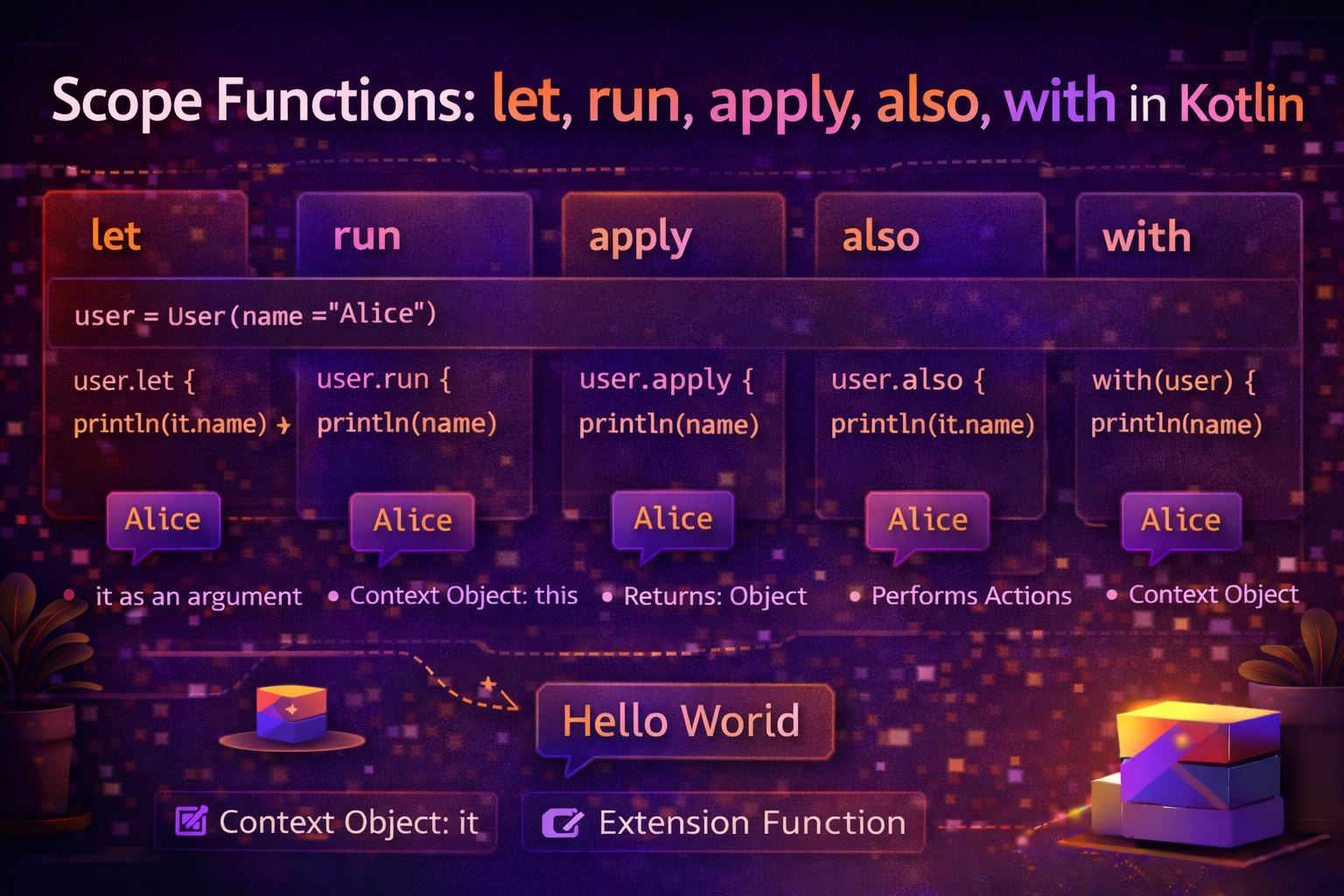
Scope functions are one of those Kotlin features that seem confusing at first but become second nature fast. You'll see them in every Android codebase — ?.let { }, .apply { }, .also { }. This guide breaks down all five scope functions clearly, explains when to use each, and shows you real Android examples so you know exactly when to reach for which one.
What Are Scope Functions?
Scope functions are standard library functions that execute a block of code in the context of an object. Inside the block, you can access the object without using its name. They make your code more concise and expressive.
// Without scope function — repetitive reference to 'user'
val user = User()
user.name = "Alice"
user.age = 25
user.email = "alice@email.com"
println(user)

// With apply — 'this' is the user, no repetition
val user = User().apply {
    name = "Alice"
    age = 25
    email = "alice@email.com"
}
println(user)
There are five scope functions: let, run, apply, also, with. They differ in two ways:
- How you refer to the object inside the block — as
thisor asit - What they return — the object itself, or the result of the lambda
The Two Key Differences
Context object — this vs it
this (implicit receiver) |
it (lambda argument) |
|---|---|
| Access members without prefix | Access object via it |
apply, run, with |
let, also |
| Reads like code inside the class | Clearer when passing to other functions |
val name = "Alice"

// 'this' — access members without prefix
name.run {
    println(length)       // same as name.length
    println(uppercase())  // same as name.uppercase()
}

// 'it' — access via explicit parameter
name.let {
    println(it.length)
    println(it.uppercase())
}
Return value — lambda result vs context object
| Returns lambda result | Returns context object |
|---|---|
let, run, with |
apply, also |
| Use when you need a transformed value | Use when you need the original object back |
let — Transform and Handle Null Safely
Context object: it Returns: Lambda result
let is most commonly used for null safety and transforming a value.
// Most common use — null safety
val name: String? = getName()

name?.let { n ->
    // Only runs if name is not null
    displayName(n)
    sendGreeting(n)
}

// Transform a value
val result = "  alice  ".let {
    it.trim().replaceFirstChar { c -> c.uppercase() }
}
println(result)   // Alice

// Chain transformations
val result = "hello world"
    .let { it.split(" ") }
    .let { it.map { w -> w.uppercase() } }
    .let { it.joinToString(", ") }
println(result)   // HELLO, WORLD
Real Android example:
// Update UI only if user is not null
viewModel.currentUser?.let { user ->
    nameTextView.text = user.name
    emailTextView.text = user.email
    loadAvatar(user.profileImageUrl)
}

// Safe navigation chain with default
val city = user?.address?.city?.let { city ->
    if (city.isNotBlank()) city else "Unknown"
} ?: "Not available"
run — Execute a Block and Get the Result
Context object: this Returns: Lambda result
run is ideal when you need to operate on an object and return a computed result.
val result = "Hello, Kotlin!".run {
    println(length)   // this is the string
    uppercase()       // returned
}
println(result)   // HELLO, KOTLIN!

// Compute a value using multiple steps
val isValidForm = run {
    val name = nameEditText.text.toString()
    val email = emailEditText.text.toString()
    val password = passwordEditText.text.toString()

    name.isNotBlank() &&
    email.contains("@") &&
    password.length >= 8
}

if (isValidForm) submitForm()
Real Android example:
val welcomeMessage = user.run {
    if (isAdmin) {
        "Welcome back, Admin $name!"
    } else {
        "Welcome, $name! You have $unreadCount unread messages."
    }
}
welcomeTextView.text = welcomeMessage

// Non-extension run — group related logic
val user = run {
    val savedId = preferences.getString("user_id", null)
    val savedToken = preferences.getString("auth_token", null)
    if (savedId != null && savedToken != null) {
        User(id = savedId, token = savedToken)
    } else null
}
apply — Configure an Object and Return It
Context object: this Returns: The context object itself
apply is the classic builder / configuration function. Use it to set up an object's properties and return the same object.
val user = User().apply {
    name = "Alice"
    age = 25
    email = "alice@email.com"
    isVerified = true
}

// Bundle creation — extremely common in Android
val bundle = Bundle().apply {
    putString("user_id", userId)
    putString("category", category)
    putBoolean("is_featured", true)
    putInt("page", 1)
}
fragment.arguments = bundle
Real Android examples:
// Intent configuration
val intent = Intent(context, ArticleDetailActivity::class.java).apply {
    putExtra("article_id", article.id)
    putExtra("category", article.category)
    addFlags(Intent.FLAG_ACTIVITY_NEW_TASK)
}
startActivity(intent)

// RecyclerView setup
recyclerView.apply {
    layoutManager = LinearLayoutManager(context)
    adapter = articleAdapter
    addItemDecoration(DividerItemDecoration(context, DividerItemDecoration.VERTICAL))
    setHasFixedSize(true)
}

// AlertDialog builder
AlertDialog.Builder(context).apply {
    setTitle("Delete Article")
    setMessage("Are you sure you want to delete this article?")
    setPositiveButton("Delete") { _, _ -> viewModel.deleteArticle(id) }
    setNegativeButton("Cancel", null)
    setCancelable(false)
}.show()

// TextView setup
titleTextView.apply {
    text = article.title
    setTextColor(ContextCompat.getColor(context, R.color.text_primary))
    setTypeface(typeface, Typeface.BOLD)
    maxLines = 2
    ellipsize = TextUtils.TruncateAt.END
}
also — Perform a Side Effect and Return the Object
Context object: it Returns: The context object itself
also is like apply but uses it. Use it for side effects — logging, validation, debugging — without interrupting a chain.
val numbers = mutableListOf(1, 2, 3)
    .also { println("Before: $it") }
    .also { it.add(4) }
    .also { println("After: $it") }
// Before: [1, 2, 3]
// After: [1, 2, 3, 4]

// Non-intrusive logging in a chain
val articles = repository.getArticles()
    .also { Log.d(TAG, "Fetched ${it.size} articles") }
    .filter { it.isPublished }
    .also { Log.d(TAG, "${it.size} articles after filtering") }
    .sortedByDescending { it.publishedAt }
Real Android examples:
// Validate while creating — don't break the flow
fun createUser(name: String, email: String): User {
    return User(name, email)
        .also { require(it.name.isNotBlank()) { "Name cannot be blank" } }
        .also { require(it.email.contains("@")) { "Invalid email" } }
}

// Cache while returning
fun getUser(id: String): User? {
    return fetchUserFromApi(id)
        ?.also { cache[id] = it }
}
with — Operate on an Object, Return a Result
Context object: this Returns: Lambda result
with is a non-extension function — you pass the object as an argument. Best when you want to call multiple functions on the same non-null object and return a result.

val result = with("Hello, Kotlin!") {
    println(length)
    lowercase()   // returned
}
println(result)   // hello, kotlin!

val stats = with(article) {
    ArticleStats(
        titleLength = title.length,
        wordCount = content.split(" ").size,
        readTimeMinutes = content.split(" ").size / 200,
        isLong = content.length > 3000
    )
}
Real Android example:
// Bind data to views — multiple operations on the same binding
with(binding) {
    titleTextView.text = article.title
    authorTextView.text = article.author.name
    dateTextView.text = article.publishedAt.toFormattedDate()
    categoryChip.text = article.category
    viewCountTextView.text = article.viewCount.formatAsCount()
    readTimeTextView.text = "${article.readTimeMinutes} min read"

    Glide.with(root.context)
        .load(article.thumbnailUrl)
        .into(thumbnailImageView)
}
Quick Comparison — All Five at a Glance
| Function | Object as | Returns | Best Used For |
|---|---|---|---|
let |
it |
Lambda result | Null safety, transformations |
run |
this |
Lambda result | Compute a result from an object |
apply |
this |
Object itself | Object configuration / setup |
also |
it |
Object itself | Side effects (logging, debugging) |
with |
this |
Lambda result | Multiple ops on non-null object |
Memory tricks
applyandalso→ return the object (good for builders and chains)let,run,with→ return the lambda result (good for transformations)apply,run,with→ context isthis(feel like you're inside the class)let,also→ context isit(object passed as parameter)
Choosing the Right Scope Function
Need null safety?
  └─ Yes → ?.let { }

Configuring an object and returning it?
  └─ Yes → apply { }

Performing a side effect (logging, caching, validating)?
  └─ Yes → also { }

Computing a result from an object?
  └─ Object as 'this'? → run { } or with(obj) { }
  └─ Object as 'it'?   → let { }
Common Mistakes to Avoid
Mistake 1: Nesting scope functions too deeply
// ❌ Confusing — what does 'this' refer to here?
user?.let {
    it.profile?.apply {
        nameTextView.text = name   // ambiguous
    }
}

// ✅ Use explicit names or separate steps
val profile = user?.profile ?: return
with(profile) {
    nameTextView.text = name
    loadAvatar(imageUrl)
}
Mistake 2: Using apply when ?.let is needed for null safety
// ❌ Crashes if user is null
user.apply {
    displayName(name)
}

// ✅ Use ?.let for null safety
user?.let {
    displayName(it.name)
}
Mistake 3: Expecting apply to return the lambda result
// ❌ apply returns the object (User), not String
val result: String = user.apply {
    name = "Alice"
}  // compile error

// ✅ Use run to return a transformed value
val result: String = user.run {
    name = "Alice"
    name
}
Mistake 4: Using with on a nullable object
// ❌ Crashes if user is null
with(user) {
    displayName(name)
}

// ✅ Use ?.run or ?.let instead
user?.run {
    displayName(name)
}
Real-World Combined Example
class ArticleDetailFragment : Fragment() {

    override fun onViewCreated(view: View, savedInstanceState: Bundle?) {
        super.onViewCreated(view, savedInstanceState)

        // apply — configure RecyclerView
        binding.relatedArticlesRecyclerView.apply {
            layoutManager = LinearLayoutManager(context, LinearLayoutManager.HORIZONTAL, false)
            adapter = relatedAdapter
            setHasFixedSize(true)
        }

        viewLifecycleOwner.lifecycleScope.launch {
            viewModel.article.collect { article ->

                // let — null-safe UI update
                article?.let { a ->

                    // with — multiple ops on binding without repeating 'binding.'
                    with(binding) {
                        titleTextView.text = a.title
                        contentTextView.text = a.content
                        authorTextView.text = a.author.name
                        dateTextView.text = a.publishedAt.toRelativeTime()
                    }

                    // also — log without breaking the chain
                    a.relatedArticles
                        .also { Log.d(TAG, "Related articles: ${it.size}") }
                        .let { relatedAdapter.submitList(it) }
                }
            }
        }

        // run — compute a value
        val shouldShowShare = run {
            UserSession.isLoggedIn && UserSession.currentUser?.isPremium == true
        }
        binding.shareButton.showIf(shouldShowShare)
    }
}
Summary
let—it, returns lambda result → null safety and transformationsrun—this, returns lambda result → compute a result using the objectapply—this, returns object → configure an object, return italso—it, returns object → side effects like logging and validationwith—this, returns lambda result → multiple operations on a non-null objectapplyandalsoreturn the object —let,run,withreturn the lambda result?.letis the most common scope function in Android for null-safe operations- Avoid deeply nested scope functions — use explicit names when it gets complex
Once these five become muscle memory, your Kotlin code becomes noticeably cleaner and more expressive. The key is knowing which one fits the situation — and that comes from practice.
Happy coding!
Comments (0)