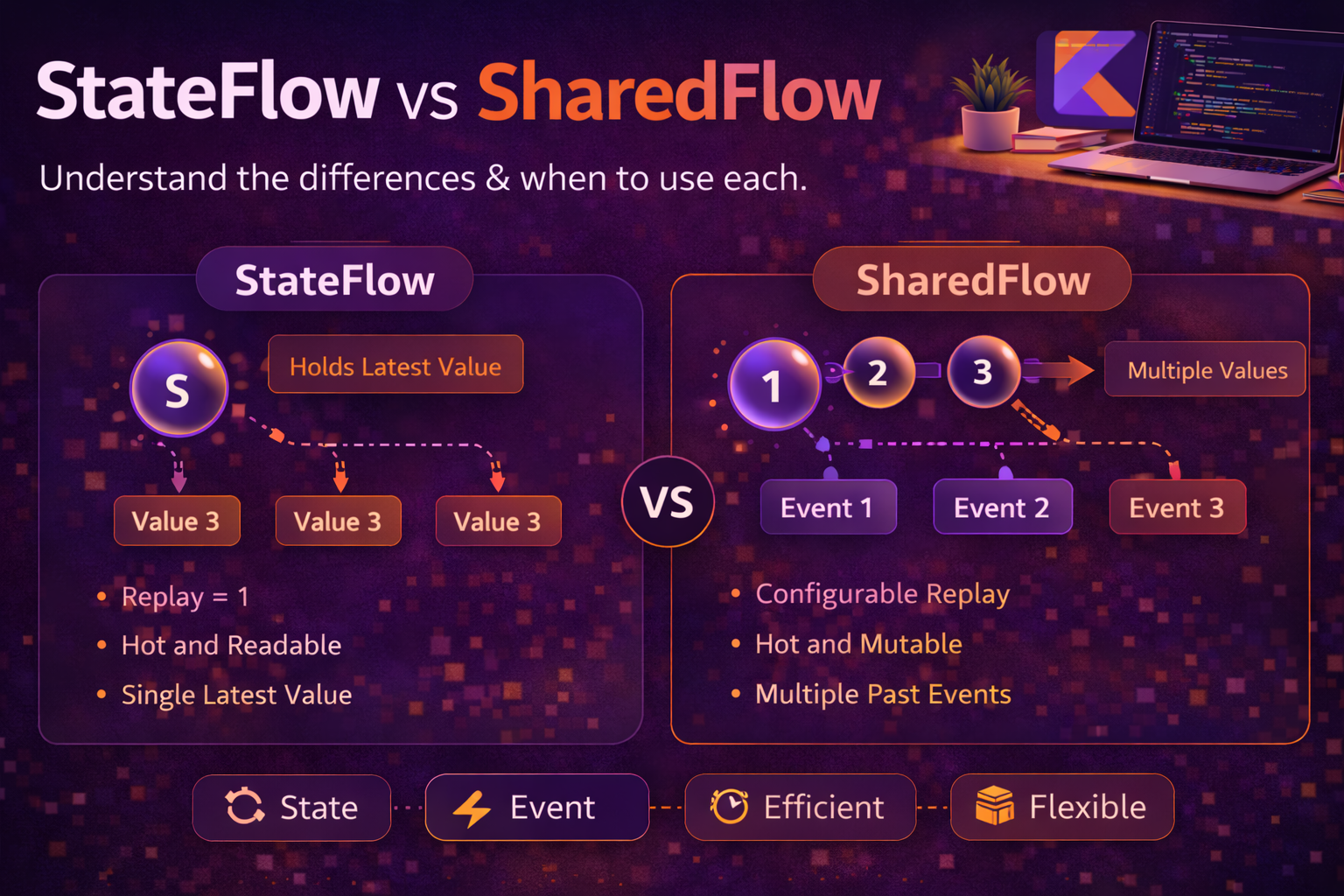
In the previous two posts, we covered cold Flows — streams that start fresh for every collector. But in real Android apps, you often need streams that are always active, hold a current value, or broadcast events to multiple collectors at once. That’s where StateFlow and SharedFlow come in — Kotlin’s hot stream primitives. StateFlow is your go-to for UI state. SharedFlow is your go-to for one-time events. This guide breaks down how each works, when to use which, and the real patterns that matter in Android development.
Hot vs Cold — Quick Recap
Before diving in, let’s be clear about the difference:
// COLD Flow — starts fresh for every collector
val coldFlow = flow {
    println("Fetching data...")
    emit(repository.getData())
}

// Collector 1 triggers "Fetching data..." and gets the result
coldFlow.collect { println(it) }

// Collector 2 triggers "Fetching data..." AGAIN — completely independent
coldFlow.collect { println(it) }


// HOT Flow — exists independently of collectors
val hotFlow = MutableStateFlow("initial")

// Value exists even with zero collectors
println(hotFlow.value)   // "initial"

// Multiple collectors share the same stream
launch { hotFlow.collect { println("Collector 1: $it") } }
launch { hotFlow.collect { println("Collector 2: $it") } }

hotFlow.value = "updated"   // both collectors receive "updated"
Cold Flows are lazy — they produce values only when collected. Hot Flows are eager — they produce values regardless of whether anyone is listening.
StateFlow
StateFlow is a hot Flow that always holds a current value. Think of it as an observable variable — it stores a single state and notifies collectors whenever that state changes.
// MutableStateFlow — read and write
val _counter = MutableStateFlow(0)   // must provide initial value

// StateFlow — read-only (expose to UI)
val counter: StateFlow<Int> = _counter

// Update the value
_counter.value = 1
_counter.value = 2

// Read the current value synchronously
println(_counter.value)   // 2

// Collect changes reactively
viewModelScope.launch {
    counter.collect { value ->
        println("Counter: $value")   // prints current value immediately, then updates
    }
}
Key characteristics of StateFlow
val state = MutableStateFlow("A")

// 1. Always has a value — no null, no empty
println(state.value)   // "A" — available immediately

// 2. Replays the latest value to new collectors
launch {
    delay(1000)
    state.collect { println(it) }   // immediately receives current value
}
state.value = "B"   // collector gets "B" when it starts (or later value)

// 3. Conflated — only the latest value matters
state.value = "C"
state.value = "D"
state.value = "E"
// A slow collector might only see "E" — intermediate values are dropped

// 4. distinctUntilChanged built-in — skips duplicate values
state.value = "E"   // same value — collectors are NOT notified
state.value = "F"   // different value — collectors ARE notified

// 5. Never completes — collectors suspend forever waiting for updates
// (unlike cold Flow which completes when the block finishes)
StateFlow in ViewModel — the standard pattern
class ArticleViewModel(private val repository: ArticleRepository) : ViewModel() {

    // Private mutable — only ViewModel can modify
    private val _uiState = MutableStateFlow<ArticleUiState>(ArticleUiState.Loading)

    // Public read-only — UI observes this
    val uiState: StateFlow<ArticleUiState> = _uiState

    init {
        loadArticles()
    }

    private fun loadArticles() {
        viewModelScope.launch {
            try {
                val articles = repository.getArticles()
                _uiState.value = ArticleUiState.Success(articles)
            } catch (e: CancellationException) {
                throw e
            } catch (e: Exception) {
                _uiState.value = ArticleUiState.Error(e.message ?: "Unknown error")
            }
        }
    }

    fun retry() {
        _uiState.value = ArticleUiState.Loading
        loadArticles()
    }
}

sealed interface ArticleUiState {
    data object Loading : ArticleUiState
    data class Success(val articles: List<Article>) : ArticleUiState
    data class Error(val message: String) : ArticleUiState
}
update {} — thread-safe state modification
// ❌ Not thread-safe — read and write are separate operations
_uiState.value = _uiState.value.copy(isLoading = true)
// Another coroutine could change value between read and write

// ✅ Thread-safe atomic update
_uiState.update { currentState ->
    currentState.copy(isLoading = true)
}
// update {} reads and writes atomically — no race conditions

// Real example — toggle a favourite
fun toggleFavourite(articleId: String) {
    _uiState.update { state ->
        if (state is ArticleUiState.Success) {
            val updated = state.articles.map { article ->
                if (article.id == articleId) {
                    article.copy(isFavourite = !article.isFavourite)
                } else article
            }
            state.copy(articles = updated)
        } else state
    }
}
SharedFlow
SharedFlow is a hot Flow that broadcasts values to multiple collectors without holding a current state. It’s designed for events — things that happen once and shouldn’t be replayed or conflated.
// MutableSharedFlow — emit events
val _events = MutableSharedFlow<UiEvent>()

// SharedFlow — read-only (expose to UI)
val events: SharedFlow<UiEvent> = _events

// Emit an event (suspending function)
viewModelScope.launch {
    _events.emit(UiEvent.ShowSnackbar("Article saved"))
}

// Collect events
viewModelScope.launch {
    events.collect { event ->
        when (event) {
            is UiEvent.ShowSnackbar -> showSnackbar(event.message)
            is UiEvent.NavigateTo -> navigate(event.route)
        }
    }
}
Key characteristics of SharedFlow
// 1. No initial value required
val events = MutableSharedFlow<String>()   // no default value

// 2. Default: no replay (new collectors miss past events)
val noReplay = MutableSharedFlow<String>()          // replay = 0 (default)
noReplay.emit("Event 1")
noReplay.collect { }   // does NOT receive "Event 1"

// 3. Configurable replay
val withReplay = MutableSharedFlow<String>(replay = 1)   // replays last 1
withReplay.emit("Event 1")
withReplay.emit("Event 2")
withReplay.collect { }   // receives "Event 2" immediately (last 1 replayed)

// 4. Does NOT skip duplicates (unlike StateFlow)
val events2 = MutableSharedFlow<String>()
events2.emit("click")
events2.emit("click")   // collectors receive "click" TWICE

// 5. Configurable buffer for slow collectors
val buffered = MutableSharedFlow<String>(
    replay = 0,
    extraBufferCapacity = 64,                // buffer up to 64 values
    onBufferOverflow = BufferOverflow.DROP_OLDEST   // drop oldest if full
)
SharedFlow for one-time events
class ArticleViewModel(private val repository: ArticleRepository) : ViewModel() {

    private val _uiState = MutableStateFlow<ArticleUiState>(ArticleUiState.Loading)
    val uiState: StateFlow<ArticleUiState> = _uiState

    // Events — should be consumed once, not replayed
    private val _events = MutableSharedFlow<UiEvent>()
    val events: SharedFlow<UiEvent> = _events

    fun saveArticle(article: Article) {
        viewModelScope.launch {
            try {
                repository.save(article)
                _events.emit(UiEvent.ShowSnackbar("Article saved"))
                _events.emit(UiEvent.NavigateBack)
            } catch (e: CancellationException) {
                throw e
            } catch (e: Exception) {
                _events.emit(UiEvent.ShowSnackbar("Save failed: ${e.message}"))
            }
        }
    }

    fun deleteArticle(id: String) {
        viewModelScope.launch {
            repository.delete(id)
            _events.emit(UiEvent.ShowSnackbar("Article deleted"))
        }
    }
}

sealed interface UiEvent {
    data class ShowSnackbar(val message: String) : UiEvent
    data class NavigateTo(val route: String) : UiEvent
    data object NavigateBack : UiEvent
}
StateFlow vs SharedFlow — Side by Side
// ┌──────────────────────┬──────────────────────┬──────────────────────┐
// │                      │     StateFlow         │     SharedFlow        │
// ├──────────────────────┼──────────────────────┼──────────────────────┤
// │ Initial value        │ Required              │ Not required          │
// │ Current value        │ .value accessible     │ No .value property    │
// │ Replay               │ Always 1 (latest)     │ Configurable (0..N)   │
// │ Duplicate emissions  │ Skipped (conflated)   │ All delivered          │
// │ Best for             │ UI State              │ One-time events        │
// │ Comparable to        │ LiveData              │ SingleLiveEvent        │
// │ Completes?           │ Never                 │ Never                  │
// └──────────────────────┴──────────────────────┴──────────────────────┘
Rule of thumb
// Use StateFlow when:
// - UI needs to display current state (loading, content, error)
// - New collectors should immediately see the latest state
// - Duplicate values are meaningless (screen already shows "loading")

// Use SharedFlow when:
// - Events should be consumed once (snackbar, navigation, toast)
// - Duplicate events matter (user clicked "save" twice = two saves)
// - You don't need a "current value" concept
Converting Cold Flow to Hot Flow
stateIn — cold Flow to StateFlow
class ArticleViewModel(repository: ArticleRepository) : ViewModel() {

    // Convert a cold database Flow to a hot StateFlow
    val articles: StateFlow<List<Article>> = repository.getArticles()   // cold Flow
        .map { it.filter { article -> article.isPublished } }
        .catch { emit(emptyList()) }
        .stateIn(
            scope = viewModelScope,           // keeps the Flow alive
            started = SharingStarted.WhileSubscribed(5000),   // sharing strategy
            initialValue = emptyList()        // value before first emission
        )
}
SharingStarted strategies
// Eagerly — starts immediately, never stops
// Use for: data that should always be ready
stateIn(viewModelScope, SharingStarted.Eagerly, initial)

// Lazily — starts on first collector, never stops
// Use for: data needed eventually but not immediately
stateIn(viewModelScope, SharingStarted.Lazily, initial)

// WhileSubscribed — starts on first collector, stops when last one leaves
// Use for: most Android UI cases (saves resources when app is in background)
stateIn(
    viewModelScope,
    SharingStarted.WhileSubscribed(
        stopTimeoutMillis = 5000,   // wait 5s after last collector before stopping
        replayExpirationMillis = 0  // keep last value after stopping (default)
    ),
    initial
)

// WhileSubscribed(5000) is the recommended default for Android —
// 5s timeout survives configuration changes (screen rotation)
// without keeping resources alive when app is truly in background
shareIn — cold Flow to SharedFlow
// Share a cold Flow among multiple collectors
val notifications: SharedFlow<Notification> = repository.getNotifications()
    .shareIn(
        scope = viewModelScope,
        started = SharingStarted.WhileSubscribed(),
        replay = 0   // don't replay old notifications
    )

// With replay — new collectors get the last N values
val recentPrices: SharedFlow<Price> = priceService.getPriceUpdates()
    .shareIn(
        scope = viewModelScope,
        started = SharingStarted.WhileSubscribed(5000),
        replay = 1   // new collectors get the last price immediately
    )
Collecting in the UI Layer
Fragment — lifecycle-aware collection
class ArticleFragment : Fragment() {

    override fun onViewCreated(view: View, savedInstanceState: Bundle?) {
        super.onViewCreated(view, savedInstanceState)

        // Collect StateFlow — UI state
        viewLifecycleOwner.lifecycleScope.launch {
            viewLifecycleOwner.repeatOnLifecycle(Lifecycle.State.STARTED) {
                viewModel.uiState.collect { state ->
                    when (state) {
                        is ArticleUiState.Loading -> showLoading()
                        is ArticleUiState.Success -> showArticles(state.articles)
                        is ArticleUiState.Error -> showError(state.message)
                    }
                }
            }
        }

        // Collect SharedFlow — one-time events
        viewLifecycleOwner.lifecycleScope.launch {
            viewLifecycleOwner.repeatOnLifecycle(Lifecycle.State.STARTED) {
                viewModel.events.collect { event ->
                    when (event) {
                        is UiEvent.ShowSnackbar -> {
                            Snackbar.make(view, event.message, Snackbar.LENGTH_SHORT).show()
                        }
                        is UiEvent.NavigateBack -> findNavController().popBackStack()
                        is UiEvent.NavigateTo -> findNavController().navigate(event.route)
                    }
                }
            }
        }
    }
}
Compose — collecting StateFlow
@Composable
fun ArticleScreen(viewModel: ArticleViewModel = viewModel()) {

    // collectAsStateWithLifecycle — lifecycle-aware, recommended
    val uiState by viewModel.uiState.collectAsStateWithLifecycle()

    when (val state = uiState) {
        is ArticleUiState.Loading -> LoadingIndicator()
        is ArticleUiState.Success -> ArticleList(state.articles)
        is ArticleUiState.Error -> ErrorMessage(state.message)
    }

    // Collecting SharedFlow events in Compose
    LaunchedEffect(Unit) {
        viewModel.events.collect { event ->
            when (event) {
                is UiEvent.ShowSnackbar -> snackbarHostState.showSnackbar(event.message)
                is UiEvent.NavigateBack -> navController.popBackStack()
                is UiEvent.NavigateTo -> navController.navigate(event.route)
            }
        }
    }
}
Collecting multiple Flows concurrently
// ❌ Second collect never runs — first collect suspends forever
viewLifecycleOwner.lifecycleScope.launch {
    viewLifecycleOwner.repeatOnLifecycle(Lifecycle.State.STARTED) {
        viewModel.uiState.collect { /* ... */ }      // suspends forever
        viewModel.events.collect { /* ... */ }        // never reached!
    }
}

// ✅ Launch each collection in a separate coroutine
viewLifecycleOwner.lifecycleScope.launch {
    viewLifecycleOwner.repeatOnLifecycle(Lifecycle.State.STARTED) {
        launch { viewModel.uiState.collect { /* ... */ } }
        launch { viewModel.events.collect { /* ... */ } }
    }
}
Real Android Patterns
Complete ViewModel with StateFlow + SharedFlow
class ArticleDetailViewModel(
    private val articleId: String,
    private val repository: ArticleRepository,
    private val bookmarkRepository: BookmarkRepository
) : ViewModel() {

    // UI State — what the screen displays
    private val _uiState = MutableStateFlow<DetailUiState>(DetailUiState.Loading)
    val uiState: StateFlow<DetailUiState> = _uiState

    // Events — one-time actions
    private val _events = MutableSharedFlow<DetailEvent>()
    val events: SharedFlow<DetailEvent> = _events

    init {
        loadArticle()
    }

    private fun loadArticle() {
        viewModelScope.launch {
            try {
                val article = repository.getArticle(articleId)
                val isBookmarked = bookmarkRepository.isBookmarked(articleId)
                _uiState.value = DetailUiState.Success(
                    article = article,
                    isBookmarked = isBookmarked
                )
            } catch (e: CancellationException) {
                throw e
            } catch (e: Exception) {
                _uiState.value = DetailUiState.Error(e.message ?: "Failed to load")
            }
        }
    }

    fun toggleBookmark() {
        _uiState.update { state ->
            if (state is DetailUiState.Success) {
                state.copy(isBookmarked = !state.isBookmarked)
            } else state
        }

        viewModelScope.launch {
            try {
                val current = _uiState.value
                if (current is DetailUiState.Success) {
                    if (current.isBookmarked) {
                        bookmarkRepository.bookmark(articleId)
                        _events.emit(DetailEvent.ShowSnackbar("Bookmarked"))
                    } else {
                        bookmarkRepository.removeBookmark(articleId)
                        _events.emit(DetailEvent.ShowSnackbar("Bookmark removed"))
                    }
                }
            } catch (e: CancellationException) {
                throw e
            } catch (e: Exception) {
                // Revert optimistic update
                _uiState.update { state ->
                    if (state is DetailUiState.Success) {
                        state.copy(isBookmarked = !state.isBookmarked)
                    } else state
                }
                _events.emit(DetailEvent.ShowSnackbar("Failed: ${e.message}"))
            }
        }
    }

    fun shareArticle() {
        val state = _uiState.value
        if (state is DetailUiState.Success) {
            viewModelScope.launch {
                _events.emit(DetailEvent.ShareArticle(state.article.url))
            }
        }
    }
}

sealed interface DetailUiState {
    data object Loading : DetailUiState
    data class Success(val article: Article, val isBookmarked: Boolean) : DetailUiState
    data class Error(val message: String) : DetailUiState
}

sealed interface DetailEvent {
    data class ShowSnackbar(val message: String) : DetailEvent
    data class ShareArticle(val url: String) : DetailEvent
}
Multiple StateFlows combined for complex UI
class HomeViewModel(
    private val userRepo: UserRepository,
    private val feedRepo: FeedRepository,
    private val notificationRepo: NotificationRepository
) : ViewModel() {

    private val _refreshing = MutableStateFlow(false)

    val uiState: StateFlow<HomeUiState> = combine(
        userRepo.currentUser(),
        feedRepo.getFeed(),
        notificationRepo.unreadCount(),
        _refreshing
    ) { user, feed, unreadCount, refreshing ->
        HomeUiState(
            userName = user.displayName,
            avatarUrl = user.avatarUrl,
            feedItems = feed.map { it.toUiModel() },
            unreadNotifications = unreadCount,
            isRefreshing = refreshing
        )
    }
    .catch { e ->
        emit(HomeUiState(error = e.message))
    }
    .stateIn(
        scope = viewModelScope,
        started = SharingStarted.WhileSubscribed(5000),
        initialValue = HomeUiState(isLoading = true)
    )

    fun refresh() {
        viewModelScope.launch {
            _refreshing.value = true
            try {
                feedRepo.refresh()
            } finally {
                _refreshing.value = false
            }
        }
    }
}
SharedFlow as an event bus between ViewModels
// Shared event bus — singleton
object AppEventBus {
    private val _events = MutableSharedFlow<AppEvent>(extraBufferCapacity = 64)
    val events: SharedFlow<AppEvent> = _events

    suspend fun send(event: AppEvent) {
        _events.emit(event)
    }
}

sealed interface AppEvent {
    data class UserLoggedOut(val reason: String) : AppEvent
    data object ThemeChanged : AppEvent
    data class DeepLink(val uri: String) : AppEvent
}

// Producer — any ViewModel can send events
class AuthViewModel : ViewModel() {
    fun logout() {
        viewModelScope.launch {
            authRepository.logout()
            AppEventBus.send(AppEvent.UserLoggedOut("User requested"))
        }
    }
}

// Consumer — any ViewModel can receive events
class CartViewModel : ViewModel() {
    init {
        viewModelScope.launch {
            AppEventBus.events.collect { event ->
                when (event) {
                    is AppEvent.UserLoggedOut -> clearCart()
                    else -> { /* ignore */ }
                }
            }
        }
    }
}
Common Mistakes to Avoid
Mistake 1: Using StateFlow for one-time events
// ❌ StateFlow replays the last value — snackbar shows again on rotation
private val _event = MutableStateFlow<String?>(null)

fun save() {
    _event.value = "Saved!"   // new collectors see this on rotation!
}

// ✅ Use SharedFlow for events — no replay by default
private val _event = MutableSharedFlow<String>()

fun save() {
    viewModelScope.launch {
        _event.emit("Saved!")   // consumed once, not replayed
    }
}
Mistake 2: Collecting multiple Flows sequentially instead of concurrently
// ❌ Second Flow is never collected
repeatOnLifecycle(Lifecycle.State.STARTED) {
    viewModel.uiState.collect { /* ... */ }   // blocks forever
    viewModel.events.collect { /* ... */ }     // never reached
}

// ✅ Launch separately
repeatOnLifecycle(Lifecycle.State.STARTED) {
    launch { viewModel.uiState.collect { /* ... */ } }
    launch { viewModel.events.collect { /* ... */ } }
}
Mistake 3: Exposing MutableStateFlow to the UI
// ❌ UI can modify state directly — breaks unidirectional data flow
class MyViewModel : ViewModel() {
    val uiState = MutableStateFlow(UiState.Loading)   // anyone can write!
}

// In Fragment:
viewModel.uiState.value = UiState.Success(fakeData)   // oops

// ✅ Expose read-only StateFlow
class MyViewModel : ViewModel() {
    private val _uiState = MutableStateFlow(UiState.Loading)
    val uiState: StateFlow<UiState> = _uiState   // read-only
}
Mistake 4: Forgetting that StateFlow skips duplicate values
// ❌ Collectors won't be notified — same value
data class FormState(val name: String, val errors: List<String>)

_formState.value = FormState("Alice", listOf("Name too short"))
_formState.value = FormState("Alice", listOf("Name too short"))
// Second emission is silently ignored — same data class equals()

// ✅ If you need every emission, use SharedFlow
// Or add a unique field like a timestamp or counter
data class FormState(
    val name: String,
    val errors: List<String>,
    val updateId: Long = System.currentTimeMillis()   // forces uniqueness
)
Mistake 5: Using WhileSubscribed(0) — losing state on rotation
// ❌ Stops immediately when collector is gone — restarts on rotation
stateIn(viewModelScope, SharingStarted.WhileSubscribed(0), initial)
// Screen rotation = collector unsubscribes briefly = upstream restarts!

// ✅ Add a timeout to survive configuration changes
stateIn(viewModelScope, SharingStarted.WhileSubscribed(5000), initial)
// 5 seconds is enough for rotation — upstream keeps running
Summary
- StateFlow is a hot Flow that always holds a current value — use it for UI state
- SharedFlow is a hot Flow that broadcasts events without holding state — use it for one-time events
- StateFlow requires an initial value, is conflated (latest value only), and skips duplicates
- SharedFlow has no initial value, configurable replay, and delivers every emission including duplicates
- Use
update {}on MutableStateFlow for thread-safe state modification - Convert cold Flow to StateFlow with
stateInand to SharedFlow withshareIn SharingStarted.WhileSubscribed(5000)is the recommended strategy for most Android UI use cases- Always expose read-only
StateFlow/SharedFlowto the UI — keepMutablevariants private - Collect with
repeatOnLifecyclein Fragments orcollectAsStateWithLifecyclein Compose - When collecting multiple Flows, launch each in a separate coroutine — collect suspends forever
- StateFlow replays the latest value to new collectors — don’t use it for one-time events
- SharedFlow with
extraBufferCapacitypreventsemitfrom suspending when collectors are slow - Use
WhileSubscribed(5000)— notWhileSubscribed(0)— to survive screen rotation
StateFlow and SharedFlow complete the reactive toolkit in Kotlin. StateFlow replaces LiveData for observable state. SharedFlow replaces SingleLiveEvent for one-time signals. Combined with cold Flow for data pipelines and operators for transformations, you now have everything you need to build fully reactive Android apps without ever reaching for RxJava.
Happy coding!
Comments (0)