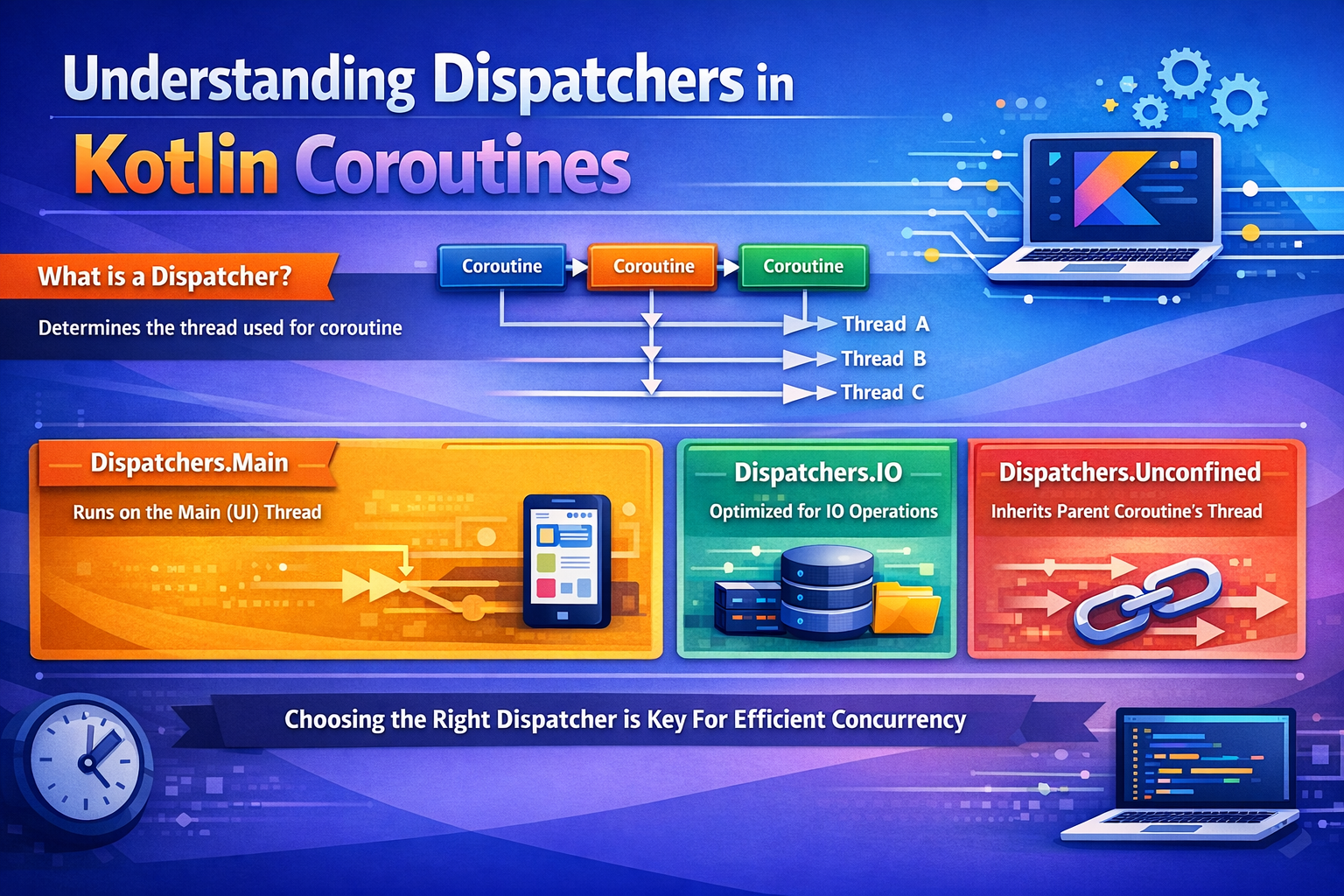
If you’ve started using Kotlin Coroutines, you’ve probably seen code like Dispatchers.IO or Dispatchers.Main and wondered — what does this actually do, and why does it matter? This guide explains dispatchers in plain language with real examples and analogies so it all makes sense.
The Problem Dispatchers Solve
In Android, there is one rule you must never break:
Never do heavy work on the main thread.
The main thread is responsible for drawing your UI. If you block it with a network call or database query, the screen freezes. The user sees an ANR (App Not Responding) dialog. Bad experience.
So heavy work needs to run on a background thread. But after the work is done, you need to come back to the main thread to update the UI.
Dispatchers are what control which thread your coroutine runs on.
Real-world analogy: Think of your app as a restaurant. The main thread is the front-of-house manager who talks to customers (the UI). The background threads are the kitchen staff doing the actual cooking (data work). A dispatcher is the intercom system that routes tasks — “this goes to the kitchen” or “this goes back to the manager.”
What Is a Dispatcher?
A dispatcher is a part of the coroutine context that decides which thread or thread pool a coroutine runs on.
When you launch a coroutine, you can pass a dispatcher to tell it where to run:
// Without dispatcher — uses the scope's default
viewModelScope.launch {
    // runs on Main by default (viewModelScope uses Dispatchers.Main.immediate)
}

// With dispatcher — explicit control
viewModelScope.launch(Dispatchers.IO) {
    // runs on background IO thread
}
Kotlin gives you four built-in dispatchers. Let’s go through each one.
1. Dispatchers.Main
Runs the coroutine on the main UI thread.
Analogy: This is the front-of-house manager. Everything that involves talking to the customer (updating UI, showing a dialog, changing text) must go through them.
Use it for: updating TextView, RecyclerView, or any UI component, showing/hiding views, navigation actions, updating LiveData or StateFlow values.
viewModelScope.launch {   // Main by default in viewModelScope
    _uiState.value = UiState.Loading      // safe — Main thread
    val data = withContext(Dispatchers.IO) {
        repository.fetchUser()            // switches to IO
    }
    _uiState.value = UiState.Success(data)   // back on Main automatically
}
In practice, you rarely need to write Dispatchers.Main explicitly because viewModelScope already runs on Main. The recommended pattern is to stay on Main by default and switch to background dispatchers only for the heavy work using withContext.
Dispatchers.Main vs Dispatchers.Main.immediate
// Dispatchers.Main — always posts to the main thread's message queue
// Even if you're already ON the main thread, it schedules and waits

// Dispatchers.Main.immediate — if already on Main, executes immediately
// No scheduling overhead when you're already on the right thread

// viewModelScope uses Main.immediate by default — this is why:
viewModelScope.launch {
    // This code runs IMMEDIATELY, no dispatch delay
    _uiState.value = UiState.Loading   // instant
}

// With plain Dispatchers.Main, there would be a 1-frame delay
// before the code runs (posted to the message queue)
Rule of thumb: You almost never need to think about this. viewModelScope and lifecycleScope use Main.immediate by default, which is the correct choice.
2. Dispatchers.IO
Runs the coroutine on a background thread pool optimized for waiting.
Analogy: This is the kitchen staff that spends a lot of time waiting — waiting for an oven to preheat, waiting for a delivery to arrive. They are not doing heavy lifting, just waiting on something external. IO threads are like this — they wait on the network, on a file read, on a database response.
Use it for: network calls (blocking ones), reading/writing files, Room database queries, SharedPreferences / DataStore reads.
// Recommended pattern: launch on Main, switch to IO for background work
viewModelScope.launch {
    _isLoading.value = true

    try {
        val articles = withContext(Dispatchers.IO) {
            newsApi.getLatestArticles()     // network call on IO
        }
        _articles.value = articles          // back on Main — safe for UI

    } catch (e: CancellationException) {
        throw e                             // always re-throw cancellation
    } catch (e: Exception) {
        _error.value = e.message
    } finally {
        _isLoading.value = false
    }
}
Under the hood: Dispatchers.IO uses a shared thread pool that can grow up to 64 threads (or the number of CPU cores, whichever is higher). It is designed for tasks that block while waiting, not for tasks that crunch numbers.
A note about Retrofit and Room
// Retrofit suspend functions are already main-safe
// Retrofit handles the thread switching internally
interface ArticleApi {
    @GET("articles")
    suspend fun getArticles(): List<Article>   // safe to call from Main
}

// So this works WITHOUT withContext:
viewModelScope.launch {
    val articles = api.getArticles()   // Retrofit handles IO internally
    _articles.value = articles
}

// Room suspend functions are also main-safe since Room 2.1
@Dao
interface ArticleDao {
    @Query("SELECT * FROM articles")
    suspend fun getAll(): List<Article>   // Room handles IO internally
}

// When DO you need withContext(Dispatchers.IO)?
// - Blocking file operations (File.readText(), InputStream)
// - SharedPreferences reads/writes
// - Non-suspend blocking API calls
// - Any third-party library that doesn't handle threading itself

viewModelScope.launch {
    val content = withContext(Dispatchers.IO) {
        File(path).readText()   // blocking I/O — needs IO dispatcher
    }
}
3. Dispatchers.Default
Runs the coroutine on a background thread pool optimized for CPU work.
Analogy: These are the specialist chefs doing the actual cooking — chopping, mixing, calculating. They are actively working the whole time, not waiting. CPU threads are like this — they are doing real computation continuously.
Use it for: sorting or filtering large lists, parsing large JSON responses, image processing or bitmap manipulation, mathematical calculations, any CPU-heavy work.
viewModelScope.launch {
    _isLoading.value = true

    val sorted = withContext(Dispatchers.Default) {
        // Sort 100,000 items — heavy CPU work
        bigList.sortedByDescending { it.score }
    }

    _items.value = sorted   // back on Main
    _isLoading.value = false
}
Another example — parsing a large JSON manually:
viewModelScope.launch {
    val rawJson = withContext(Dispatchers.IO) {
        file.readText()                        // IO — file read (waiting)
    }
    val parsed = withContext(Dispatchers.Default) {
        parseComplexJson(rawJson)              // Default — CPU work (computing)
    }
    _data.value = parsed                       // Main — update UI
}
Under the hood: Dispatchers.Default uses a thread pool with size equal to the number of CPU cores on the device (minimum 2). This prevents too many threads from competing for CPU time.
IO and Default share the same thread pool
// Important implementation detail:
// Dispatchers.IO and Dispatchers.Default share the SAME underlying thread pool
// They differ in how many threads they allow to be active simultaneously:
//   - Default: limited to CPU core count (e.g., 8 threads on an 8-core device)
//   - IO: limited to max(64, CPU core count) threads

// This means switching between IO and Default with withContext is CHEAP
// No actual thread switch happens if the current thread is already in the pool
viewModelScope.launch {
    val raw = withContext(Dispatchers.IO) {
        api.fetchData()                         // waiting (IO)
    }
    val processed = withContext(Dispatchers.Default) {
        transform(raw)                          // computing (Default)
    }
    // The switch from IO → Default may reuse the SAME thread
    // Only the concurrency limit changes, not the actual pool
}
4. Dispatchers.Unconfined
Starts in the current thread but after the first suspension point, resumes in whatever thread handled the suspension.
Analogy: A freelance worker with no fixed desk. They start work at whatever desk is available, and after a break, they sit wherever is free when they come back.
launch(Dispatchers.Unconfined) {
    println("Before delay: ${Thread.currentThread().name}")
    // Prints: main

    delay(100)

    println("After delay: ${Thread.currentThread().name}")
    // Prints: kotlinx.coroutines.DefaultExecutor  ← different thread!
}
The thread changed after delay(). This makes behaviour unpredictable in real apps.
// ❌ Don't use Unconfined in production Android code
// The coroutine could resume on any thread — UI updates might crash

// ✅ Useful in specific testing scenarios
// and for coroutines that don't touch UI or thread-confined resources
The Recommended Pattern
The modern, recommended approach in Android is simple: launch on Main, switch for background work.
// ✅ THE PATTERN: stay on Main, use withContext for background work
viewModelScope.launch {                              // Main (default)
    _uiState.value = UiState.Loading                 // Main — update UI

    try {
        val rawData = withContext(Dispatchers.IO) {
            repository.fetchData()                   // IO — network/file
        }

        val processed = withContext(Dispatchers.Default) {
            heavyTransformation(rawData)             // Default — CPU
        }

        _uiState.value = UiState.Success(processed) // Main — update UI

    } catch (e: CancellationException) {
        throw e
    } catch (e: Exception) {
        _uiState.value = UiState.Error(e.message ?: "Unknown error")
    }
}

// Why this pattern?
// 1. UI code runs naturally on Main — no withContext(Main) needed
// 2. Only background work is explicitly switched — easy to audit
// 3. Clean, linear, top-to-bottom readability
// 4. Error handling wraps everything in one place
// ❌ OLD PATTERN: launch on IO, switch back to Main for UI
viewModelScope.launch(Dispatchers.IO) {
val data = repository.fetchData()
withContext(Dispatchers.Main) { // manually switching back to Main
_uiState.value = UiState.Success(data)
}
}
// Problems:
// - Every UI update needs withContext(Main)
// - Easy to forget and crash with CalledFromWrongThreadException
// - More verbose, harder to readCustom Dispatchers
Sometimes you need a dispatcher for a specific purpose — for example, limiting concurrency for a rate-limited API, or a single thread for sequential database writes.
limitedParallelism — the modern approach
// Create a dispatcher that limits concurrency
// This is the recommended way in modern Kotlin coroutines

// Single-threaded — guarantees sequential execution, no race conditions
val dbDispatcher = Dispatchers.IO.limitedParallelism(1)

viewModelScope.launch {
    withContext(dbDispatcher) {
        database.write(record1)   // runs first
        database.write(record2)   // then this — guaranteed order
    }
}

// Limited concurrency — max 3 simultaneous operations
val rateLimitedDispatcher = Dispatchers.IO.limitedParallelism(3)

repeat(10) { i ->
    launch(rateLimitedDispatcher) {
        println("Task $i on ${Thread.currentThread().name}")
        delay(1000)
    }
}
// Only 3 run simultaneously, others wait for a slot

// Benefits of limitedParallelism over creating raw thread pools:
// - Reuses the existing IO thread pool (no extra threads created)
// - No need to manually close() the dispatcher
// - No risk of thread leaks
// - Lightweight — just limits concurrency
Raw thread pool dispatchers — legacy approach
// You can still create dispatchers from Java Executors
// But prefer limitedParallelism when possible

val singleThread = Executors.newSingleThreadExecutor()
    .asCoroutineDispatcher()

val fixedPool = Executors.newFixedThreadPool(3)
    .asCoroutineDispatcher()

// ⚠️ IMPORTANT: Always close custom executor-based dispatchers when done
// Otherwise you leak threads!
singleThread.close()
fixedPool.close()

// This is why limitedParallelism is preferred — no cleanup needed
Common Mistakes
Mistake 1: Using IO for CPU work
// ❌ Wrong — IO can spawn up to 64 threads competing for CPU
launch(Dispatchers.IO) {
    val sorted = millionItems.sortedBy { it.name }   // CPU-heavy
}

// ✅ Correct — Default limits threads to CPU core count
launch(Dispatchers.Default) {
    val sorted = millionItems.sortedBy { it.name }
}

// Why it matters: 64 threads doing CPU work simultaneously will
// cause excessive context switching and actually SLOW DOWN your app
// Default's core-count limit ensures optimal CPU utilisation
Mistake 2: Launching on IO and updating UI without switching back
// ❌ Crashes with CalledFromWrongThreadException
launch(Dispatchers.IO) {
    val data = api.fetch()
    textView.text = data   // UI update on background thread!
}

// ✅ Correct — switch back to Main for UI
launch(Dispatchers.IO) {
    val data = api.fetch()
    withContext(Dispatchers.Main) {
        textView.text = data
    }
}

// ✅ Even better — use the recommended pattern
viewModelScope.launch {   // Main by default
    val data = withContext(Dispatchers.IO) { api.fetch() }
    textView.text = data   // already on Main
}
Mistake 3: Using withContext(Dispatchers.IO) for Retrofit/Room suspend functions
// ❌ Unnecessary — Retrofit handles threading internally
val data = withContext(Dispatchers.IO) {
    retrofit.getArticles()   // Retrofit suspend functions are main-safe
}

// ✅ Just call it directly
val data = retrofit.getArticles()   // already main-safe

// DO use withContext(IO) for non-suspend blocking calls:
val content = withContext(Dispatchers.IO) {
    File(path).readText()   // blocking call — needs IO
}
Mistake 4: Creating executor-based dispatchers without closing them
// ❌ Thread leak — threads never cleaned up
val dispatcher = Executors.newFixedThreadPool(4).asCoroutineDispatcher()
// forgot dispatcher.close()!

// ✅ Use limitedParallelism instead — no cleanup needed
val dispatcher = Dispatchers.IO.limitedParallelism(4)
Quick Reference
// ┌───────────────────────┬─────────────────────┬──────────────────────┬──────────────────────┐
// │ Dispatcher            │ Thread              │ Use For              │ Avoid                │
// ├───────────────────────┼─────────────────────┼──────────────────────┼──────────────────────┤
// │ Dispatchers.Main      │ UI thread           │ UI updates,          │ Any blocking work    │
// │                       │                     │ StateFlow, LiveData  │                      │
// │ Dispatchers.Main      │ UI thread           │ Same as Main, but   │ Any blocking work    │
// │   .immediate          │ (no re-dispatch)    │ executes immediately │                      │
// │ Dispatchers.IO        │ Background          │ Network, DB, files   │ CPU-heavy work       │
// │                       │ (up to 64 threads)  │ (blocking I/O)       │                      │
// │ Dispatchers.Default   │ Background          │ Sorting, parsing,    │ Network or file I/O  │
// │                       │ (= CPU cores)       │ math, CPU work       │                      │
// │ Dispatchers.Unconfined│ Current → varies    │ Testing only         │ Production code      │
// └───────────────────────┴─────────────────────┴──────────────────────┴──────────────────────┘

// Key facts:
// - IO and Default SHARE the same thread pool (switching between them is cheap)
// - viewModelScope uses Main.immediate by default
// - Retrofit and Room suspend functions are already main-safe
// - Use limitedParallelism() to limit concurrency without creating raw threads
Summary
- Dispatchers control which thread your coroutine runs on
- Dispatchers.Main → UI thread only, for updating views and state
- Dispatchers.Main.immediate → same as Main but skips re-dispatch if already on Main (used by
viewModelScope) - Dispatchers.IO → background, for network, database, and file I/O (up to 64 threads)
- Dispatchers.Default → background, for heavy CPU computation (limited to CPU core count)
- Dispatchers.Unconfined → avoid in production, use in tests only
- IO and Default share the same thread pool — switching between them is cheap
- Use the recommended pattern: launch on Main, use
withContextfor background work - Retrofit and Room suspend functions are already main-safe — no
withContext(IO)needed - Use
limitedParallelism()to limit concurrency — preferred over creating raw thread pools - Always re-throw
CancellationExceptionin try-catch blocks
Choosing the right dispatcher is one of the most important habits to build as an Android developer. Get it right, and your app stays smooth, responsive, and crash-free.
Happy coding!
Comments (0)